小程序-分享海报-实例

文章目录
思路:
- 在js中引入生成海报插件,配置posterConfig常量。
- 点击生成海报触发生成海报事件onCreateOtherPoster。
- 海报生成成功后将图片赋值给弹框图片,使海报以弹框形式显示。
- 点击保存图片,保存图片到相册
步骤
1、 引入生成海报插件,配置相关数据
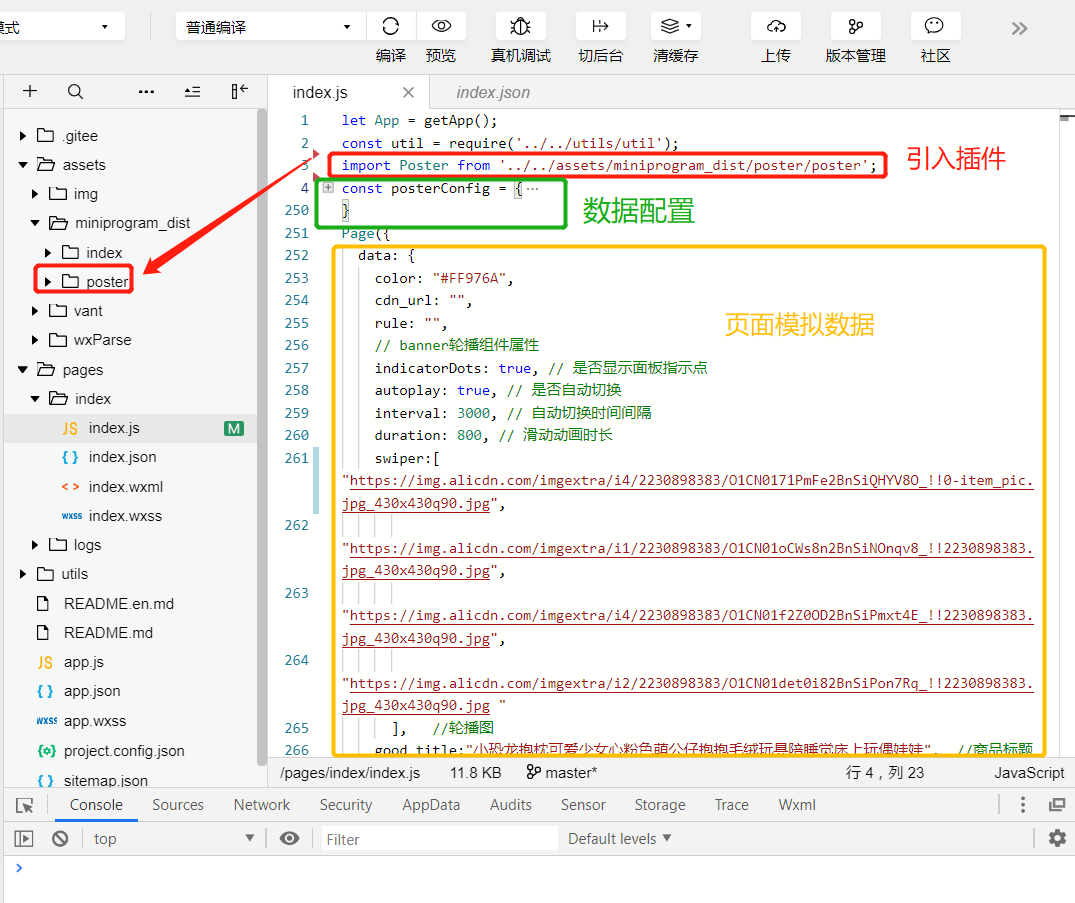
配置数据相关代码:
const posterConfig = {
jdConfig: {
width: 750,
height: 1000,
backgroundColor: '#fff',
debug: false,
preload: true,
blocks: [{
    width: 690,
    height: 808,
    x: 30,
    y: 183,
    borderWidth: 2,
    borderColor: '#f0c2a0',
    borderRadius: 20,
  },
  {
    width: 634,
    height: 74,
    x: 59,
    y: 770,
    backgroundColor: '#fff',
    opacity: 0.5,
    zIndex: 100,
  },
],
texts: [{
    x: 113,
    y: 61,
    baseLine: 'middle',
    text: '会跑的骨头',
    fontSize: 32,
    color: '#8d8d8d',
  },
  {
    x: 30,
    y: 113,
    baseLine: 'top',
    text: '发现一个好物,推荐给你呀',
    fontSize: 38,
    color: '#080808',
  },
  {
    x: 92,
    y: 810,
    fontSize: 38,
    baseLine: 'middle',
    text: '标题',
    width: 570,
    lineNum: 1,
    color: '#222',
    zIndex: 200,
  },
  {
    x: 78,
    y: 895,
    baseLine: 'middle',
    text: [{
        text: '',
        fontSize: 28,
        color: '#ec1731',
      },
      {
        text: '¥99',
        fontSize: 36,
        color: '#ec1731',
        marginLeft: 30,
      }
    ]
  },
  {
    x: 522,
    y: 895,
    baseLine: 'middle',
    text: '',
    fontSize: 28,
    color: '#929292',
  },
  {
    x: 106,
    y: 945,
    baseLine: 'middle',
    text: [{
        text: '商家发货&售后',
        fontSize: 28,
        color: '#929292',
      },
      {
        text: '七天退货',
        fontSize: 28,
        color: '#929292',
        marginLeft: 50,
      },
      {
        text: '运费险',
        fontSize: 28,
        color: '#929292',
        marginLeft: 50,
      },
    ]
  },
  {
    x: 360,
    y: 1065,
    baseLine: 'top',
    text: '长按识别小程序码',
    fontSize: 38,
    color: '#080808',
  },
  {
    x: 360,
    y: 1123,
    baseLine: 'top',
    text: '超值好货',
    fontSize: 28,
    color: '#929292',
  },
],
images: [{
    width: 62,
    height: 62,
    x: 30,
    y: 30,
    borderRadius: 62,
    url: '/assets/img/logo1.jpg', //店铺图片
  },
  {
    width: 645,
    height: 645,
    x: 59,
    y: 210,
    url: 'https://img.alicdn.com/imgextra/i4/2230898383/O1CN0171PmFe2BnSiQHYV8O_!!0-item_pic.jpg_430x430q90.jpg', //海报图
  },
  {
    width: 220,
    height: 220,
    x: 92,
    y: 1020,
    url: 'https://img.alicdn.com/imgextra/i4/2230898383/O1CN0171PmFe2BnSiQHYV8O_!!0-item_pic.jpg_430x430q90.jpg', //二维码
  }
]
},
demoConfig: {
width: 750,
height: 1000,
backgroundColor: '#fff',
debug: false,
blocks: [{
  x: 0,
  y: 10,
  width: 750, // 如果内部有文字,由文字宽度和内边距决定
  height: 120,
  paddingLeft: 0,
  paddingRight: 0,
  borderWidth: 10,
  borderColor: 'red',
  backgroundColor: 'blue',
  borderRadius: 40,
  text: {
    text: [{
        text: '金额¥ 1.00',
        fontSize: 80,
        color: 'yellow',
        opacity: 1,
        marginLeft: 50,
        marginRight: 10,
      },
      {
        text: '金额¥ 1.00',
        fontSize: 20,
        color: 'yellow',
        opacity: 1,
        marginLeft: 10,
        textDecoration: 'line-through',
      },
    ],
    baseLine: 'middle',
  },
}],
texts: [{
    x: 0,
    y: 180,
    text: [{
        text: '长标题长标题长标题长标题长标题长标题长标题长标题长标题',
        fontSize: 40,
        color: 'red',
        opacity: 1,
        marginLeft: 0,
        marginRight: 10,
        width: 200,
        lineHeight: 40,
        lineNum: 2,
      },
      {
        text: '原价¥ 1.00',
        fontSize: 40,
        color: 'blue',
        opacity: 1,
        marginLeft: 10,
        textDecoration: 'line-through',
      },
    ],
    baseLine: 'middle',
  },
  {
    x: 10,
    y: 330,
    text: '金额¥ 1.00',
    fontSize: 80,
    color: 'blue',
    opacity: 1,
    baseLine: 'middle',
    textDecoration: 'line-through',
  },
],
images: [{
    url: 'https://lc-I0j7ktVK.cn-n1.lcfile.com/02bb99132352b5b5dcea.jpg',
    width: 300,
    height: 300,
    y: 450,
    x: 0,
  },
  {
    url: 'https://lc-I0j7ktVK.cn-n1.lcfile.com/02bb99132352b5b5dcea.jpg',
    width: 100,
    height: 100,
    y: 450,
    x: 400,
    borderRadius: 100,
    borderWidth: 10,
  },
],
lines: [{
  startY: 800,
  startX: 10,
  endX: 300,
  endY: 800,
  width: 5,
  color: 'red',
}]
}
}
2、 点击分享按钮触发toggleAction事件,show-->true显示底部列表
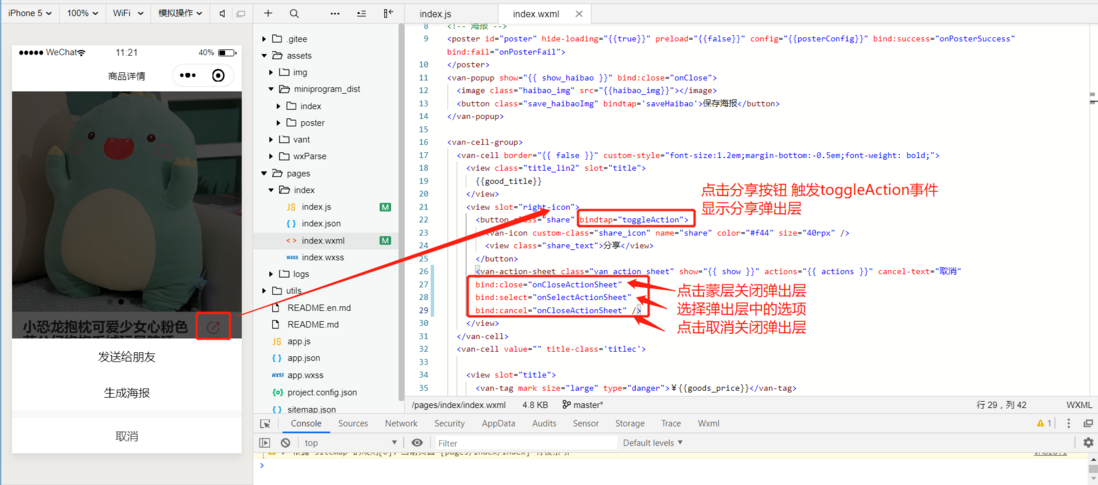
//上拉菜单 选项列表 切换显示/隐藏
toggle(type) {
this.setData({
  [type]: !this.data[type]
});
},
toggleAction() {
this.toggle('show');},
//关闭上拉菜单
onCloseActionSheet() {
this.setData({
  show: false
});
},
//点击 上拉菜单
onSelectActionSheet: function(e) {
var that = this;
//如果选择了发送给朋友
if (e.detail.name == "发送给朋友") {
  that.onCloseActionSheet();
}
if (e.detail.name == "生成海报") {
  //关闭 上拉列表
  that.onCloseActionSheet();
  //调用生成海报的事件
  that.onCreateOtherPoster();
}
},
3、点击生成海报, onSelectActionSheet判断后触发生成海报事件,为海报赋值

4、海报生成成功,点击保存图片按钮,保存图片到本地


全部代码:
wxml:
<view class="diy-banner">
<swiper class="banner-box swiper-box dot-round" current="current_img_index" duration="{{duration}}" circular="{{true}}" indicator-dots="{{indicatorDots}}" interval="{{interval}}" autoplay="{{autoplay}}">
<swiper-item bindtap="Tap_topimg" wx:for="{{swiper}}" wx:key="{{item}}">
  <image class="slide-image" mode="aspectFill" src="{{item}}" data-id="{{index}}"></image>
</swiper-item>
</swiper>
</view>
<!-- 海报 -->
<poster id="poster" hide-loading="{{true}}" preload="{{false}}" config="{{posterConfig}}" bind:success="onPosterSuccess" bind:fail="onPosterFail">
</poster>
<van-popup show="{{ show_haibao }}" bind:close="onClose">
<image class="haibao_img" src="{{haibao_img}}"></image>
<button class="save_haibaoImg" bindtap='saveHaibao'>保存海报</button>
</van-popup>
<van-cell-group>
<van-cell border="{{ false }}" custom-style="font-size:1.2em;margin-bottom:-0.5em;font-weight: bold;">
<view class="title_lin2" slot="title">
  {{good_title}}
</view>
<view slot="right-icon">
  <button class="share" bindtap="toggleAction">
    <van-icon custom-class="share_icon" name="share" color="#f44" size="40rpx" />
    <view class="share_text">分享</view>
  </button>
  <van-action-sheet class="van_action_sheet" show="{{ show }}" actions="{{ actions }}" cancel-text="取消"
  bind:close="onCloseActionSheet"
  bind:select="onSelectActionSheet"
  bind:cancel="onCloseActionSheet" />
</view>
</van-cell>
<van-cell value="" title-class='titlec'>
<view slot="title">
  <van-tag mark size="large" type="danger">¥{{goods_price}}</van-tag>
  <span wx:if="{{line_price!=0.00}}" class="van-cell-text yuanjia">¥62</span>
  <view class="title_num_sales">销量:100</view>
  <view class="title_num_stock">库存:1269</view>
  <view class="title_desc">
    <view class="title_desc_item">
      <van-icon name="passed" />
      <text>正品保证</text>
    </view>
    <view class="title_desc_item">
      <van-icon name="passed" />
      <text>极速发货</text>
    </view>
    <view class="title_desc_item">
      <van-icon name="passed" />
      <text>7天退换</text>
    </view>
  </view>
</view>
</van-cell>
</van-cell-group>
<view class="modal_cont_box">
<view class="til_conview">
<van-row class='in-title'>
  <van-col>
    <text class="til_con"> 快递: 包邮</text>
  </van-col>
</van-row>
</view>
<view class="tmall-types" wx:for="{{specData.spec_attr}}" wx:for-item="attr" wx:for-index="attr_idx" wx:key="key">
<view class="tipstxt">{{attr.group_name}}:</view>
<van-radio-group custom-class="radio_c" value="{{goods_spec_arr[attr_idx]}}" data-id="{{attr.group_id}}" data-attr_idx="{{attr_idx}}" bind:change="RonChange">
  <van-radio wx:for="{{attr.spec_items}}" disabled="{{item.hidden}}" custom-class="radio_cc" icon-class="radio_cc {{item.hidden ? 'hidden-cl' : 'radio_i' }}" label-class="{{item.hidden ? 'hidden-cl' : 'radio_l' }}" wx:for-index="item_idx" wx:key="ikey"
    name="{{item.item_id}}">{{item.spec_value}}</van-radio>
</van-radio-group>
</view>
<view class="tmall-types">
<view class="tipstxt">数量:</view>
<van-stepper disable-input custom-class="van-stepper-c" value="{{ goods_num }}" integer min="1" max="999" bind:change="onstepChange" />
</view>
</view>
<van-tabs custom-class="ju-bottom" active="{{ active }}" bind:change="onChange">
<van-tab title="商品详情">
<view class="detail">
  <image mode='widthFix' wx:for="{{detail_list}}" wx:key="{{item}}" src="{{item}}"></image>
</view>
</van-tab>
<van-tab title="评价">
<view class="assess" wx:for="{{comment_list}}" wx:for-index="idx" wx:key="{{item}}">
  <view class="user">
    <image class="user_icon" src="{{item.avatar}}"></image>
    <text class="user_name">{{item.nickname}}</text>
  </view>
  <view class="assess_content">
    {{item.content}}
  </view>
  <view class="assess_img">
    <image data-src="{{item}}" data-index='{{idx}}' wx:for="{{item.image}}" wx:key="key" src="{{item}}" bindtap="imgYu">
    </image>
  </view>
</view>
</van-tab>
</van-tabs>
<van-goods-action custom-class="van_goods_action">
<van-goods-action-icon icon="home" text="首页" bind:click="go_home" />
<van-goods-action-icon icon="like-o" link-type="switchTab" text="收藏" bind:click="set_user_collect_list" wx:if="{{collect == 0}}" />
<van-goods-action-icon icon="like" link-type="switchTab" text="收藏" bind:click="delete_user_collection_list" color="#FF976A" wx:else/>
<van-goods-action-button loading="{{addcart_loading}}" text="加入购物车" type="warning" bind:click="addcart" />
<van-goods-action-button text="立即购买" bind:click="ByNow" />
</van-goods-action>
<van-toast id="van-toast" />
wxss:
/ banner轮播 /
.slide-image {
background: #fff;
}
.diy-banner {
position: relative;
}
.swiper_video {
width: 100%;
height: 100%;
}
/ banner组件按钮 /
.swiper-box .wx-swiper-dot {
height: 20rpx;
width: 20rpx;
}
.swiper-box {
width: 750rpx;
height: 720rpx;
position: relative;
}
.swiper-box image {
width: 100%;
height: 100%;
}
.van-nbar-c {
background-color: #6d189e !important;
}
/ S 商品简介 /
.van-tag {
color: #e51c23 !important;
border-radius: none !important;
background-color: #fff !important;
padding: 0px !important;
}
.titlec {
font-size: 28rpx;
/ font-weight: bold; /
}
.yuanjia {
font-size: 26rpx;
color: #bbb;
text-decoration: line-through;
margin-left: 16rpx;
}
.title_num_sales {
color: #bbb;
display: inline-block;
margin-left: 16rpx;
}
.title_num_stock {
float: right;
color: #bbb;
margin-right: 16rpx;
}
.title_desc {
padding-top: 16rpx;
}
.title_desc_item {
padding-right: 20rpx;
display: inline-block;
}
.title_desc_item van-icon {
color: #8bc34a;
vertical-align: middle;
padding-right: 6rpx;
}
.title_desc_item text {
color: #333;
font-size: 26rpx;
}
/ 标题截取2行 /
.title_lin2{
/ 控制显示的行数 /
height: 100rpx;
line-height:50rpx;
/ 显示多行 /
display: -webkit-box;
overflow: hidden;
/ 为显示的行数 /
-webkit-line-clamp: 2;
-webkit-box-orient: vertical;
}
/ E 商品简介 /
.modal_cont_box {
padding: 20rpx 12px;
background-color: white;
margin-top: 10rx;
}
.tipstxt {
font-size: 28rpx;
color: rgb(88, 88, 88);
margin-bottom: 10rpx;
}
.van-col text {
color: #333;
font-size: 28rpx;
}
.van-radio {
min-width: 40%;
max-width: 100%;
}
.van-radio__label {
font-size: 28rpx !important;
}
.radio_c {
margin-left: -1em;
padding-top: 0.3em;
width: 100%;
}
.radio_cc {
display: inline-block;
margin-left: 20rpx;
}
.radio_i {
color: #ff976a;
}
.radio_l {
color: rgb(88, 88, 88);
font-size: 28rpx;
}
.tmall-types {
margin-top: 1em;
}
/ S 商品详情 /
.detail {
text-align: center;
width: 100%;
padding: 20rpx;
box-sizing: border-box;
background-color: #fff;
}
.detail image{
width:100%;
}
/ S 评价 /
.ju-bottom {
padding-bottom: 200rpx;
}
.assess {
width: 100%;
padding: 40rpx 20rpx 20rpx 20rpx;
box-sizing: border-box;
background-color: #fff;
border-bottom: 1px solid #eee;
}
.user_icon {
width: 45rpx;
height: 45rpx;
border-radius: 50%;
vertical-align: middle;
margin-right: 16rpx;
}
.user_name {
color: #bbb;
font-size: 26rpx;
}
.assess_content {
padding: 16rpx 0rpx;
font-size: 28rpx;
line-height: 40rpx;
color: #333;
}
.assess_img {
width: 100%;
display: flex;
box-sizing: border-box;
}
.assess_img image {
width: 200rpx;
height: 150rpx;
margin-right: 20rpx;
}
/ 提高底部商品导航的层级 /
.van_goods_action {
z-index:99;
}
.icon_red {
color: #f4555a;
}
/ S 分享按钮 /
.share {
display: inline-block;
padding-top:10rpx;
background-color: #fff;
text-align: center;
margin:0rpx;
box-sizing: border-box;
}
button::after {
border: none;
}
.share_icon {
display: block !important;
font-weight: bold;
padding:0rpx;
margin:0rpx;
}
.share_text{
padding:0rpx;
margin:0rpx;
font-size: 26rpx;
color: #bbb;
height:40rpx;
line-height: 40rpx;
}
.shear_sheet{
z-index: 9999999;
}
/ E分享按钮 /
/ S 海报 /
.haibao_img{
width:600rpx;
height:940rpx;
}
.save_haibaoImg{
background-color:#fff;
margin-top:20rpx;
margin-bottom: 30rpx;
height:60rpx;
line-height: 60rpx;
width:306rpx;
font-size: 28rpx;
color:#8BC34A;
text-align: center;
border: 1px solid #8BC34A;
border-radius:34rpx;
padding:0rpx;
}
/ E 海报 /
/ 上拉列表 /
.van_action_sheet{
font-weight: normal;
font-size:28rpx;
}
js:
let App = getApp();
const util = require('../../utils/util');
import Poster from '../../assets/miniprogram_dist/poster/poster';
const posterConfig = {
jdConfig: {
width: 750,
height: 1000,
backgroundColor: '#fff',
debug: false,
preload: true,
blocks: [{
    width: 690,
    height: 808,
    x: 30,
    y: 183,
    borderWidth: 2,
    borderColor: '#f0c2a0',
    borderRadius: 20,
  },
  {
    width: 634,
    height: 74,
    x: 59,
    y: 770,
    backgroundColor: '#fff',
    opacity: 0.5,
    zIndex: 100,
  },
],
texts: [{
    x: 113,
    y: 61,
    baseLine: 'middle',
    text: '会跑的骨头',
    fontSize: 32,
    color: '#8d8d8d',
  },
  {
    x: 30,
    y: 113,
    baseLine: 'top',
    text: '发现一个好物,推荐给你呀',
    fontSize: 38,
    color: '#080808',
  },
  {
    x: 92,
    y: 810,
    fontSize: 38,
    baseLine: 'middle',
    text: '标题',
    width: 570,
    lineNum: 1,
    color: '#222',
    zIndex: 200,
  },
  {
    x: 78,
    y: 895,
    baseLine: 'middle',
    text: [{
        text: '',
        fontSize: 28,
        color: '#ec1731',
      },
      {
        text: '¥99',
        fontSize: 36,
        color: '#ec1731',
        marginLeft: 30,
      }
    ]
  },
  {
    x: 522,
    y: 895,
    baseLine: 'middle',
    text: '',
    fontSize: 28,
    color: '#929292',
  },
  {
    x: 106,
    y: 945,
    baseLine: 'middle',
    text: [{
        text: '商家发货&售后',
        fontSize: 28,
        color: '#929292',
      },
      {
        text: '七天退货',
        fontSize: 28,
        color: '#929292',
        marginLeft: 50,
      },
      {
        text: '运费险',
        fontSize: 28,
        color: '#929292',
        marginLeft: 50,
      },
    ]
  },
  {
    x: 360,
    y: 1065,
    baseLine: 'top',
    text: '长按识别小程序码',
    fontSize: 38,
    color: '#080808',
  },
  {
    x: 360,
    y: 1123,
    baseLine: 'top',
    text: '超值好货',
    fontSize: 28,
    color: '#929292',
  },
],
images: [{
    width: 62,
    height: 62,
    x: 30,
    y: 30,
    borderRadius: 62,
    url: '/assets/img/logo1.jpg', //店铺图片
  },
  {
    width: 645,
    height: 645,
    x: 59,
    y: 210,
    url: 'https://img.alicdn.com/imgextra/i4/2230898383/O1CN0171PmFe2BnSiQHYV8O_!!0-item_pic.jpg_430x430q90.jpg', //海报图
  },
  {
    width: 220,
    height: 220,
    x: 92,
    y: 1020,
    url: 'https://img.alicdn.com/imgextra/i4/2230898383/O1CN0171PmFe2BnSiQHYV8O_!!0-item_pic.jpg_430x430q90.jpg', //二维码
  }
]
},
demoConfig: {
width: 750,
height: 1000,
backgroundColor: '#fff',
debug: false,
blocks: [{
  x: 0,
  y: 10,
  width: 750, // 如果内部有文字,由文字宽度和内边距决定
  height: 120,
  paddingLeft: 0,
  paddingRight: 0,
  borderWidth: 10,
  borderColor: 'red',
  backgroundColor: 'blue',
  borderRadius: 40,
  text: {
    text: [{
        text: '金额¥ 1.00',
        fontSize: 80,
        color: 'yellow',
        opacity: 1,
        marginLeft: 50,
        marginRight: 10,
      },
      {
        text: '金额¥ 1.00',
        fontSize: 20,
        color: 'yellow',
        opacity: 1,
        marginLeft: 10,
        textDecoration: 'line-through',
      },
    ],
    baseLine: 'middle',
  },
}],
texts: [{
    x: 0,
    y: 180,
    text: [{
        text: '长标题长标题长标题长标题长标题长标题长标题长标题长标题',
        fontSize: 40,
        color: 'red',
        opacity: 1,
        marginLeft: 0,
        marginRight: 10,
        width: 200,
        lineHeight: 40,
        lineNum: 2,
      },
      {
        text: '原价¥ 1.00',
        fontSize: 40,
        color: 'blue',
        opacity: 1,
        marginLeft: 10,
        textDecoration: 'line-through',
      },
    ],
    baseLine: 'middle',
  },
  {
    x: 10,
    y: 330,
    text: '金额¥ 1.00',
    fontSize: 80,
    color: 'blue',
    opacity: 1,
    baseLine: 'middle',
    textDecoration: 'line-through',
  },
],
images: [{
    url: 'https://lc-I0j7ktVK.cn-n1.lcfile.com/02bb99132352b5b5dcea.jpg',
    width: 300,
    height: 300,
    y: 450,
    x: 0,
    // borderRadius: 150,
    // borderWidth: 10,
    // borderColor: 'red',
  },
  {
    url: 'https://lc-I0j7ktVK.cn-n1.lcfile.com/02bb99132352b5b5dcea.jpg',
    width: 100,
    height: 100,
    y: 450,
    x: 400,
    borderRadius: 100,
    borderWidth: 10,
  },
],
lines: [{
  startY: 800,
  startX: 10,
  endX: 300,
  endY: 800,
  width: 5,
  color: 'red',
}]
}
}
Page({
data: {
color: "#FF976A",
cdn_url: "",
rule: "",
// banner轮播组件属性
indicatorDots: true, // 是否显示面板指示点
autoplay: true, // 是否自动切换
interval: 3000, // 自动切换时间间隔
duration: 800, // 滑动动画时长
swiper:[      "https://img.alicdn.com/imgextra/i4/2230898383/O1CN0171PmFe2BnSiQHYV8O_!!0-item_pic.jpg_430x430q90.jpg",
    "https://img.alicdn.com/imgextra/i1/2230898383/O1CN01oCWs8n2BnSiNOnqv8_!!2230898383.jpg_430x430q90.jpg",
    "https://img.alicdn.com/imgextra/i4/2230898383/O1CN01f2Z0OD2BnSiPmxt4E_!!2230898383.jpg_430x430q90.jpg",
    "https://img.alicdn.com/imgextra/i2/2230898383/O1CN01det0i82BnSiPon7Rq_!!2230898383.jpg_430x430q90.jpg "
  ],   //轮播图
good_title:"小恐龙抱枕可爱少女心粉色萌公仔抱抱毛绒玩具陪睡觉床上玩偶娃娃",  //商品标题
goods_price:45,    //商品价格
detail_list:[
  "https://img.alicdn.com/imgextra/i3/2230898383/O1CN01SQih2Y2BnSiM7dRoL_!!2230898383.jpg",
  "https://img.alicdn.com/imgextra/i4/2230898383/O1CN01MgLoCN2BnSiQHV0r8_!!2230898383.jpg",
  "https://img.alicdn.com/imgextra/i1/2230898383/O1CN017ZbuXI2BnSiMJlxXa_!!2230898383.jpg",
  "https://img.alicdn.com/imgextra/i3/2230898383/O1CN010XjsyS2BnSiM7d2qs_!!2230898383.jpg",
  "https://img.alicdn.com/imgextra/i2/2230898383/O1CN01g5v4MP2BnSiQYHBNT_!!2230898383.jpg",
  "https://img.alicdn.com/imgextra/i4/2230898383/O1CN01sdAB4M2BnSiQHX5lZ_!!2230898383.jpg",
  "https://img.alicdn.com/imgextra/i3/2230898383/O1CN01wYsk1M2BnSiPFNELK_!!2230898383.jpg",
 "https://img.alicdn.com/imgextra/i3/2230898383/O1CN01XJtiay2BnSiMpD0Sx_!!2230898383.jpg"

],  //商品详情图片
comment_list:[
 {
    avatar:"https://ss1.bdstatic.com/70cFuXSh_Q1YnxGkpoWK1HF6hhy/it/u=1615207080,3037986495&fm=26&gp=0.jpg",
    nickname:"月野兔",
    content:"超级喜欢这个公仔的,现在每天晚上睡觉都会抱着它",
    image:[
      "https://img.alicdn.com/imgextra/i1/2230898383/O1CN01oCWs8n2BnSiNOnqv8_!!2230898383.jpg_430x430q90.jpg",
      "https://img.alicdn.com/bao/uploaded/i1/O1CN013KScMh22d5EhbiBrY_!!0-rate.jpg_400x400.jpg",
      "https://img.alicdn.com/bao/uploaded/i3/O1CN01JO7Myo1tf4Q8sgrP4_!!0-rate.jpg_400x400.jpg",
    ]
 },
  {
    avatar: "https://ss1.bdstatic.com/70cFvXSh_Q1YnxGkpoWK1HF6hhy/it/u=3131981126,1877674083&fm=26&gp=0.jpg",
    nickname: "青柠之夏",
    content: "与图片色差相差不大,男朋友买的生日礼物,很喜欢",
  },
  {
    avatar: "https://ss1.bdstatic.com/70cFvXSh_Q1YnxGkpoWK1HF6hhy/it/u=3872326548,781102463&fm=26&gp=0.jpg",
    nickname: "骨头呀",
    content: "这个用户很懒,什么都没写",
  },
  {
    avatar: "https://ss0.bdstatic.com/70cFvHSh_Q1YnxGkpoWK1HF6hhy/it/u=1189945575,4198805875&fm=11&gp=0.jpg",
    nickname: "猪小屁",
    content: "这个用户很懒,什么都没写",
  }

],   //评论列表
show: false, //分享上拉菜单列表按钮 底部弹窗默认不显示
actions: [{ //分享上拉菜单列表
    name: '发送给朋友',
    openType: 'share'
  },
  {
    name: '生成海报',
  }
],
posterConfig: posterConfig.jdConfig, //海报
show_haibao: false, //弹窗默认不显示
haibao_img: "",
},
//关闭弹窗
onClose() {
this.setData({
  show_haibao: false
});
},
//海报 成功
onPosterSuccess(e) {
var that = this;
//关闭 生成中...弹窗提示
wx.hideLoading();
const {
  detail
} = e;
that.setData({
  show_haibao: true, //显示海报弹窗
  haibao_img: detail
})
console.log(that.data.haibao_img)
},
//海报 失败
onPosterFail(err) {
//弹窗提示生成失败
wx.showToast({
  title: '生成失败',
  icon: 'none',
  duration: 2000
})
console.error(err);
},
//保存海报图片
saveHaibao: function() {
var that = this;
console.log(that.data.haibao_img)
console.log(" saveHaibao事件")
wx.saveImageToPhotosAlbum({ //下载图片
  filePath: that.data.haibao_img,
  success: function() {
    wx.showToast({
      title: "保存成功",
      icon: "success",
    })
  }
})
},
onLoad: function(options) {
let that = this;
},
onReady() {
},
onShow: function() {
},
//图片预览
imgYu: function(e) {
console.log(e)
let that = this;
var src = e.currentTarget.dataset.src; //获取data-src
var index = e.currentTarget.dataset.index;
var imgList = that.data.comment_list[index].image; //获取data-list
//图片预览
console.log(src);
console.log(imgList);
wx.previewImage({
  current: src, // 当前显示图片的http链接
  urls: imgList // 需要预览的图片http链接列表
})
},
//用户点击右上角分享
onShareAppMessage: function(res) {
console.log(res)
return {
  title: "会跑的骨头",
  desc: "",
  path: '/pages/goods/index?goods_id=' + this.data.share_goods_id,
};
},
//上拉菜单 选项列表 切换显示/隐藏
toggle(type) {
this.setData({
  [type]: !this.data[type]
});
},
toggleAction() {
this.toggle('show');},
//关闭上拉菜单
onCloseActionSheet() {
this.setData({
  show: false
});
},
//点击 上拉菜单
onSelectActionSheet: function(e) {
var that = this;
//如果选择了发送给朋友
if (e.detail.name == "发送给朋友") {
  that.onCloseActionSheet();
}
if (e.detail.name == "生成海报") {
  //关闭 上拉列表
  that.onCloseActionSheet();
  //调用生成海报的事件
  that.onCreateOtherPoster();
}
},
//生成海报
onCreateOtherPoster() {
console.log("生成海报事件")
//显示 生成中...弹窗提示
wx.showLoading({
  title: '生成中...',
})
this.setData({
  posterConfig: posterConfig.jdConfig
}, () => {
  Poster.create(true); // 入参:true为抹掉重新生成
});
this.setData({
  'posterConfig.images[1].url': this.data.swiper[0], //重新赋值海报商品图片
  'posterConfig.texts[2].text': this.data.good_title, //重新赋值海报商品标题
  'posterConfig.texts[3].text[1].text': '¥' + this.data.goods_price //重新赋值海报商品价格
}, () => {
  Poster.create(true); // 入参:true为抹掉重新生成
});
console.log(this.data.posterConfig.images[1].url)
}
})
gitHub项目源码链接:https://gitee.com/DreamZHH/sh...
评论
登录后参与技术讨论,分享你的经验与见解。
登录 / 注册暂无评论