【源码】vue/cli@4.5.9(一)

文章目录
vue -V发生过程

入口文件
文件路径:/packages/@vue/cli/bin/vue.js
checkNodeVersion
运行vue.js,第一步就是校验Node版本是否符合package.json中的engines.node的node版本。
const requiredVersion = require('../package.json').engines.node

function checkNodeVersion (wanted, id) {
  if (!semver.satisfies(process.version, wanted, { includePrerelease: true })) {
    console.log(chalk.red(
      'You are using Node ' + process.version + ', but this version of ' + id +
      ' requires Node ' + wanted + '.\nPlease upgrade your Node version.'
    ))
    process.exit(1)
  }
}

checkNodeVersion(requiredVersion, '@vue/cli')其中npm包semver的satisfies方法校验版本是否符合,若不符合则退出运行进程。
随后判断Node版本若不是LTS版本,则警告用户升级。
const EOL_NODE_MAJORS = ['8.x', '9.x', '11.x', '13.x']
for (const major of EOL_NODE_MAJORS) {
  if (semver.satisfies(process.version, major)) {
    console.log(chalk.red(
      `You are using Node ${process.version}.\n` +
      `Node.js ${major} has already reached end-of-life and will not be supported in future major releases.\n` +
      `It's strongly recommended to use an active LTS version instead.`
    ))
  }
}
commander 执行命令行输入
commander是一个轻巧的nodejs模块,提供了用户命令行输入和参数解析强大功能。具体可以见下面的参考文章
const program = require('commander')

program
  .version(`@vue/cli ${require('../package').version}`)
  .usage('<command> [options]')

program
  .command('create <app-name>')
  // 省略options
  ...
program
  .command('add <plugin> [pluginOptions]')
  // 省略后面代码,待具体分析
  ...
program.parse(process.argv)
vue -V会触发commander的version函数,输出package.json的version属性。
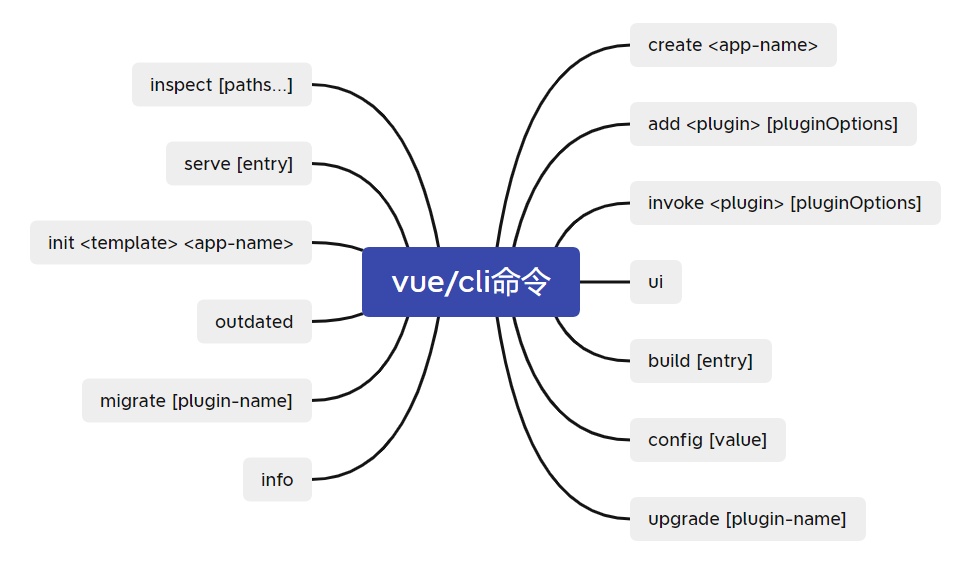
此外,commander还监听执行14个命令,后面会具体分析几个重要的命令
总结
简单介绍了命令行工具vue/@cli执行vue -V的过程,首先会检查运行的node版本是否符合需求,然后通过commander来解析执行命令行输入。最后再简单介绍了vue/cli还绑定的14个命令行。其中chalk和commander作为cli常用的开发工具需要熟练掌握,同时也需要了解process的相关api,例如process.version获取node版本等。
评论
登录后参与技术讨论,分享你的经验与见解。
登录 / 注册暂无评论