ubuntu 使用 git 上传代码到 github

文章目录
原文链接: ubuntu 使用 git 上传代码到 github
更新代码
git commit -a -m 'commit all files'
1.申请一个github帐号,然后新建一个repositories,取个名字。本例所取名字为Student-Information-Manage-System
2.在ubuntu上安装git
sudo apt-get install git
3.生成密钥 ssh-keygen -t rsa -C "youremail@mail.com"
其中"youremail@mail.com"是你的邮箱名。之后会要求确认路径和输入密码,我们使用默认的一路回车就行。
成功的话会在~/下生成.ssh文件夹,按住ctrl+h可以显示隐藏文件夹,点进去,打开id_rsa.pub,复制里面的key。
4.回到github,进入Account Setting,左边选择SSH Keys,Add SSH,title随便填,粘贴key.
5.验证是否成功,输入ssh -T git@github.com,如果看到如下信息,表示成功连上github.
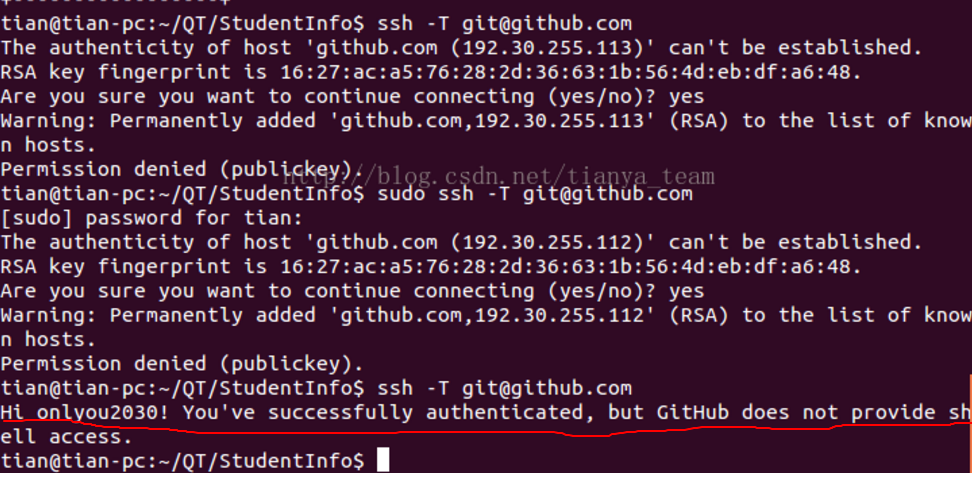
6.在将本地仓库上传到github之前,需要设置username和email,因为github每次commit都会记录他们。
git config --global user.name "onlyou2030"
git config --global user.email 529647632@qq.com
7.cd要上传的仓库路径,添加远程地址
git remote add origin git@github.com:yourName/yourRepo.git
后面的yourName和yourRepo表示你在github的用户名和刚才新建的仓库,加完之后进入.git,打开config,这里会多出一个remote "origin"内容,
这就是刚才添加的远程地址,也可以直接修改config来配置远程地址。
8.提交,上传
1)接下来在本地仓库添加一些文件,比如README(注意先在本地仓库添加README文件后执行下面命令)
git add README
git commit -m "first commit"
2)上传到github
git push origin master
注意:git push命令将本地仓库推送到远程服务器,git pull相反。
注意:在上面提交命令后,可能会出现“因为您当前分支的最新提交落后于其对应的远程分支”等类似错误,
需要先获取远端更新并与本地合并,再git push。
合并操作如下:
git fetch origin //获取远程更新
git merge origin/master
在git push则可以成功。
如果想要添加所有文件,可以使用“git add .”代替。
添加完成后可以在github上看到所有添加的文件
1.本地安装git和在github上注册账号
2.SHH认证及设置用户名和邮箱
为了保证安全,需要再本地生成秘钥,并把公共秘钥给远程github。
输入
ssh-keygen -t rsa
1
之后在 ~/.ssh/ 目录下可以看到 id_rsa 和 id_rsa.pub 两个文件。这两个就是 SSH Key 的秘钥对,其中,id_rsa 是私钥,不能泄露出去,id_rsa.pub 是公钥。
然后登陆 GitHub,上传 SSH Key 公钥
依次选择“Settings –> SSH and GPG keys –> New SSH key”,填上适当的 Title,并复制 id_rsa.pub 文件的内容粘贴在 Key 文本框里。
验证成功
ssh -T git@github.com
1
执行后提示:
Hi github! You’ve successfully authenticated, but GitHub does not provide shell access.
此时设置用户名和邮箱为注册Github时的名字
git config --global user.name “lukeyan”
git config --global user.email xxx@gmail.com
1
2
3.远程github网上新建一个仓库
设我的仓库名字为hellogithub
完成后
4.新建本地代码仓库
mkdir hellogithub
//向文件夹中添加.cpp文件,加入仓库
git add . //.表示全添加, git add README.md 表示只添加说明文件
//提交到仓库,这个版本名字叫
git commit -m "first commit"
1
2
3
4
5
5.提交本地代码到远程(同步)
按照以下格式提交到远程
git remote add origin git@github.com:yourgithubname/yourrepositoryname
git push -u origin master
1
2
比如我的仓库名为hellogithub,提交命令如下
add origin后面的网址就是你远程仓库的网址url。
git remote add origin https://github.com/QianFeifanhnu/githubhello.git/
1
2
如果git远程地址配错了,再次配置提示以下错误:
fatal: 远程 origin 已经存在
此时只需要将远程配置删除,重新添加即可;
git remote rm origin
1
然后
push -u origin master
1
origin master表示本地仓库。
如果出现
提示:更新被拒绝,因为远程仓库包含您本地尚不存在的提交。这通常是因为另外
提示:一个仓库已向该引用进行了推送。再次推送前,您可能需要先整合远程变更
提示:(如 ‘git pull …’)。
提示:详见 ‘git push –help’ 中的 ‘Note about fast-forwards’ 小节。
解决方式:
通过+master强行更新
解决
git push -u origin +master
评论
登录后参与技术讨论,分享你的经验与见解。
登录 / 注册暂无评论