VMware Workstation - Device and Credential Guard Problem

文章目录
Problem
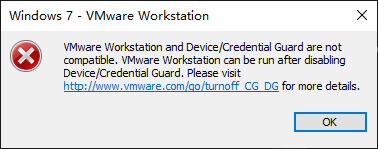
VMware Workstation (Windows) fails to run virtual machine with error "VMware Workstation and Device/Credential Guard are not compatible."

Solution
https://www.youtube.com/watch?v=VIBdY-5zr58
In search box type gpedit, and then go to Computer Configuration - Administrative Templates - System - Device Guard - Virtualization Based Security. Now Double click that and Disable
In search box, type Turn Windows features on or off, now uncheck Hyper-V and restart system.
Open Registry Editor by typing regedit in search box.
- Go to
HKEY_LOCAL_MACHINE\System\CurrentControlSet\Control\DeviceGuard. Add a newDWORDvalue namedEnableVirtualizationBasedSecurityand set it to0to disable it. - Go to
HKEY_LOCAL_MACHINE\System\CurrentControlSet\Control\LSA. Add a newDWORDvalue namedLsaCfgFlags and set it to 0 to disable it.
Open command prompt as a administrator and type the following commands
bcdedit /create {0cb3b571-2f2e-4343-a879-d86a476d7215} /d "DebugTool" /application osloader

bcdedit /set {0cb3b571-2f2e-4343-a879-d86a476d7215} path "\EFI\Microsoft\Boot\SecConfig.efi"

bcdedit /set {bootmgr} bootsequence {0cb3b571-2f2e-4343-a879-d86a476d7215}

bcdedit /set {0cb3b571-2f2e-4343-a879-d86a476d7215} loadoptions DISABLE-LSA-ISO,DISABLE-VBS

bcdedit /set hypervisorlaunchtype off
Restart system.
评论
登录后参与技术讨论,分享你的经验与见解。
登录 / 注册暂无评论