 <dependency>
     <groupId>org.springframework.boot</groupId>
     <artifactId>spring-boot-starter-websocket</artifactId>
 </dependency>
  1 package me.abdusalam.websocket.demo.config;
  2 import org.springframework.context.annotation.Bean;
  3 import org.springframework.context.annotation.Configuration;
  4 import org.springframework.web.socket.server.standard.ServerEndpointExporter;
  5
  6 // 开启 WebSocket 支持
  7 @Configuration
  8 public class WebSocketConfig {
  9
 10     @Bean
 11     public ServerEndpointExporter serverEndpointExporter() {
 12         return new ServerEndpointExporter();
 13     }
 14
 15 }
  1 package me.abdusalam.websocket.demo.dao;
  2 import me.abdusalam.websocket.demo.server.WebSocketServer;
  3 import java.util.concurrent.CopyOnWriteArraySet;
  4
  5 // 模拟数据库
  6 public class DB {
  7
  8     /**
  9      * 记录 有多少个客户端【前端浏览器】与服务端【后端】创建连接 的个数
 10      * 应该把它设计成线程安全的 , 使用 synchronized 进行操作
 11      */
 12     private static Integer connectedClientNum = 0;
 13     public static synchronized void increaseConnectedClientNum() {
 14         connectedClientNum++;
 15     }
 16     public static synchronized void decreaseConnectedClientNum() {
 17         connectedClientNum--;
 18     }
 19
 20     /**
 21      * java.util.concurrent 包的线程安全的 Set 集合
 22      * 客户端【前端浏览器】 每次 使用 new WebSocket("ws://localhost:8080/websocket") 时,即与服务端【后端】创建连接时,后端 new 一个 WebSocketServer
 23      *      【 可见 WebSocketServer 是多例的 --> 前端有多少个 new WebSocket("ws://localhost:8080/websocket")   就后端有多少个 new WebSocketServer 】
 24      * WebSocketServers 用来存储 总共有多少个 WebSocketServer 被 new 了
 25      */
 26     public static CopyOnWriteArraySet<WebSocketServer> webSocketServers = new CopyOnWriteArraySet<>();
 27
 28 }
  1 package me.abdusalam.websocket.demo.server;
  2 import java.io.IOException;
  3 import javax.websocket.OnClose;
  4 import javax.websocket.OnError;
  5 import javax.websocket.OnMessage;
  6 import javax.websocket.OnOpen;
  7 import javax.websocket.Session;
  8 import javax.websocket.server.ServerEndpoint;
  9 import me.abdusalam.websocket.demo.dao.DB;
 10 import org.springframework.stereotype.Component;
 11
 12 @Component
 13 @ServerEndpoint("/WebSocketServer")
 14 public class WebSocketServer {
 15
 16     /**
 17      * 与某一个客户端的连接会话
 18      * 用这个 session 向客户端发消息
 19      */
 20     private Session session;
 21
 22     // 向所有客户端【浏览器】发消息
 23     public static void sendMessage2allClients(String message){
 24         for (WebSocketServer item : DB.webSocketServers) {
 25             try {
 26                 // 发消息
 27                 item.session.getBasicRemote().sendText(message);
 28             } catch (IOException e) {
 29                 // 给某一个客户端【浏览器】发消息抛异常,没关系,继续给下一个客户端【浏览器】发消息
 30                 continue;
 31             }
 32         }
 33     }
 34
 35
 36     // 当前端创建连接【 new WebSocket("ws://localhost:8080/websocket") 】时,调用的方法
 37     @OnOpen
 38     public void clientConnected(Session session) {
 39         DB.increaseConnectedClientNum();
 40         DB.webSocketServers.add(this);
 41         this.session = session;
 42         sendMessage2allClients("系统消息:SESSION_ID 为 " + this.session.getId() + " 的客户端连接成功");
 43     }
 44
 45
 46     // 收到客户端【浏览器】消息后调用的方法
 47     @OnMessage
 48     public void receiveMessageFromClient(String message) {
 49         sendMessage2allClients("SESSION_ID " + this.session.getId() + " : " + message);
 50     }
 51
 52
 53     //
 54     @OnError
 55     public void onError(Throwable error) {
 56         error.printStackTrace();
 57     }
 58
 59
 60     // 连接关闭调用的方法
 61     @OnClose
 62     public void onClose() {
 63         DB.decreaseConnectedClientNum();
 64         DB.webSocketServers.remove(this);
 65         sendMessage2allClients("系统消息:SESSION_ID 为 " + this.session.getId() + " 的客户端断开了连接");
 66     }
 67
 68 }
  1 package me.abdusalam.websocket.demo.controller;
  2 import me.abdusalam.websocket.demo.server.WebSocketServer;
  3 import org.springframework.web.bind.annotation.*;
  4
  5 @RestController
  6 @RequestMapping("/controller")
  7 public class Controller {
  8
  9     //推送数据接口
 10     @PostMapping("/sendMessage2allClients")
 11     public void sendMessage2allClients(String message) {
 12         WebSocketServer.sendMessage2allClients( message );
 13     }
 14 }
  1 <!DOCTYPE html>
  2 <html lang="en">
  3 <head>
  4     <meta charset="UTF-8">
  5     <title>WebSocket Demo</title>
  6     <script src="https://cdn.bootcss.com/jquery/3.4.1/jquery.min.js"></script>
  7 </head>
  8 <body>
  9
 10     <h1 style="text-align: center" id="h1"></h1>
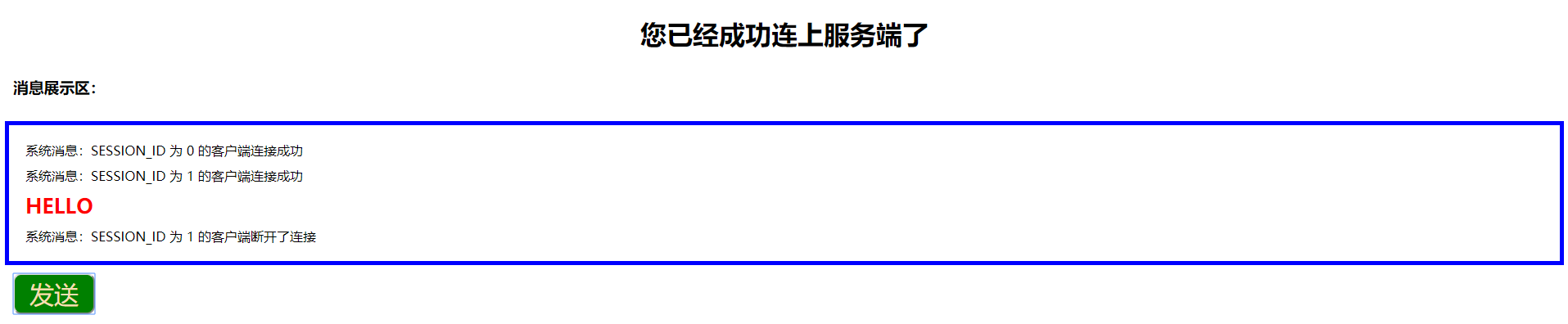
 11     <h3 style="padding: 10px">消息展示区:</h3>
 12     <div style="border: 5px solid blue;padding: 10px;" id="div"></div>
 13
 14     <button onclick="send()">发送</button>
 15
 16     <script>
 17         if(typeof(WebSocket) == "undefined") {
 18             alert("您的浏览器不支持WebSocket");
 19         }else{
 20
 21             // 实例化 WebSocket 对象,指定要连接的服务器地址与端口  建立连接
 22             var ws = new WebSocket("ws://localhost:8080/WebSocketServer");
 23
 24             // 用来消息展示的 div
 25             var div = document.getElementById("div");
 26
 27             // 打开事件
 28             ws.onopen = function() {
 29                 document.getElementById("h1").innerText = "您已经成功连上服务端了";
 30
 31                 // 可以使用 ws.send("消息内容") 向服务端发消息
 32             };
 33
 34             // 获得消息事件
 35             ws.onmessage = function(msg) {
 36                 div.innerHTML = div.innerHTML + "<div style='margin: 10px;'>" + msg.data + "</div>";
 37             };
 38
 39             // 关闭事件
 40             // ws.onclose = function() {
 41             //    console.log("已关闭");
 42             // };
 43
 44             // 发生了错误事件
 45             ws.onerror = function() {
 46                 alert("发生了错误");
 47                 //此时可以尝试刷新页面
 48             }
 49
 50             function send() {
 51                 $.post( '/controller/sendMessage2allClients', {message:prompt("请输入:")}, function(response){} );
 52             }
 53         }
 54     </script>
 55 </body>
 56 </html>





评论
登录后参与技术讨论,分享你的经验与见解。
登录 / 注册暂无评论