如何让 Visual Studio Code 里显示 Cypress 的 intelligent code suggestion

文章目录
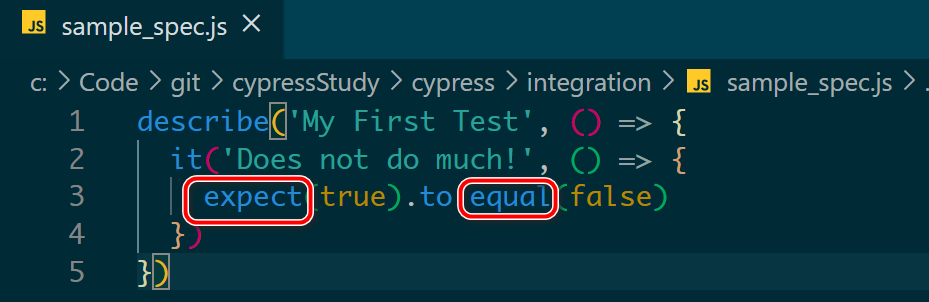
如下图所示,把鼠标 hover 在 Visual Studio Code 里打开的 Cypress 代码时:
只会显示 “any”的 popover 对话框出来: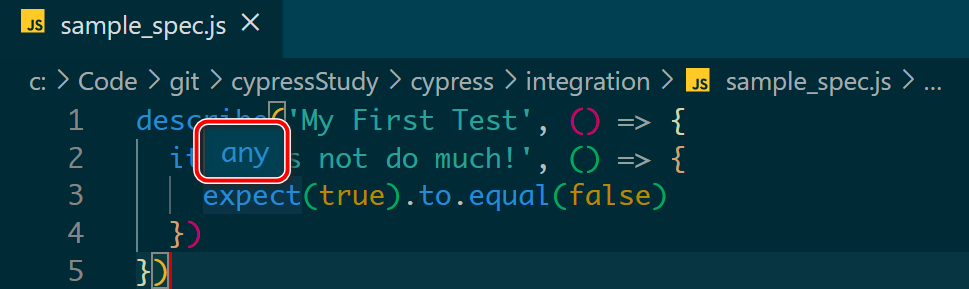
在文件头加上下列这段注释之后:
/// <reference types="Cypress" />
代码自动补全也生效了:

更多Jerry的原创文章,尽在:"汪子熙":
如下图所示,把鼠标 hover 在 Visual Studio Code 里打开的 Cypress 代码时:
只会显示 “any”的 popover 对话框出来:
在文件头加上下列这段注释之后:
/// <reference types="Cypress" />
代码自动补全也生效了:
更多Jerry的原创文章,尽在:"汪子熙":
评论
登录后参与技术讨论,分享你的经验与见解。
登录 / 注册暂无评论