dva中简单的数据流图

文章目录
dva中简单的数据流图: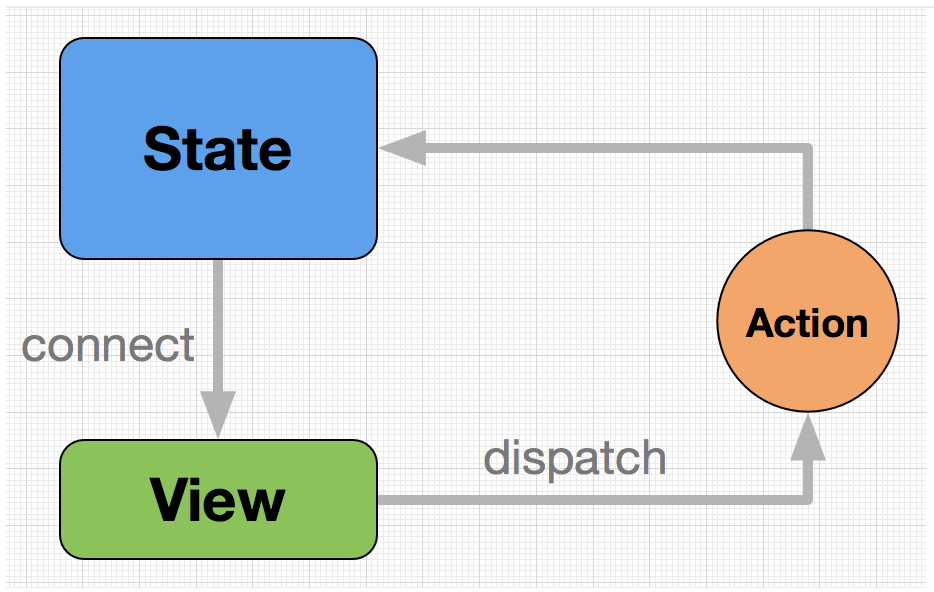
State : 一个对象,保存整个应用的状态。View : React组件构成的视图层。Action : 一个对象,描述事件。connect方法 : 一个函数,绑定State到的Viewdispatch方法 : 一个函数,发送Action到State
先来看个简单的例子:
描述:更新名称。
View视图层:
import React, { Component } from 'react';
import UserUI from '../components/userUI'
import {connect} from 'dva'
class UserPage extends Component{
    handlerBack = () =>{
        console.log(this.props);
        this.props.history.push('/')
    }
    handlerChangeName = () =>{
        console.log(this.props);
        this.props.dispatch({    // 通过dispatch函数,发送Action到State,然后更改视图
            type:'IndexText/setName',
            payLoad:{
                name:'柠檬啊'
            }
        })
    }
    render(){
        console.log(this.props)
        return(
            <div>
                我是user页
                <button onClick={this.handlerBack}>回首页</button>
                <UserUI></UserUI>
                <div>
                   {this.props.msg} <br/>
                    {this.props.state.name}
                </div>
                <button onClick={this.handlerChangeName}>更改名字</button>
            </div>
        )
    }
}

export default connect(mapStateToProps)(UserPage);     // 使用connect将State绑定到View视图
Model/IndexText.js
export default{
    namespace:'IndexText',
    state:{
        name:'西柚'
    },
    reducers:{
        setName(state,payLoad){
            console.log('running',payLoad.payLoad.name)
            let _state = JSON.parse(JSON.stringify(state));
            _state.name = payLoad.payLoad.name;
            return _state;
        }
    }
}觉得对自己有帮助就点个赞👍呀。
评论
登录后参与技术讨论,分享你的经验与见解。
登录 / 注册暂无评论