IntelliJ IDEA Java 中如何快速插入 try / catch

文章目录
在 IntelliJ IDEA 中是有快捷键的。
On the Code menu, click Surround With Ctrl+Alt+T.
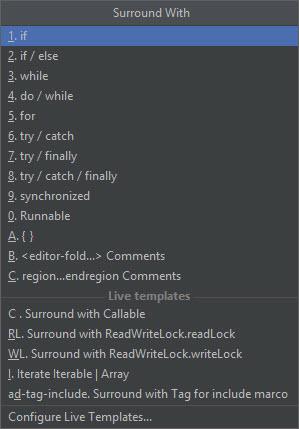
在 Java 的语句中,可以支持下面的一些快捷插入。
ifif/elsewhiledo/whilefortry/catchtry/finallytry/catch/finallysynchronizedRunnable{}
在 IntelliJ IDEA 中是有快捷键的。
On the Code menu, click Surround With Ctrl+Alt+T.
在 Java 的语句中,可以支持下面的一些快捷插入。
ifif/elsewhiledo/whilefortry/catchtry/finallytry/catch/finallysynchronizedRunnable{}
评论
登录后参与技术讨论,分享你的经验与见解。
登录 / 注册暂无评论