Elasticsearch 之(25)重写IK分词器源码来基于mysql热更新词库

文章目录
热更新
在上一节《 IK分词器配置文件讲解以及自定义词库》自定义词库,每次都是在es的扩展词典中,手动添加新词语,很坑
(1)每次添加完,都要重启es才能生效,非常麻烦
(2)es是分布式的,可能有数百个节点,你不能每次都一个一个节点上面去修改
es不停机,直接我们在外部某个地方添加新的词语,es中立即热加载到这些新词语
热更新的方案
(1)修改ik分词器源码,然后手动支持从mysql中每隔一定时间,自动加载新的词库
(2)基于ik分词器原生支持的热更新方案,部署一个web服务器,提供一个http接口,通过modified和tag两个http响应头,来提供词语的热更新
用第一种方案,第二种,ik git社区官方都不建议采用,觉得不太稳定
1、下载源码
https://github.com/medcl/elasticsearch-analysis-ik/tree/v5.2.0
ik分词器,是个标准的java maven工程,直接导入eclipse就可以看到源码
2、修改源码
Dictionary单例类的初始化方法initial,在这里需要创建一个我们自定义的线程,并且启动它
/**
 * 词典初始化 由于IK Analyzer的词典采用Dictionary类的静态方法进行词典初始化
 * 只有当Dictionary类被实际调用时,才会开始载入词典, 这将延长首次分词操作的时间 该方法提供了一个在应用加载阶段就初始化字典的手段
 *
 * @return Dictionary
 */
public static synchronized Dictionary initial(Configuration cfg) {
    if (singleton == null) {
        synchronized (Dictionary.class) {
            if (singleton == null) {


                singleton = new Dictionary(cfg);
                singleton.loadMainDict();
                singleton.loadSurnameDict();
                singleton.loadQuantifierDict();
                singleton.loadSuffixDict();
                singleton.loadPrepDict();
                singleton.loadStopWordDict();

                new Thread(new HotDictReloadThread()).start();

                if(cfg.isEnableRemoteDict()){
                    // 建立监控线程
                    for (String location : singleton.getRemoteExtDictionarys()) {
                        // 10 秒是初始延迟可以修改的 60是间隔时间 单位秒
                        pool.scheduleAtFixedRate(new Monitor(location), 10, 60, TimeUnit.SECONDS);
                    }
                    for (String location : singleton.getRemoteExtStopWordDictionarys()) {
                        pool.scheduleAtFixedRate(new Monitor(location), 10, 60, TimeUnit.SECONDS);
                    }
                }


                return singleton;
            }
        }
    }
    return singleton;
}
HotDictReloadThread类:就是死循环,不断调用Dictionary.getSingleton().reLoadMainDict(),去重新加载词典
public class HotDictReloadThread implements Runnable {

private static final Logger logger = ESLoggerFactory.getLogger(HotDictReloadThread.class.getName());

@Override
public void run() {
    while(true) {
        logger.info("[==========]reload hot dict from mysql......");
        Dictionary.getSingleton().reLoadMainDict();
    }
}

}
Dictionary类:更新词典 this.loadMySQLExtDict()
/**
 * 加载主词典及扩展词典
 */
private void loadMainDict() {
    // 建立一个主词典实例
    _MainDict = new DictSegment((char) 0);

    // 读取主词典文件
    Path file = PathUtils.get(getDictRoot(), Dictionary.PATH_DIC_MAIN);

    InputStream is = null;
    try {
        is = new FileInputStream(file.toFile());
    } catch (FileNotFoundException e) {
        logger.error(e.getMessage(), e);
    }

    try {
        BufferedReader br = new BufferedReader(new InputStreamReader(is, "UTF-8"), 512);
        String theWord = null;
        do {
            theWord = br.readLine();
            if (theWord != null && !"".equals(theWord.trim())) {
                _MainDict.fillSegment(theWord.trim().toCharArray());
            }
        } while (theWord != null);

    } catch (IOException e) {
        logger.error("ik-analyzer", e);

    } finally {
        try {
            if (is != null) {
                is.close();
                is = null;
            }
        } catch (IOException e) {
            logger.error("ik-analyzer", e);
        }
    }
    // 加载扩展词典
    this.loadExtDict();
    // 加载远程自定义词库
    this.loadRemoteExtDict();
    // 从mysql加载词典
    this.loadMySQLExtDict();
}

/**
 * 从mysql加载热更新词典
 */
private void loadMySQLExtDict() {
    Connection conn = null;
    Statement stmt = null;
    ResultSet rs = null;

    try {
        Path file = PathUtils.get(getDictRoot(), "jdbc-reload.properties");
        prop.load(new FileInputStream(file.toFile()));

        logger.info("[==========]jdbc-reload.properties");
        for(Object key : prop.keySet()) {
            logger.info("[==========]" + key + "=" + prop.getProperty(String.valueOf(key)));
        }

        logger.info("[==========]query hot dict from mysql, " + prop.getProperty("jdbc.reload.sql") + "......");

        conn = DriverManager.getConnection(
                prop.getProperty("jdbc.url"),
                prop.getProperty("jdbc.user"),
                prop.getProperty("jdbc.password"));
        stmt = conn.createStatement();
        rs = stmt.executeQuery(prop.getProperty("jdbc.reload.sql"));

        while(rs.next()) {
            String theWord = rs.getString("word");
            logger.info("[==========]hot word from mysql: " + theWord);
            _MainDict.fillSegment(theWord.trim().toCharArray());
        }

        Thread.sleep(Integer.valueOf(String.valueOf(prop.get("jdbc.reload.interval"))));
    } catch (Exception e) {
        logger.error("erorr", e);
    } finally {
        if(rs != null) {
            try {
                rs.close();
            } catch (SQLException e) {
                logger.error("error", e);
            }
        }
        if(stmt != null) {
            try {
                stmt.close();
            } catch (SQLException e) {
                logger.error("error", e);
            }
        }
        if(conn != null) {
            try {
                conn.close();
            } catch (SQLException e) {
                logger.error("error", e);
            }
        }
    }
}
Dictionary类:更新分词 this.loadMySQLStopwordDict();
/**
 * 从mysql加载停用词
 */
private void loadMySQLStopwordDict() {
    Connection conn = null;
    Statement stmt = null;
    ResultSet rs = null;

    try {
        Path file = PathUtils.get(getDictRoot(), "jdbc-reload.properties");
        prop.load(new FileInputStream(file.toFile()));

        logger.info("[==========]jdbc-reload.properties");
        for(Object key : prop.keySet()) {
            logger.info("[==========]" + key + "=" + prop.getProperty(String.valueOf(key)));
        }

        logger.info("[==========]query hot stopword dict from mysql, " + prop.getProperty("jdbc.reload.stopword.sql") + "......");

        conn = DriverManager.getConnection(
                prop.getProperty("jdbc.url"),
                prop.getProperty("jdbc.user"),
                prop.getProperty("jdbc.password"));
        stmt = conn.createStatement();
        rs = stmt.executeQuery(prop.getProperty("jdbc.reload.stopword.sql"));

        while(rs.next()) {
            String theWord = rs.getString("word");
            logger.info("[==========]hot stopword from mysql: " + theWord);
            _StopWords.fillSegment(theWord.trim().toCharArray());
        }

        Thread.sleep(Integer.valueOf(String.valueOf(prop.get("jdbc.reload.interval"))));
    } catch (Exception e) {
        logger.error("erorr", e);
    } finally {
        if(rs != null) {
            try {
                rs.close();
            } catch (SQLException e) {
                logger.error("error", e);
            }
        }
        if(stmt != null) {
            try {
                stmt.close();
            } catch (SQLException e) {
                logger.error("error", e);
            }
        }
        if(conn != null) {
            try {
                conn.close();
            } catch (SQLException e) {
                logger.error("error", e);
            }
        }
    }
}
配置
jdbc.url=jdbc:mysql://localhost:3306/test?serverTimezone=GMT
jdbc.user=root
jdbc.password=root
jdbc.reload.sql=select word from hot_words
jdbc.reload.stopword.sql=select stopword as word from hot_stopwords
jdbc.reload.interval=1000
3、mvn package打包代码
target\releases\elasticsearch-analysis-ik-5.2.0.zip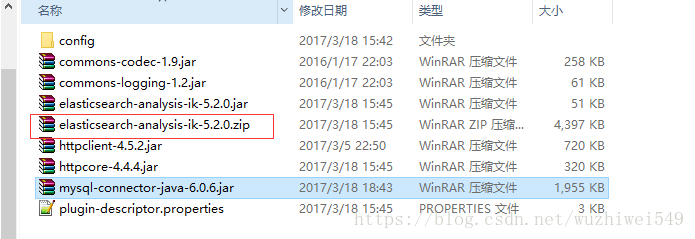
4、解压缩ik压缩包
将mysql驱动jar,放入ik的目录下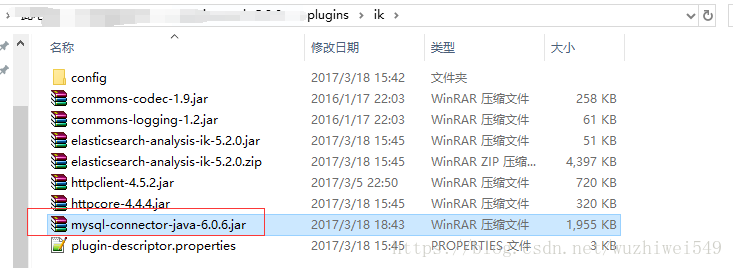
5、重启es
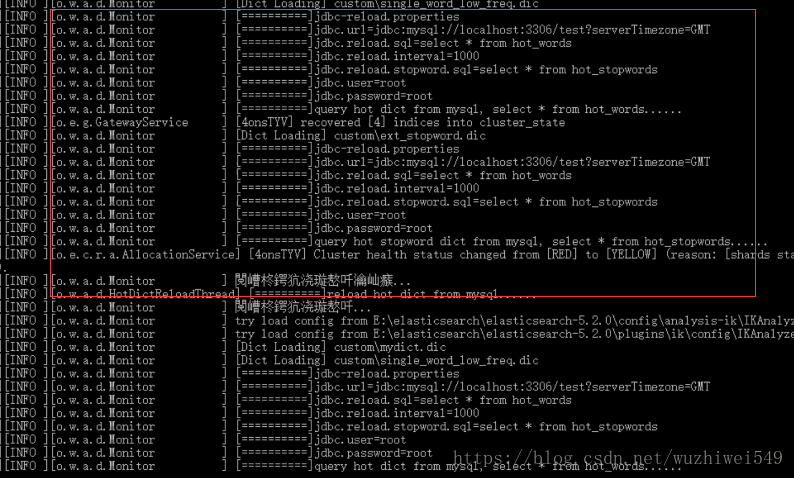
6、在mysql中添加词库与停用词
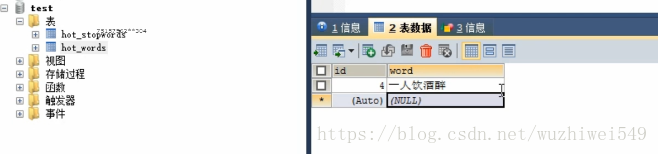
7、kibana分词验证
GET /my_index/_analyze
{
  "text": "一人饮酒醉",
  "analyzer": "ik_max_word"
}

{
  "tokens": [
    {
      "token": "一人饮酒醉",
      "start_offset": 0,
      "end_offset": 5,
      "type": "CN_WORD",
      "position": 0
    },
    {
      "token": "一人",
      "start_offset": 0,
      "end_offset": 2,
      "type": "CN_WORD",
      "position": 1
    },
    {
      "token": "一",
      "start_offset": 0,
      "end_offset": 1,
      "type": "TYPE_CNUM",
      "position": 2
    },
    {
      "token": "人",
      "start_offset": 1,
      "end_offset": 2,
      "type": "COUNT",
      "position": 3
    },
    {
      "token": "饮酒",
      "start_offset": 2,
      "end_offset": 4,
      "type": "CN_WORD",
      "position": 4
    },
    {
      "token": "饮",
      "start_offset": 2,
      "end_offset": 3,
      "type": "CN_WORD",
      "position": 5
    },
    {
      "token": "酒醉",
      "start_offset": 3,
      "end_offset": 5,
      "type": "CN_WORD",
      "position": 6
    },
    {
      "token": "酒",
      "start_offset": 3,
      "end_offset": 4,
      "type": "CN_WORD",
      "position": 7
    },
    {
      "token": "醉",
      "start_offset": 4,
      "end_offset": 5,
      "type": "CN_WORD",
      "position": 8
    }
  ]
}
评论
登录后参与技术讨论,分享你的经验与见解。
登录 / 注册暂无评论