Java中如何自定含义注解

文章目录
自定义注解会需要元注解,此处先介绍元注解。
元注解
java中有四种元注解:@Retention、@Inherited、@Documented、@Target
@Retention
注解的保留位置(枚举RetentionPolicy),RetentionPolicy可选值:
- SOURCE:注解仅存在于源码中,在class字节码文件中不包含
- CLASS:默认的保留策略,注解在class字节码文件中存在,但运行时无法获得
- RUNTIME:注解在class字节码文件中存在,在运行时可以通过反射获取到
@Inherited
声明子类可以继承此注解,如果一个类A使用此注解,则类A的子类也继承此注解
@Documented
声明注解能够被javadoc等识别(下面自定义注解处会有例子做介绍,点击查看)
@Target
用来声明注解范围(枚举ElementType),ElementType可选值:
- TYPE:接口、类、枚举、注解
- FIELD:字段、枚举的常量
- METHOD:方法
- PARAMETER:方法参数
- CONSTRUCTOR:构造函数
- LOCAL_VARIABLE:局部变量
- ANNOTATION_TYPE:注解
- PACKAGE:包
自定义注解介绍自定义注解使用场景
- 类属性自动赋值。
- 验证对象属性完整性。
- 代替配置文件功能,像spring基于注解的配置。
- 可以生成文档,像java代码注释中的@see,@param等
1和2这个没有做过类似实例,应该是像Hibernate中的使用注解映射Bean对象到数据库一样(_此处为个人猜测,如有错误请留言指出_),中间有检测和自动赋值。
自定义注解定义
定义一个自定义注解(不使用元注解):
[AppleScript]纯文本查看__复制代码
1
public @interface MyAnnotation`{`}
定义一个自定义注解(使用元注解,每个元注解都是可选,非必选):
[AppleScript]纯文本查看__复制代码
1
2
3
4
5
6
7
@Retention`(RetentionPolicy.RUNTIME)`
@Inherited
@Documented
@Target`({ElementType.FIELD,ElementType.METHOD})`
public @interface MyAnnotation`1`{
public String name`()` `default` `"hello";`
}
注解中可以声明成员方法,声明的成员方法为最终的注解里面的参数,成员方法可以使用default关键字设置默认值。上面的注解使用如:@MyAnnotation1(name=”ddd”);
自定义注解演示
新建一个自定义注解:
[AppleScript]纯文本查看__复制代码
1
2
3
4
5
6
7
8
@Retention`(RetentionPolicy.RUNTIME)`
@Inherited
@Documented
@Target`({ElementType.FIELD,ElementType.METHOD})`
@interface MyAnno`{`
public String name`()` `default` `"zhangsan";`
public String email`()` `default` `"hello@example.com";`
}
定义一个User类,来使用自定义注解:
[AppleScript]纯文本查看__复制代码
01
02
03
04
05
06
07
08
09
10
11
12
13
14
class User`{`
@MyAnno`(name` `=` `"zhang")`
private String name`;`
@MyAnno`(name` `=` `"zhang@example.com")`
private String email`;`
@MyAnno`(name` `=` `"sayHelloWorld")`
public String sayHello`(){`
return ""`;`
}
}
- @Documented注解的作用
定义的MyAnno注解中使用了@Documented注解,现在来看下User类中sayHello方法的javadoc,截图如下: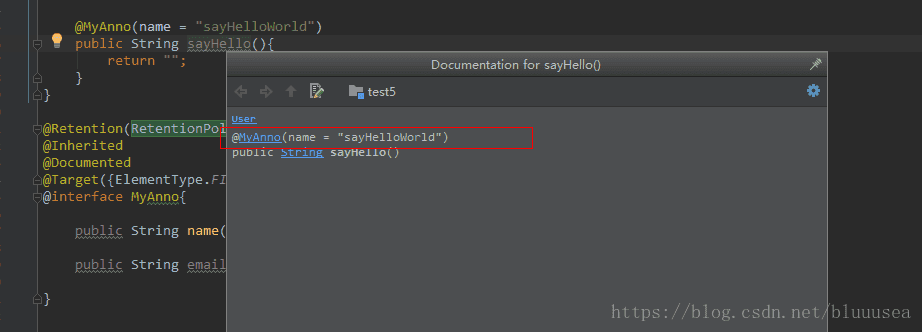
能看到@MyAnno注解出现在javadoc中。
如果不使用@Documented注解,我们看下sayHello方法的javadoc,截图如下:
发现@MyAnno的提示信息没有了,也就是javadoc不能识别此注解信息了,@Documented注解的作用就很明显能看出来了。 - 通过反射获取注解信息
下面我们通过反射来演示下获取属性的注解信息和方法的注解信息:
[AppleScript]纯文本查看__复制代码
01
02
03
04
05
06
07
08
09
10
11
12
13
14
15
16
17
18
19
20
21
22
23
24
25
26
Method[] methods = User.`class.getMethods();`
/`/Field[] fields` `=` `User.class.getFields();`
Field[] fields = User.`class.getDeclaredFields();`
/`*`
getFields:只能访问public属性及继承到的public属性
getDeclaredFields:只能访问到本类的属性,不能访问继承到的属性
getMethods:只能访问public方法及继承到的public方法
getDeclaredMethods:只能访问到本类的方法,不能访问继承到的方法
getConstructors:只能访问public构造函数及继承到的public构造函数
getDeclaredConstructors:只能访问到本类的构造函数,不能访问继承到的构造函数
*`/`
for (`Field field : fields`) {
MyAnno annotation = field.getAnnotation`(MyAnno.class);`
if`(annotation!=null)`{
System.out.println`("property="+annotation.name());`
}
}
for (`Method method : methods`) {
MyAnno annotation = method.getAnnotation`(MyAnno.class);`
if`(annotation!=null)`{
System.out.println`("sayHello="+annotation.name());`
}
}
输出如下:
[AppleScript]纯文本查看__复制代码1
2
3
property`=`zhang
property`=`zhang@example.com
sayHello`=`sayHelloWorld
评论
登录后参与技术讨论,分享你的经验与见解。
登录 / 注册暂无评论