vue封装axios

文章目录
1、目录结构
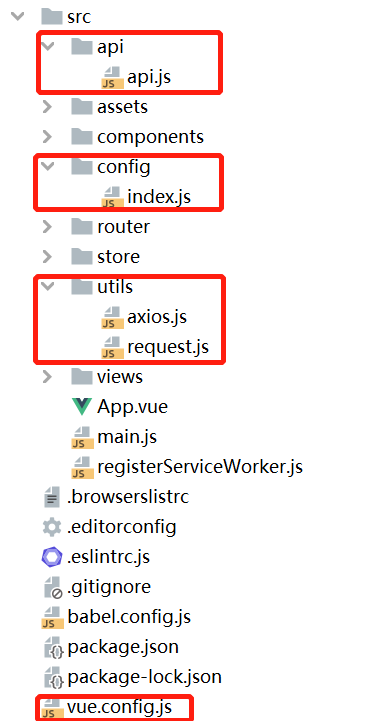
2、配置
2.1 vue.config.js
用@代替/src这个目录,避免写错路径
const path = require('path')
const resolve = dir => {
  return path.join(__dirname, dir)
}
module.exports = {
    devServer: {
        open: true,
        host: 'localhost',
        port: 8080,
        https: false,
        hotOnly: false,
        disableHostCheck: true,
        proxy: {
            // 配置跨域
            '/api': {
                target: 'http://localhost:8000/',
                ws: true,
                changOrigin: true,
                pathRewrite: {
                    '^/api': ''
                }
            }
        },
        before: app => { }
    },
    chainWebpack: config => {
      // key,value自行定义
      config.resolve.alias.set('@', resolve('src'))
    }
};
2.2 config.js
export default {
  // 配置显示在浏览器标签的title
  title: '沉潜',

  // token在Cookie中存储的天数,默认1天
  cookieExpires: 1,

  // 是否使用国际化,默认为false 如果不使用,则需要在路由中给需要在菜单中展示的路由设置meta: {title: 'xxx'} 用来在菜单中显示文字
  useI18n: true,

  // api请求基础路径
  baseUrl: {
    dev: 'http://localhost:8000/',
    pro: 'https://xxx.com/api/'
  },

  // 默认打开的首页的路由name值,默认为home
  homeName: 'home',

  // 需要加载的插件
  plugin: {
    'error-store': {
      // 设为false后不会在顶部显示错误日志徽标
      showInHeader: true,
      // 设为true后在开发环境不会收集错误信息,方便开发中排查错误
      developmentOff: true
    }
  }
}
2.3 request.js
import HttpRequest from '@/utils/axios'
import config from '@/config'
const baseUrl = process.env.NODE_ENV === 'development' ? config.baseUrl.dev : config.baseUrl.pro
const axios = new HttpRequest(baseUrl)
export default axios
2.4 axios.js
import axios from 'axios'

class HttpRequest {

  constructor (baseUrl) {
    this.baseUrl = baseUrl
    this.queue = {}
  }

  getInsideConfig () {
    const config = {
      baseURL: this.baseUrl,
      headers: {
        Authorization: ''
      }
    }
    return config
  }

  destroy (url) {
    delete this.queue[url]
    if (!Object.keys(this.queue).length) {
      // Spin.hide()
    }
  }

  interceptors (instance, url) {
    // 请求拦截
    instance.interceptors.request.use(config => {
      // 添加全局的loading...
      if (!Object.keys(this.queue).length) {
        // Spin.show() // 不建议开启,因为界面不友好
      }
      this.queue[url] = true
      return config
    }, error => {
      return Promise.reject(error)
    })

    // 响应拦截
    instance.interceptors.response.use(res => {
      this.destroy(url)
      const { data } = res
      if (typeof data === 'object') {
        // 自己处理
      }
      return data
    }, error => {
      this.destroy(url)
      let errorInfo = error.response
      if (!errorInfo) {
        const { request: { statusText, status }, config } = JSON.parse(JSON.stringify(error))
        errorInfo = {
          statusText,
          status,
          request: { responseURL: config.url }
        }
        console.log(errorInfo)
      }
      return Promise.reject(error)
    })
  }

  request (options) {
    const instance = axios.create()
    options = Object.assign(this.getInsideConfig(), options)
    this.interceptors(instance, options.url)
    return instance(options)
  }
}
export default HttpRequest
2.5 api.js
import axios from '@/utils/request'
export const insert = (data) => {
  return axios.request({
    url: '/insert',
    method: 'post',
    data
  })
}
export const update = (data) => {
  return axios.request({
    url: '/update',
    method: 'post',
    data
  })
}
export const getList = (params) => {
  return axios.request({
    url: '/getList',
    method: 'get',
    params
  })
}
3、使用
import { getList, update } from '@/api/api'
test () {
  getList({ limit: 10, offset: 1 }).then(res => {
    if (res.status === 200) {
      console.log(res)
    }
  })
  update({ name: '沉潜', userId: 1 }).then(res => {
    if (res.status === 200) {
      console.log(res)
    }
  })
}
评论
登录后参与技术讨论,分享你的经验与见解。
登录 / 注册暂无评论