Missing Semester MIT 1

文章目录
MIT the missing semester
这门课主要会教授一些课堂上不会讲的东西, 比如debug, shell, vim. 刚好国庆假期将近刷题刷烦了, 来学一下, 毕竟vim和gdb还不太熟练.
课程链接: https://missing.csail.mit.edu/
Okay, let's get started!!!.
environment variables
when type echo hello (in any path), you can see hello in your terminal, but how does the system get the echo program working? when ls in current location, we cannt find a program named echo. And the answer behind this magic is environment variables.
when type:echo $PATH, the following will show up:
/usr/local/sbin:/usr/local/bin:/usr/sbin:/usr/bin:/sbin:/binthese are the locations that are registered in the environment variable, when we type echo hello, the system will go to these locations to find whether there is a program named echo, if true, will call it.
eg:
type: which echo
/bin/echowhich means we are using the echo program under directory /bin/
some commands
1 cd change directory:
`cd ~` change dir to user space;
`cd -` change dir to the last location, this is super useful;
`cd ..` go to upper directory;
`cd /` go to root;
2 ls list
`ls` list stuff under cur directory
`ls -l` list stuff using a long listing format including permission, date, owner, group...
`ls -a` list stuff (including hidding file)
`ll` list all stuff from root to cur directory
3 cat show the content of a file, more can do the same thing;
4 df show free disk;
5 free show free memory;
6 top show the usage of computer resources;
7 sudo do something with root previlege;
8 sudo su enter root mode, exit with exit;
9 pwd print working directory;
10 cp copy file to dest;
11 mv move file to dest, if dest in the same dir, this will simply change file name;
12 touch create a file;
13 rm delete file, directory;
14 mkdir create a directory;
permissions
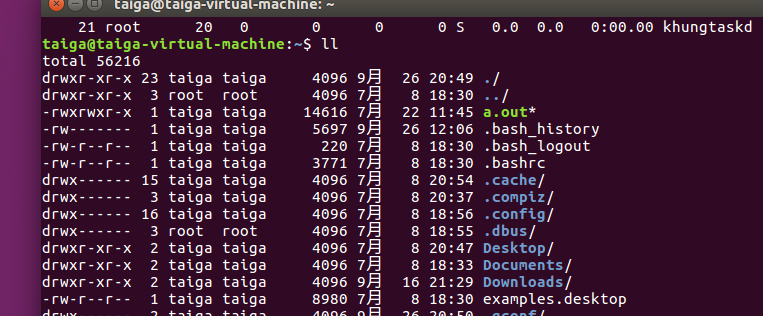
in the pic above, the first letter d shows whether this is a directory, then followed by 9 letters, these are permissions, the first three letters are for owner; the second are for group, the third are for all users.r means read, weighted 4, w means write, weighted 2, x means execute, weighted 1. if we dont have x and try to execute the file, we ll get a permission denied. Fortunately, we can use chmod to change permission, as mentioned above,chmod 777 means open all permissions(read, write, execute) to all types of users;chmod 755 means only owner can write this file;
redirection
< input> output>> append| pipe: make the output of left program be the input of right program;
EXERCISES
- Create a new directory called
missingunder/tmp. - Look up the
touchprogram. Themanprogram is your friend. - Use
touchto create a new file calledsemesterinmissing. Write the following into that file, one line at a time:
#!/bin/sh
curl --head --silent https://missing.csail.mit.edu
The first line might be tricky to get working. It’s helpful to know that
#starts a comment in Bash, and!has a special meaning even within double-quoted (") strings. Bash treats single-quoted strings (') differently: they will do the trick in this case. See the Bash quoting manual page for more information.- Try to execute the file, i.e. type the path to the script (
./semester) into your shell and press enter. Understand why it doesn’t work by consulting the output ofls(hint: look at the permission bits of the file). - Run the command by explicitly starting the
shinterpreter, and giving it the filesemesteras the first argument, i.e.sh semester. Why does this work, while./semesterdidn’t? - Look up the
chmodprogram (e.g. useman chmod). - Use
chmodto make it possible to run the command./semesterrather than having to typesh semester. How does your shell know that the file is supposed to be interpreted usingsh? See this page on the shebang) line for more information. - Use
|and>to write the “last modified” date output bysemesterinto a file calledlast-modified.txtin your home directory.
Ans:
1.cd /tmp; mkdir missing
touch semesterecho '#!/bin/sh' > semester; echo curl --head --silent https://missing.csail.mit.edu > semesterorecho \#\!/bin/sh- I guess sh have top previlege
sudo chmod 777 ./semester./semester | grep -i last-modified > ~/last-modified.txt
评论
登录后参与技术讨论,分享你的经验与见解。
登录 / 注册暂无评论