Python3 使用代理的两种方式

文章目录
原文链接: Python3 使用代理的两种方式
常见代理网站
https://www.kuaidaili.com/free/
常见agent
一、为何要设置User Agent
有一些网站不喜欢被爬虫程序访问,所以会检测连接对象,如果是爬虫程序,也就是非人点击访问,它就会不让你继续访问,所以为了要让程序可以正常运行,需要隐藏自己的爬虫程序的身份。此时,我们就可以通过设置User Agent的来达到隐藏身份的目的,User Agent的中文名为用户代理,简称UA。
User Agent存放于Headers中,服务器就是通过查看Headers中的User Agent来判断是谁在访问。在Python中,如果不设置User Agent,程序将使用默认的参数,那么这个User Agent就会有Python的字样,如果服务器检查User Agent,那么没有设置User Agent的Python程序将无法正常访问网站。
Python允许我们修改这个User Agent来模拟浏览器访问,它的强大毋庸置疑。
二、常见的User Agent
1.Android
- Mozilla/5.0 (Linux; Android 4.1.1; Nexus 7 Build/JRO03D) AppleWebKit/535.19 (KHTML, like Gecko) Chrome/18.0.1025.166 Safari/535.19
- Mozilla/5.0 (Linux; U; Android 4.0.4; en-gb; GT-I9300 Build/IMM76D) AppleWebKit/534.30 (KHTML, like Gecko) Version/4.0 Mobile Safari/534.30
- Mozilla/5.0 (Linux; U; Android 2.2; en-gb; GT-P1000 Build/FROYO) AppleWebKit/533.1 (KHTML, like Gecko) Version/4.0 Mobile Safari/533.1
2.Firefox
- Mozilla/5.0 (Windows NT 6.2; WOW64; rv:21.0) Gecko/20100101 Firefox/21.0
- Mozilla/5.0 (Android; Mobile; rv:14.0) Gecko/14.0 Firefox/14.0
3.Google Chrome
- Mozilla/5.0 (Windows NT 6.2; WOW64) AppleWebKit/537.36 (KHTML, like Gecko) Chrome/27.0.1453.94 Safari/537.36
- Mozilla/5.0 (Linux; Android 4.0.4; Galaxy Nexus Build/IMM76B) AppleWebKit/535.19 (KHTML, like Gecko) Chrome/18.0.1025.133 Mobile Safari/535.19
4.iOS
- Mozilla/5.0 (iPad; CPU OS 5_0 like Mac OS X) AppleWebKit/534.46 (KHTML, like Gecko) Version/5.1 Mobile/9A334 Safari/7534.48.3
- Mozilla/5.0 (iPod; U; CPU like Mac OS X; en) AppleWebKit/420.1 (KHTML, like Gecko) Version/3.0 Mobile/3A101a Safari/419.3
上面列举了Andriod、Firefox、Google Chrome、iOS的一些User Agent,直接copy就能用。
三、设置User Agent的方法
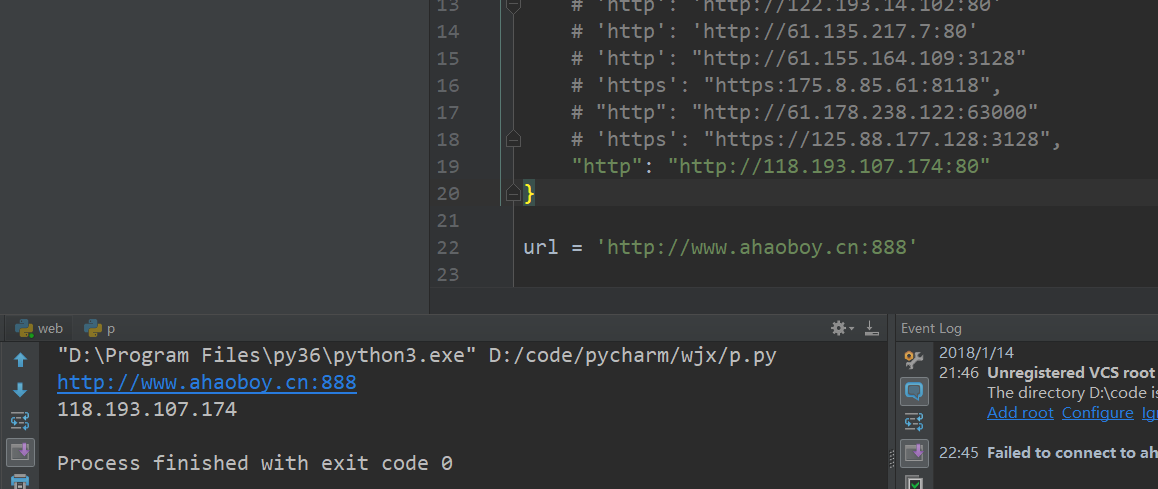
通过代理隐藏自己的ip信息
设置代理字典
proxyDict = {
                      "http"  : self.http_proxy,
                      "https" : self.https_proxy,
                      "ftp"   : self.ftp_proxy
                    }
有密码的代理
proxies = {
    "http": "http://user:pass@10.10.1.10:3128/"
}
第一种requests模块
# 作者:十四君
# 链接:https://www.zhihu.com/question/23825711/answer/129293723
# 来源:知乎
# 著作权归作者所有。商业转载请联系作者获得授权,非商业转载请注明出处。

# encoding=utf8
import requests
import sys

type = sys.getfilesystemencoding()
s = requests.session()
proxie = {
    # 'http': 'http://122.193.14.102:80'
    # 'http': 'http://61.135.217.7:80'
    # 'http': "http://61.155.164.109:3128"
    # 'https': "https:175.8.85.61:8118",
    # "http": "http://61.178.238.122:63000"
    # 'https': "https://125.88.177.128:3128",
    "http": "http://118.193.107.174:80"
}

url = 'http://www.ahaoboy.cn:888'

print(url)
response = s.get(url, verify=False, proxies=proxie, timeout=20)
print(response.text)
第二种urlopen模块
from urllib import request

if __name__ == "__main__":
    # 访问网址
    url = 'http://www.ahaoboy.cn:888/'
    # 这是代理IP
    proxy = {
        # 'http': '106.46.136.112:808'
        # 'https': "https://112.112.236.145:9999",
        "http": "http://118.193.107.174:80"
    }
    # 创建ProxyHandler
    proxy_support = request.ProxyHandler(proxy)
    # 创建Opener
    opener = request.build_opener(proxy_support)
    # 添加User Angent
    opener.addheaders = [('User-Agent',
                          'Mozilla/5.0 (Windows NT 6.1; Win64; x64) AppleWebKit/537.36 (KHTML, like Gecko) Chrome/56.0.2924.87 Safari/537.36')]
    # 安装OPener
    request.install_opener(opener)
    # 使用自己安装好的Opener
    response = request.urlopen(url)
    # 读取相应信息并解码
    html = response.read().decode("utf-8")
    # 打印信息
    print(html)
评论
登录后参与技术讨论,分享你的经验与见解。
登录 / 注册暂无评论