Odoo 14 中的 OWL - 扩展和修补现有的 OWL 组件。

文章目录
OWL 组件介绍
OWL 组件与通常的 Odoo JS 类大不相同,它们具有您熟悉的自定义继承系统。
首先它们是ES6 类,如果您不熟悉 ES6 类,可以先学习ES6的内容
ES6 类基本上是 JavaScript 中现有的基于原型的继承的语法糖。在最基本的层面上,ES6 Class 是一个符合基于原型继承的构造函数。ES6 类仍然有 Object.prototype!
基于类和基于原型的继承之间最重要的区别在于,类定义了可以在运行时实例化的类型,而原型本身就是一个对象实例。
要使用 Odoo 14 现有的 OWL 组件,先了解一些基本的概念。
class Component {
  constructor(name) {
    this.name = name;
  }

  render() {
    console.log(`${this.name} renders itself.`);
  }

  // Getter/setter methods are supported in classes,
  // similar to their ES5 equivalents
  get uniqueId() {
    return `${this.name}-test`;
  }
}
可以使用关键字继承类 extends 并用 super 调用父函数。
class MyBetterComponent extends Component {
  constructor(name) {
    super(name); // call the super class constructor and pass in the name parameter
  }

  render() {
    console.log(`${this.name} with id ${this.uniqueId} render itslef better.`);
  }
}

let comp = new MyBetterComponent('MyBetterComponent');
comp.render(); // MyBetterComponent with id
这是标准的 ES6 super 关键字,不要将它与_super 框架内构建的 Odoo函数混淆。
Odoo 中 OWL 组件的大部分修补、扩展、覆盖都会用到这些基础知识!
Odoo OWL 实用程序补丁和 patchMixin 函数。
扩展 Odoo OWL 组件是通过一个patch 来完成扩展的, 有两种办法
- 组件 (Component) 本身公开一个patch函数,因为它包裹在patchMixin.
- 必须使用 patch 直接使用该函数(在 web.utils 包中)将补丁应用到 OWL 组件。
使用 patchMixin,组件公开了一个“补丁”功能。
在 odoo/addons/web/static/src/js/core/patch_mixin.js 我们有这个patchMixin函数:
function patchMixin(OriginalClass) {
    let unpatchList = [];
    class PatchableClass extends OriginalClass {}

    PatchableClass.patch = function (name, patch) {
        if (unpatchList.find(x => x.name === name)) {
            throw new Error(`Class ${OriginalClass.name} already has a patch ${name}`);
        }
        if (!Object.prototype.hasOwnProperty.call(this, 'patch')) {
            throw new Error(`Class ${this.name} is not patchable`);
        }
        const SubClass = patch(Object.getPrototypeOf(this));
        unpatchList.push({
            name: name,
            elem: this,
            prototype: this.prototype,
            origProto: Object.getPrototypeOf(this),
            origPrototype: Object.getPrototypeOf(this.prototype),
            patch: patch,
        });
        Object.setPrototypeOf(this, SubClass);
        Object.setPrototypeOf(this.prototype, SubClass.prototype);
    };

    PatchableClass.unpatch = function (name) {
        if (!unpatchList.find(x => x.name === name)) {
            throw new Error(`Class ${OriginalClass.name} does not have any patch ${name}`);
        }
        const toUnpatch = unpatchList.reverse();
        unpatchList = [];
        for (let unpatch of toUnpatch) {
            Object.setPrototypeOf(unpatch.elem, unpatch.origProto);
            Object.setPrototypeOf(unpatch.prototype, unpatch.origPrototype);
        }
        for (let u of toUnpatch.reverse()) {
            if (u.name !== name) {
                PatchableClass.patch(u.name, u.patch);
            }
        }
    };
    return PatchableClass;
}
它的组件被 patchMixin 包围并返回 例如在 odoo/addons/mail/static/src/components/messaging_menu/messaging_menu.js 中, MessagingMenu 返回如下:
// ...
const patchMixin = require('web.patchMixin');

const { Component } = owl;

class MessagingMenu extends Component {
// ...
// content of the file
// ...
}
return patchMixin(MessagingMenu);
实际上 这种返回 patchMixin 的 情况并不多, 应该首先检查这种情况, 可以将这种类型的组件称之为 可修补的组件
web.utilspatch 功能是有限,他可以在集成大部分功能,但是 Constructor, getters, setters 方法不会被继承这是补丁功能内容:
/**
 * Patch a class and return a function that remove the patch
 * when called.
 *
 * This function is the last resort solution for monkey-patching an
 * ES6 Class, for people that do not control the code defining the Class
 * to patch (e.g. partners), and when that Class isn't patchable already
 * (i.e. when it doesn't have a 'patch' function, defined by the 'web.patchMixin').
 *
 * @param {Class} C Class to patch
 * @param {string} patchName
 * @param {Object} patch
 * @returns {Function}
 */
patch: function (C, patchName, patch) {
    let metadata = patchMap.get(C.prototype);
    if (!metadata) {
        metadata = {
            origMethods: {},
            patches: {},
            current: []
        };
        patchMap.set(C.prototype, metadata);
    }
    const proto = C.prototype;
    if (metadata.patches[patchName]) {
        throw new Error(`Patch [${patchName}] already exists`);
    }
    metadata.patches[patchName] = patch;
    applyPatch(proto, patch);
    metadata.current.push(patchName);

    function applyPatch(proto, patch) {
        Object.keys(patch).forEach(function (methodName) {
            const method = patch[methodName];
            if (typeof method === "function") {
                const original = proto[methodName];
                if (!(methodName in metadata.origMethods)) {
                    metadata.origMethods[methodName] = original;
                }
                proto[methodName] = function (...args) {
                    const previousSuper = this._super;
                    this._super = original;
                    const res = method.call(this, ...args);
                    this._super = previousSuper;
                    return res;
                };
            }
        });
    }

    return utils.unpatch.bind(null, C, patchName);
},
可修补组件(与 “patchMixin”一起返回):扩展、猴子补丁、覆盖。
基本语法
PatchableComponent.patch("name_of_the_patch", (T) => {
    class NewlyPatchedComponent extends T {
        //... go wild
    }
    return NewlyPatchedComponent
})
有了这个补丁,你就可以使用 es6 的语法了。你的扩展组件也是一个 ES6 类,因此您可以使用Constructor, getters, setters 属性和其他函数。
示例:控制面板组件。
在示例中,我们将扩展 ControlPanel 组件。此组件与patchMixin函数一起返回,原始文件:
// at the end of file...
ControlPanel.template = 'web.ControlPanel';

return patchMixin(ControlPanel);
将在 ControlPanel,该消息将调用 API 显示一些正能量的话!。
使用 fetch 向 API 发出请求,我们将使用willUpdateProps钩子,因此每次用户在他的 WebClient 上导航时,它都会获取一个新的数据
实现代码:
- 扩展
owl xml模板添加一个 添加class 进行渲染,
<?xml version="1.0" encoding="UTF-8" ?>
<templates>
    <t t-inherit="web.ControlPanel" t-inherit-mode="extension" owl="1">
        <xpath expr="//div[hasclass('o_control_panel')]" position="inside">
            <div t-esc="state.customText" class="o_control_panel_random_quote"></div>
        </xpath>
    </t>
</templates>
继承 OWL XML 模板与扩展标准 QWeb 模板非常相似,不要忘记天机 owl="1" 我们将把我们div放在控制面板里面,并state在我们的组件里面显示 customText 。
创建scss 文件 添加样式
.o_control_panel {
  .o_control_panel_random_quote {
    color: $text-muted;
    font-style: italic;
    align-items: center;
    justify-content: center;
    font-weight: bolder;
  }
}
创建 /src/js/control_panel.js 文件 在国内 可能访问速度比较慢,
odoo.define("owl_tutorial.ControlPanel", function (require) {
  "use strict";
  const ControlPanel = require("web.ControlPanel");
  const { useState } = owl.hooks;

  // ConstrolPanel has a patch function thanks to the patchMixin
  // This is the usual syntax, first argument is the name of our patch.
  ControlPanel.patch("owl_tutorial.ControlPanelCodingDodo", (T) => {
    class ControlPanelPatched extends T {
      constructor() {
        super(...arguments);
        this.state = useState({
          customText: "",
        });
        console.log(this.state);
      }

      async willUpdateProps(nextProps) {
        // Don't forget to call the super
        await super.willUpdateProps(nextProps);

        let self = this;
        fetch("https://type.fit/api/quotes")
          .then(function (response) {
            return response.json();
          })
          .then(function (data) {
            let quote = data[Math.floor(Math.random() * data.length)];
            // Update the state of the Component
            Object.assign(self.state, {
              customText: `${quote.text} - ${quote.author}`,
            });
          });
      }
    }
    return ControlPanelPatched;
  });
});
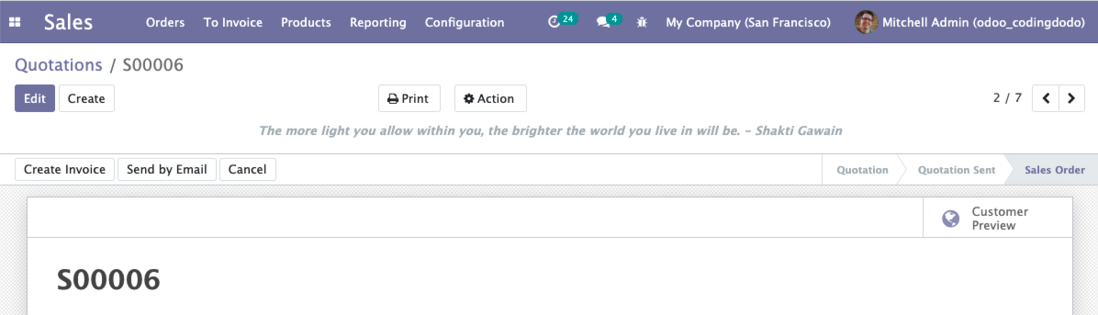
返回 ComponentpatchMixin 直接扩展、修补其功能和添加特性都会变得非常容易!
不可修补组件:使用“web.utils”补丁覆盖常规函数。
从 Odoo 14 开始,大多数组件都不会返回patchMixin , 如果我们想覆盖某些组件函数的内容,我们将使用web.utils 补丁函数。
未完
........
评论
登录后参与技术讨论,分享你的经验与见解。
登录 / 注册暂无评论