pipenv 的使用

文章目录
pipenv 的使用
pipenv 简介
pipenv 是 Python官方推荐 的包管理工具。可以说,它集成了virtualenv, pip和pyenv三者的功能。其目的旨在集合了所有的包管理工具的长处,如: npm, yarn, composer等的优点。
它能够自动为项目创建和管理虚拟环境,从Pipfile文件添加或删除安装的包,同时生成Pipfile.lock来锁定安装包的版本和依赖信息,避免构建错误。
pipenv主要解决了如下问题:
- 不用再单独使用
pip和virtualenv, 现在它们合并在一起了 - 不用再维护
requirements.txt, 使用Pipfile和Pipfile.lock来代替 - 可以使用多个python版本(
python2和python3) - 在安装了
pyenv的条件下,可以自动安装需要的Python版本
pipenv 安装
pip install pipenv -i https://pypi.douban.com/simple
pipenv 命令
Usage: pipenv \[OPTIONS\] COMMAND \[ARGS\]...
Options:
--where Output project home information.
--venv Output virtualenv information.
--py Output Python interpreter information.
--envs Output Environment Variable options.
--rm Remove the virtualenv.
--bare Minimal output.
--completion Output completion (to be eval'd).
--man Display manpage.
--support Output diagnostic information for use in GitHub issues.
--site-packages Enable site-packages for the virtualenv. \[env var:
PIPENV\_SITE\_PACKAGES\]
--python TEXT Specify which version of Python virtualenv should use.
--three / --two Use Python 3/2 when creating virtualenv.
--clear Clears caches (pipenv, pip, and pip-tools). \[env var:
PIPENV\_CLEAR\]
-v, --verbose Verbose mode.
--pypi-mirror TEXT Specify a PyPI mirror.
--version Show the version and exit.
-h, --help Show this message and exit.
Usage Examples:
Create a new project using Python 3.7, specifically:
$ pipenv --python 3.7
Remove project virtualenv (inferred from current directory):
$ pipenv --rm
Install all dependencies for a project (including dev):
$ pipenv install --dev
Create a lockfile containing pre-releases:
$ pipenv lock --pre
Show a graph of your installed dependencies:
$ pipenv graph
Check your installed dependencies for security vulnerabilities:
$ pipenv check
Install a local setup.py into your virtual environment/Pipfile:
$ pipenv install -e .
Use a lower-level pip command:
$ pipenv run pip freeze
Commands:
check Checks for security vulnerabilities and against PEP 508 markers
provided in Pipfile.
clean Uninstalls all packages not specified in Pipfile.lock.
graph Displays currently-installed dependency graph information.
install Installs provided packages and adds them to Pipfile, or (if no
packages are given), installs all packages from Pipfile.
lock Generates Pipfile.lock.
open View a given module in your editor.
run Spawns a command installed into the virtualenv.
shell Spawns a shell within the virtualenv.
sync Installs all packages specified in Pipfile.lock.
uninstall Un-installs a provided package and removes it from Pipfile.
update Runs lock, then sync.
pipenv 常用命令介绍
# 安装包
$ pipenv install

# 安装指定包版本
eg: $ pipenv install django=2.1.7

# 安装 pipfile.lock 中固定版本
$ pipenv install --ingnore-pipfile

# 激活(进入)当前项目的虚拟环境
$ pipenv shell

# 查看当前虚拟环境的路径
$ pipenv --venv

# 安装开发依赖包
$ pipenv install pytest --dev

# 图形显示包依赖关系(可检查安装包对其他包版本的要求)
$ pipenv graph

# 生成lockfile(pipenv install 默认会生成 lockfile 文件)
$ pipenv lock

# 删除某个安装包
$ pipenv uninstall django

# 删除所有的安装包
$ pipenv uninstall --all

# 退出当前虚拟环境
$ exit or ctrl+d

# 删除当前虚拟环境
$ pipenv --rm
pipenv 高级
- 导入:
当在执行pipenv install命令的时候,如果有一个requirements.txt文件,那么会自动从requirements.txt文件导入安装包信息并创建一个Pipfile文件。同样可以使用
$ pipenv install -r path/to/requirements.txt来导入requirements.txt文件
- 指定 python 版本
$ pipenv --python 3
$ pipenv --python 3.6
$ pipenv --python 2.7.14
我们也可以从Pipfile和Pipfile.lock文件来生成requirements.txt
- 生成 requirements.txt 文件
注意⚠️:pipenv会自动扫描系统寻找合适的版本信息,如果找不到的话,同时又安装了pyenv, 它会自动调用pyenv下载对应的版本的python
# 生成requirements.txt文件
$ pipenv lock -r

# 生成dev-packages的requirements.txt文件
# pipenv lock -r -d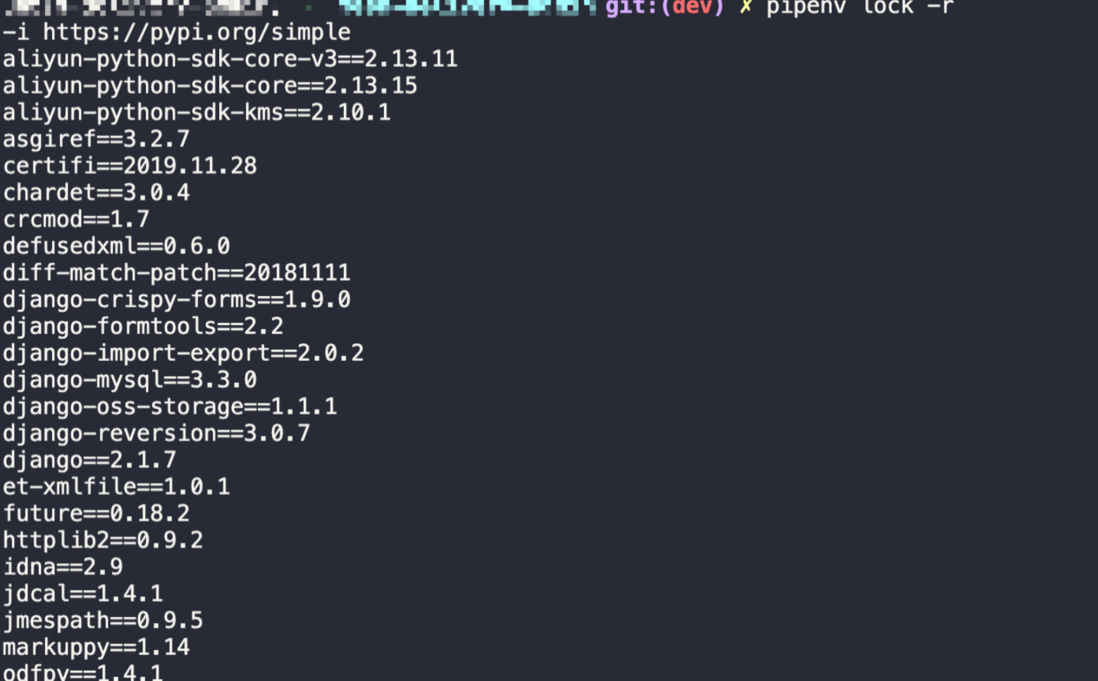
- 排查安全隐患
pipenv包含了safety模块,可以让我们坚持安装包是否存在安全隐患。
pipenv check
- 代码风格检查
pipenv默认集成了flake8, 可以用来检测编码风格
pipenv check --style test.py
评论
登录后参与技术讨论,分享你的经验与见解。
登录 / 注册暂无评论