element-ui部分引入失效问题追踪

文章目录
背景
项目使用vue2与element-ui;最近发现项目的部分引入失效了
// babel.config.js
module.exports = api => {
    return {
        "presets": ['@vue/cli-plugin-babel/preset'],
        "plugins": [
          [
            "component",
            {
              "libraryName": "element-ui",
              "styleLibraryName": "theme-chalk"
            }
          ]
        ]
      };
};
babel-plugin-component 负责将element-ui的引入代码转换为部分引入代码;
全量的element-ui是被谁引入的
这里我们使用Vue.component这个函数作为切入点;
发现Vue.component对于同一个组件(如ElTooltip)调用了2次;
看到全量引入的element-ui来自于node_modules中的包;
查看了下logic-tree这个包的代码
// 打包前源码
import { Button } from 'element-ui';

// 打包后
var _ks_kwai_ui__WEBPACK_IMPORTED_MODULE_0__ = __webpack_require__(/*! element-ui */ \"../../node_modules/element-ui/lib/element-ui.common.js\");可以看出包本身代码没有问题,是我们在打包时babel-plugin-component没能在包文件上生效,导致import语句被webpack翻译为使用了main下的index.js
为什么babel-plugin-component没能生效?
可以看出babel-loader没有去编译node_modules下的文件。
很好理解,如果所有node_modules代码都要编译,会大大增加打包与热更新时间;
在babel-plugin-component源码中加入log,发现确实没有调用
        ImportDeclaration: function ImportDeclaration(path, _ref2) {
          var opts = _ref2.opts;
          var node = path.node;
          var value = node.source.value;
          var result = {};

          if (Array.isArray(opts)) {
            result = opts.find(function (option) {
              return option.libraryName === value;
            }) || {};
          }

          console.log('hy', value);
...通过文档阅读后,发现参数transpileDependencies可以控制node_modules哪些包需要经过babel
默认情况下 babel-loader 会忽略所有 node_modules 中的文件。你可以启用本选项,以避免构建后的代码中出现未转译的第三方依赖
transpileDependencies 失效
我们的项目采用pluginAPI来配置vue.config,因此在plugin中加入如下代码(现状)
module.exports = api => {
    api.service.projectOptions.transpileDependencies = [
        'logic-tree'
    ];
    api.service.projectOptions.productionSourceMap = false;
    ...
}但是加上后发现没有生效;通过调试与源码搜索发现transpileDependencies的使用方为@vue/cli-plugin-babel,也是一个plugin,而且他的调用顺序先于我们的plugin,此时transpileDependencies还未初始化,效果如图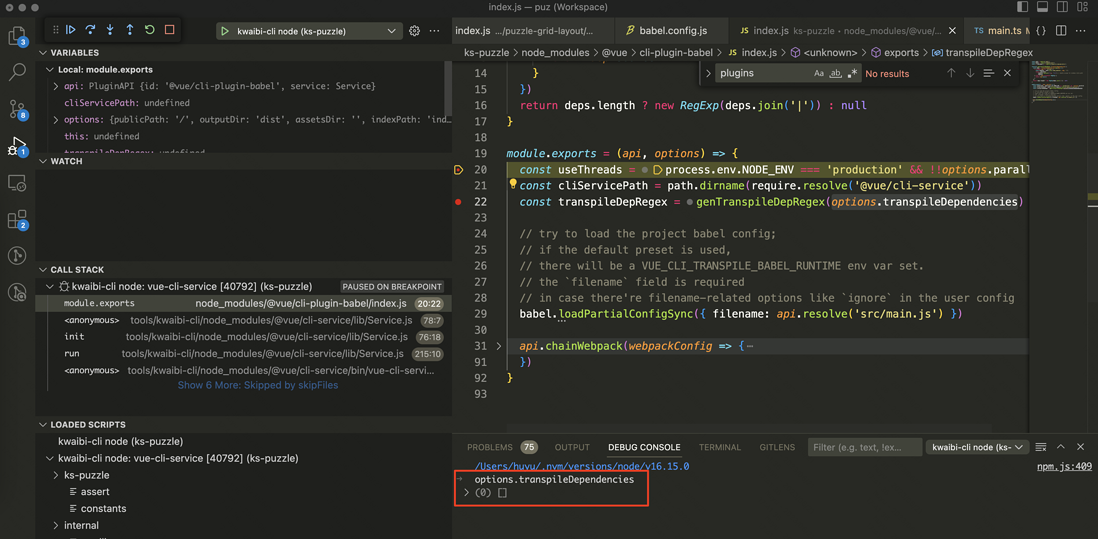
还是需要一个vue.config.js,我这里建立一个空的vue.config.js来配置transpileDependencies参数
// vue.config.js
module.exports = {
    transpileDependencies: [
        'logic-tree'
    ],
};
babel-plugin-component 报错
这次打包babel-plugin-component终于生效了,但是却引起如下报错。
查看了下logic-tree/dist/index.es.js源码
import{Button as t,Tooltip as e}from"element-ui";var r=Object.freeze(Object.defineProperty({__proto__:null,get default(){return No}},Symbol.toStringTag,{value:"Module"})),n="undefined"!=typeof globalThis?globalThis:"undefined"!=typeof window?window:"undefined"!=typeof global?global:"undefined"!=typeof self?self:...发现这个包的es版本代码,将Tootip起了个别名e,babel-plugin-component没有兼容别名。
解决办法:将 babel-plugin-component 替换为 babel-plugin-import;
至此,问题解决,完。
附录1 关于调试
注意:调试之前需要先清除 node_modules/.cache,否则plugin代码不会调用
追查问题过程中涉及对vue-cli-service整个打包过程的调试,之前的调试方案一般借助npx --node-options='--inspect-brk',结合chrome://inspect页面进行调试,例如
PROJECT_PATH=/root-project/custom-widgets/customization-table npx --node-options='--inspect-brk' /root-project/tools/kwaibi-cli/node_modules/.bin/vue-cli-service build --target lib --name kwaibi-custom-widget-plugin/customization-table@0.9.82 --dest /root-project/custom-widgets/customization-table/dist /root-project/custom-widgets/customization-table/src/main.ts但是node端经常会fork child-process,这时候我们只调试主进程是没有意义的,还需要找到子进程fork的地方手动加上inspect参数才能对子进程进行调试
vscode参数autoAttachChildProcesses帮助我们节省了这些工作。
进入vscode调试功能,配置launch.json如下
{
    "configurations": [
        {
            "type": "node-terminal",
            "name": "kwaibi-cli node",
            "request": "launch",
            "command": "PROJECT_PATH=/root-project/custom-widgets/customization-table /root-project/tools/kwaibi-cli/node_modules/.bin/vue-cli-service build --target lib --name kwaibi-custom-widget-plugin/customization-table@0.9.82 --dest /root-project/custom-widgets/customization-table/dist /root-project/custom-widgets/customization-table/src/main.ts",
            "autoAttachChildProcesses": true,
            "cwd": "${workspaceFolder}/tools/kwaibi-cli",
            "env": {
                "PROJECT_PATH": "${workspaceFolder}/custom-widgets/customization-table"
            }
        }
    ]
}
效果如图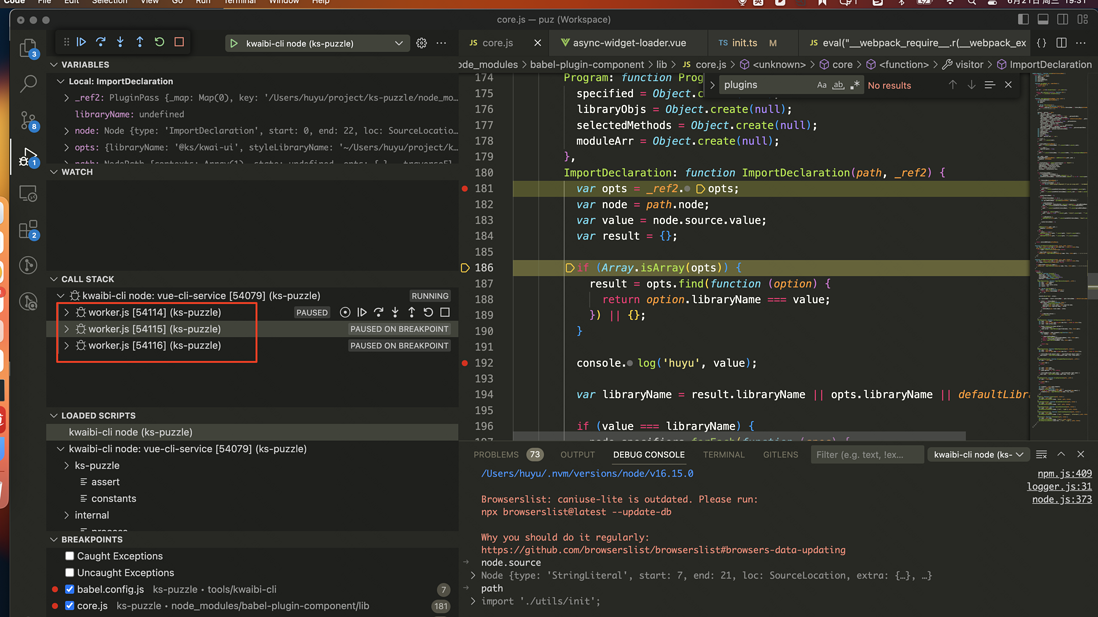
评论
登录后参与技术讨论,分享你的经验与见解。
登录 / 注册暂无评论