【SERO TECH】手机轻钱包DApp接入教程

文章目录
介绍
SERO Popup 钱包是一款去中心化的手机端钱包,分为IOS、Android、浏览器三个版本。可以管理SERO生态中丰富的资产形式,并且支持Pullup钱包的助记词导入。Popup 钱包将是今后SERO上各种去中心化应用的主要入口。
[](https://wiki.sero.cash/zh/ind...
-
IOS
-
使用WebApp
-
在浏览器里面打开链接
- 点击下方 [分享] 按钮
- 点击 [添加到主屏幕]
-
-
使用 TestFlight 安装
- 先安装Apple官方的Beta测试工具TestFlight
-
再在浏览器中打开 Popup 安装链接
-
-
Android
-
浏览器
[](https://wiki.sero.cash/zh/ind...
[](https://wiki.sero.cash/zh/ind.... 配置开发环境
- 使用Crome浏览器打开:http://popup.sero.cash/
- 新建开发账号
- 在“我的”-“设置”-“节点设置”,设置gero节点,本例使用:http://127.0.0.1:8545
[](https://wiki.sero.cash/zh/ind.... 开发智能合约
- IDE:https://remix.web.sero.cash/
- 源码:
pragma solidity ^0.4.16;

contract HelloDapp {

    string public name;
    string public message;

    constructor() public{
        name = "Tom";
        message = "Hello";
    }

    function say(string _name,string _msg) public {
        name = _name;
        message = _msg;
    }

    function sayHello() public view returns (string){
        var a = stringAdd(name," say ");
        return stringAdd(a,message);
    }

    function stringAdd(string a, string b) returns(string){
        bytes memory _a = bytes(a);
        bytes memory _b = bytes(b);
        bytes memory res = new bytes(_a.length + _b.length);
        for(uint i = 0;i < _a.length;i++)
            res[i] = _a[i];
        for(uint j = 0;j < _b.length;j++)
            res[_a.length+j] = _b[j];
        return string(res);
    }
}[](https://wiki.sero.cash/zh/ind.... 新建DApp工程 (本教程使用react开发)
- 安装开发组件
create-react-app hello-dapp
cd hello-dapp
npm install
npm install sero-pp serojs bignumber.js sero-web3
npm run start- 修改App.js,导入组件
import serojs from 'serojs'
import seropp from 'sero-pp'
import Web3 from 'sero-web3'
import BigNumber from 'bignumber.js'- 初始化DApp信息,
contractAddress是智能合约地址
const dapp = {
            name: "Hello DApp",
            contractAddress: contractAddress,
            github: "https://github.com/sero-cash/sero-pp/example",
            author: "tom",
            url: "http://127.0.0.1:3000",
            logo: "http://127.0.0.1:3000/logo192.png",
        }

seropp.init(dapp,function (rest) {
    console.log("init result >>> " , rest);
})[](https://wiki.sero.cash/zh/ind.... 调试
- 在Popup钱包中,打开“应用” ,输入DApp的地址

- 核心方法
// 调用智能合约的方法(不发送交易)
callMethod(_method, _args, callback) {
        let that = this;
        // let param = [ABI, contractAddress, _method, args]

        let packData = contract.packData(_method, _args);
        let callParams = {
            from: that.state.accounts[0].MainPKr,
            to: contractAddress,
            data: packData
        }

        seropp.call(callParams,function (callData) {
            if(callData !== "0x"){
                let res = contract.unPackData(_method, callData);
                if (callback){
                    callback(res);
                }
            }else{
                callback("0x0");
            }
        });
    }

// 执行智能合约的方法(发送交易)
executeMethod(_method, args, value, cy, callback) {
        let that = this;

        let packData = contract.packData(_method, args);
        let executeData = {
            from: that.state.accounts[0].PK,
            to: contractAddress,
            value: "0x"+value,//SERO
            data: packData,
            gasPrice: "0x"+new BigNumber("1000000000").toString(16),
            cy:cy,
        };
        let estimateParam = {
            from: that.state.accounts[0].MainPKr,
            to: contractAddress,
            value: "0x"+value,//SERO
            data: packData,
            gasPrice: "0x"+new BigNumber("1000000000").toString(16),
            cy:cy,
        }
        seropp.estimateGas(estimateParam,function (gas) {
            executeData["gas"] = gas;
            seropp.executeContract(executeData,function (res) {
                if (callback) {
                    callback(res)
                }
            })
        });
}- 加载账户
getAccountList = ()=>{
        let that = this;
        seropp.getAccountList(function (rest) {
            that.setState({
                accounts:rest
            })
        })
}- 查询智能合约
load = () => {
        let that = this;
        this.callMethod("name","",function (rest) {
            that.setState({
                name:rest
            })
        })

        this.callMethod("msg","",function (rest) {
            that.setState({
                msg:rest
            })
        })

        this.callMethod("sayHello","",function (rest) {
            that.setState({
                say:rest
            })
        })

        let balance = web3.sero.getBalance(contractAddress, "latest");
        console.log("balance:: ",balance);
}- 执行智能合约
execute = () => {
        let name = document.getElementById("name").value;
        let msg = document.getElementById("msg").value;
        this.executeMethod("say",[name,msg],0,"SERO",function (res) {
            alert("transaction submit successful. hash :"+res);
        })
}[](https://wiki.sero.cash/zh/ind...://github.com/sero-cash/sero-pp/tree/master/example/hello-dapp)5. DEMO下载https://github.com/sero-cash/sero-pp/tree/master/example/hello-dapp
- Hello Dapp页面

- 加载账户

- 查询和执行智能合约
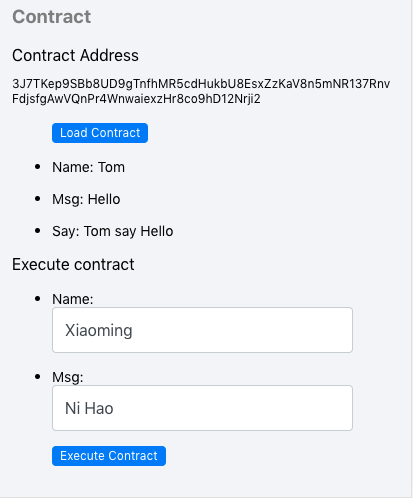
- 确认交易信息(SERO Popup的组件,无需单独开发)

- 弹出密码输入框(SERO Popup的组件,无需单独开发)

[](https://wiki.sero.cash/zh/ind...
开发者帮助文档:SERO remixIDE /SERO WiKi/SERO Github
评论
登录后参与技术讨论,分享你的经验与见解。
登录 / 注册暂无评论