SpringCloud Alibaba实战二十六

文章目录
前言
今天内容主要是解决一位粉丝提的问题:在使用 Spring Security OAuth2 时如何自定义认证服务器返回异常。
那么首先我们先以 Password模式为例看看在认证时会出现哪些异常情况。
授权模式错误
这里我们故意将授权模式 password 修改成 password1,认证服务器返回如下所示的异常
{ "error": "unsupported_grant_type", "error_description": "Unsupported grant type: password1" }
密码错误
在认证时故意输错 username 或 password 会出现如下异常错误:
{ "error": "invalid_grant", "error_description": "Bad credentials" }
客户端错误
在认证时故意输错 client_id 或 client_secret
{ "error": "invalid_client", "error_description": "Bad client credentials" }
上面的返回结果很不友好,而且前端代码也很难判断是什么错误,所以我们需要对返回的错误进行统一的异常处理,让其返回统一的异常格式。
问题剖析
如果只关注解决方案,可以直接跳转到解决方案模块!
OAuth2Exception异常处理
在Oauth2认证服务器中认证逻辑最终调用的是 TokenEndpoint#postAccessToken()方法,而一旦认证出现 OAuth2Exception异常则会被 handleException()捕获到异常。如下图展示的是当出现用户密码异常时debug截图:

认证服务器在捕获到 OAuth2Exception后会调用 WebResponseExceptionTranslator#translate()方法对异常进行翻译处理。
默认的翻译处理实现类是 DefaultWebResponseExceptionTranslator,处理完成后会调用 handleOAuth2Exception()方法将处理后的异常返回给前端,这就是我们之前看到的异常效果。
处理方法
熟悉Oauth2套路的同学应该知道了如何处理此类异常,就是「自定义一个异常翻译类让其返回我们需要的自定义格式,然后将其注入到认证服务器中。」
但是这种处理逻辑只能解决 OAuth2Exception异常,即前言部分中的「授权模式异常」和「账号密码类的异常」,并不能解决我们客户端的异常。
客户端异常处理
客户端认证的异常是发生在过滤器 ClientCredentialsTokenEndpointFilter上,其中有后置添加失败处理方法,最后把异常交给 OAuth2AuthenticationEntryPoint这个所谓认证入口处理。执行顺序如下所示: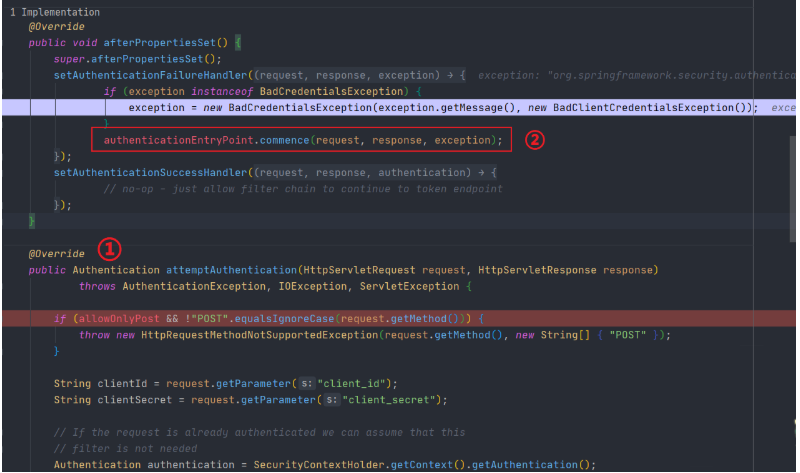
然后跳转到父类的 AbstractOAuth2SecurityExceptionHandler#doHandle()进行处理: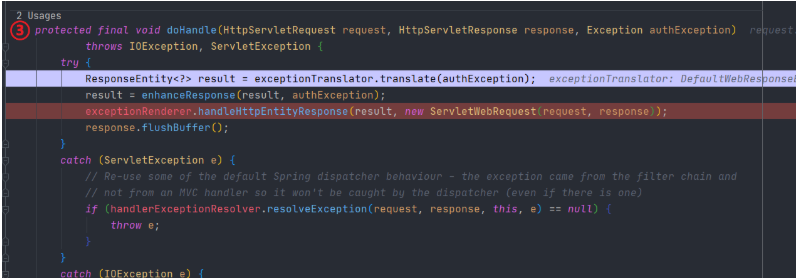
最终由 DefaultOAuth2ExceptionRenderer#handleHttpEntityResponse()方法将异常输出给客户端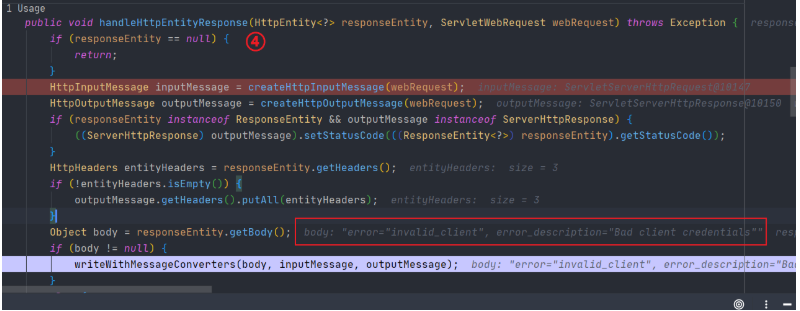
处理方法
通过上面的分析我们得知客户端的认证失败异常是过滤器 ClientCredentialsTokenEndpointFilter转交给 OAuth2AuthenticationEntryPoint得到响应结果的,既然这样我们就可以重写 ClientCredentialsTokenEndpointFilter然后使用自定义的 AuthenticationEntryPoint替换原生的 OAuth2AuthenticationEntryPoint,在自定义 AuthenticationEntryPoint处理得到我们想要的异常数据。
解决方案
为了解决上面这些异常,我们首先需要编写不同异常的错误代码:ReturnCode.java
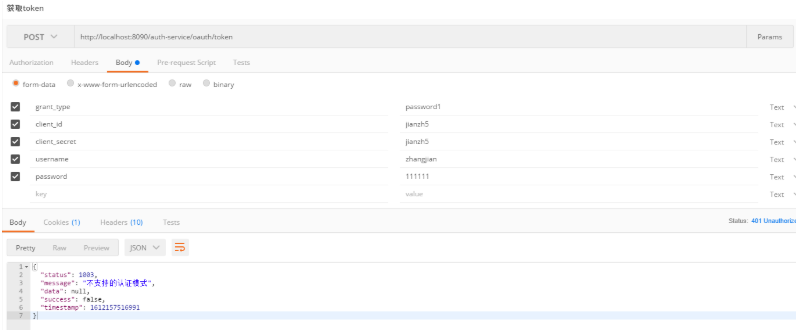
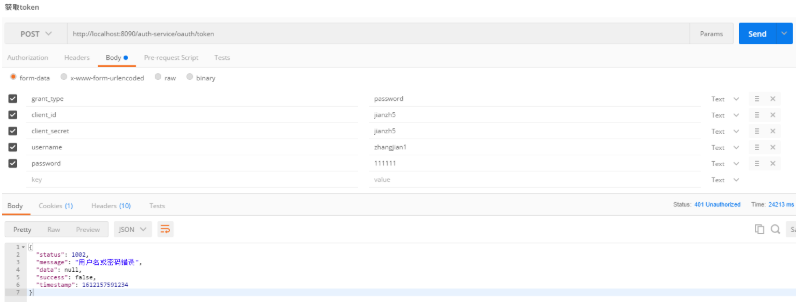
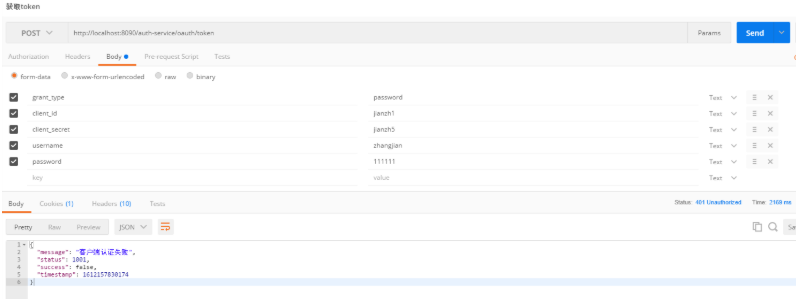
CLIENT_AUTHENTICATION_FAILED(1001,"客户端认证失败"), USERNAME_OR_PASSWORD_ERROR(1002,"用户名或密码错误"), UNSUPPORTED_GRANT_TYPE(1003, "不支持的认证模式");
OAuth2Exception异常
如上所说我们编写一个自定义异常翻译类 CustomWebResponseExceptionTranslator
`@Slf4j
public class CustomWebResponseExceptionTranslator implements WebResponseExceptionTranslator {
@Override
public ResponseEntity<ResultData> translate(Exception e) throws Exception {
log.error("认证服务器异常",e);
ResultData response = resolveException(e);
return new ResponseEntity<>(response, HttpStatus.valueOf(response.getHttpStatus()));
}
/**
* 构建返回异常
* @param e exception
* @return
*/
private ResultData resolveException(Exception e) {
// 初始值 500
ReturnCode returnCode = ReturnCode.RC500;
int httpStatus = HttpStatus.UNAUTHORIZED.value();
//不支持的认证方式
if(e instanceof UnsupportedGrantTypeException){
returnCode = ReturnCode.UNSUPPORTED_GRANT_TYPE;
//用户名或密码异常
}else if(e instanceof InvalidGrantException){
returnCode = ReturnCode.USERNAME_OR_PASSWORD_ERROR;
}
ResultData failResponse = ResultData.fail(returnCode.getCode(), returnCode.getMessage());
failResponse.setHttpStatus(httpStatus);
return failResponse;
}
}
`
然后在认证服务器配置类中注入自定义异常翻译类
@Override public void configure(AuthorizationServerEndpointsConfigurer endpoints) throws Exception { //如果需要使用refresh_token模式则需要注入userDetailService endpoints .authenticationManager(this.authenticationManager) .userDetailsService(userDetailService) // 注入tokenGranter .tokenGranter(tokenGranter); //注入自定义的tokenservice,如果不使用自定义的tokenService那么就需要将tokenServce里的配置移到这里 // .tokenServices(tokenServices()); // 自定义异常转换类 endpoints.exceptionTranslator(new CustomWebResponseExceptionTranslator()); }
客户端异常
重写客户端认证过滤器,不使用默认的 OAuth2AuthenticationEntryPoint处理异常
`public class CustomClientCredentialsTokenEndpointFilter extends ClientCredentialsTokenEndpointFilter {
private final AuthorizationServerSecurityConfigurer configurer;
private AuthenticationEntryPoint authenticationEntryPoint;
public CustomClientCredentialsTokenEndpointFilter(AuthorizationServerSecurityConfigurer configurer) {
this.configurer = configurer;
}
@Override
public void setAuthenticationEntryPoint(AuthenticationEntryPoint authenticationEntryPoint) {
super.setAuthenticationEntryPoint(null);
this.authenticationEntryPoint = authenticationEntryPoint;
}
@Override
protected AuthenticationManager getAuthenticationManager() {
return configurer.and().getSharedObject(AuthenticationManager.class);
}
@Override
public void afterPropertiesSet() {
setAuthenticationFailureHandler((request, response, e) -> authenticationEntryPoint.commence(request, response, e));
setAuthenticationSuccessHandler((request, response, authentication) -> {
});
}
}
`
在认证服务器注入异常处理逻辑,自定义异常返回结果。(代码位于 AuthorizationServerConfig)
@Bean public AuthenticationEntryPoint authenticationEntryPoint() { return (request, response, e) -> { response.setStatus(HttpStatus.UNAUTHORIZED.value()); ResultData<String> resultData = ResultData.fail(ReturnCode.CLIENT_AUTHENTICATION_FAILED.getCode(), ReturnCode.CLIENT_AUTHENTICATION_FAILED.getMessage()); WebUtils.writeJson(response,resultData); }; }
修改认证服务器配置,注入自定义过滤器
`@Override
public void configure(AuthorizationServerSecurityConfigurer security) throws Exception {
CustomClientCredentialsTokenEndpointFilter endpointFilter = new CustomClientCredentialsTokenEndpointFilter(security);
endpointFilter.afterPropertiesSet();
endpointFilter.setAuthenticationEntryPoint(authenticationEntryPoint());
security.addTokenEndpointAuthenticationFilter(endpointFilter);
security
.authenticationEntryPoint(authenticationEntryPoint())
/* .allowFormAuthenticationForClients()*/ //如果使用表单认证则需要加上
.tokenKeyAccess("permitAll()")
.checkTokenAccess("isAuthenticated()");
}
`
此时需要删除 allowFormAuthenticationForClients()配置,否则自定义的过滤器不生效,至于为什么不生效大家看看源码就知道了。
测试
授权模式错误
账号密码错误
客户端错误
以上,希望对你有所帮助!
End
干货分享
这里为大家准备了一份小小的礼物,关注公众号,输入如下代码,即可获得百度网盘地址,无套路领取!
001:《程序员必读书籍》
002:《从无到有搭建中小型互联网公司后台服务架构与运维架构》
003:《互联网企业高并发解决方案》
004:《互联网架构教学视频》
006:《SpringBoot实现点餐系统》
007:《SpringSecurity实战视频》
008:《Hadoop实战教学视频》
009:《腾讯2019Techo开发者大会PPT》
010: 微信交流群
近期热文top
4、基于Prometheus和Grafana的监控平台 - 环境搭建

我就知道你“在看”

本文分享自微信公众号 - JAVA日知录(javadaily)。
如有侵权,请联系 support@oschina.cn 删除。
本文参与“OSC源创计划”,欢迎正在阅读的你也加入,一起分享。
评论
登录后参与技术讨论,分享你的经验与见解。
登录 / 注册暂无评论