半小时,将你的Spark SQL模型变为在线服务

文章目录
SparkSQL在机器学习场景中应用
第四范式已经在很多行业落地了上万个AI应用,比如在金融行业的反欺诈,媒体行业的新闻推荐,能源行业管道检测,而SparkSQL在这些AI应用中快速实现特征变换发挥着重要的作用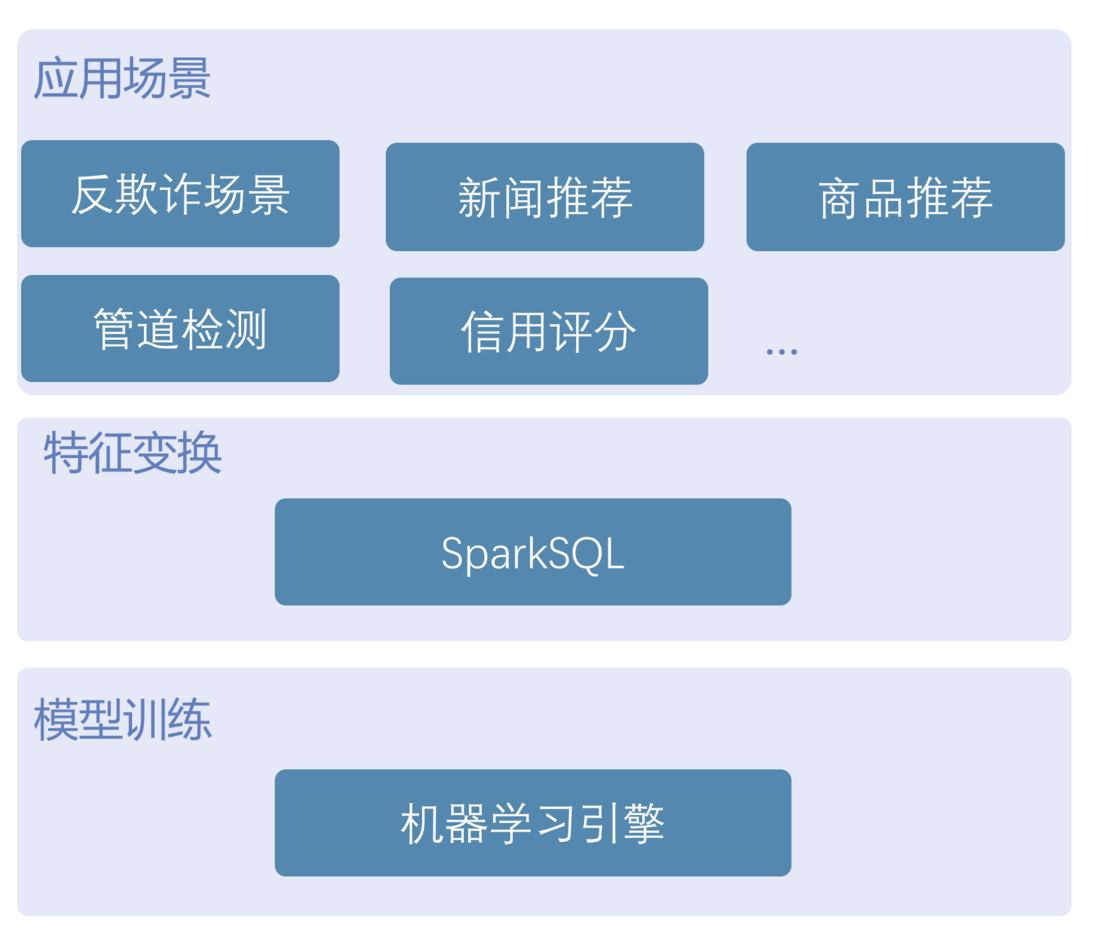
SparkSQL在特征变换主要有一下几类
- 多表场景,用于表之间拼接操作,比如交易信息表去拼接账户表
- 使用udf进行简单的特征变换,比如对时间戳进行hour函数处理
- 使用时间窗口和udaf进行时序类特征处理,比如计算一个人最近1天的消费金额总和
SparkSQL到目前为止,解决很好的解决离线模型训练特征变换问题,但是随着AI应用的发展,大家对模型的期望不再只是得出离线调研效果,而是在真实的业务场景发挥出价值,而真实的业务场景是模型应用场景,它需要高性能,需要实时推理,这时候我们就会遇到以下问题
- 多表数据离线到在线怎么映射,即批量训练过程中输入很多表,到在线环境这些表该以什么形式存在,这点也会影响整个系统架构,做得好能够提升效率,做得不好就会大大增加模型产生业务价值的成本
- SQL转换成实时执行成本高,因为在线推理需要高性能,而数据科学家可能做出成千上万个特征,每个特征都人肉转换,会大大增加的工程成本
- 离线特征和在线特征保持一致困难,手动转换就会导致一致性能,而且往往很难一致
- 离线效果很棒但是在线效果无法满足业务需求
在具体的反欺诈场景,模型应用要求tp99 20ms去检测一笔交易是否是欺诈,所以对模型应用性能要求非常高
第四范式特征工程数据库是如何解决这些问题

通过特征工程数据库让SparkSQL的能力得到了补充
- 以数据库的形式,解决了离线表到在线的映射问题,我们对前面给出的答案就是离线表是怎么分布的,在线也就怎么分布
- 通过同一套代码去执行离线和在线特征转换,让在线模型效果得到了保证
- 数据科学家与业务开发团队的合作以sql为传递介质,而不再是手工去转换代码,大大提升模型迭代效率
- 通过llvm加速的sql,相比scala实现的spark2.x和3.x在时序复杂特征场景能够加速2~3倍,在线通过in-memory的存储,能够保证sql能够在非常低延迟返回结果
快速将spark sql 模型变成实时服务demo
demo的模型训练场景为预测一次打车行程到结束所需要的时间,这里我们将使用fedb ,pyspark,lightgbm等工具最终搭建一个http 模型推理服务,这也会是spark在机器学习场景的实践
整个demo200多行代码,制作时间不超过半个小时
- train_sql.py 特征计算与训练, 80行代码
- predict_server.py 模型推理http服务, 129行代码
场景数据和特征介绍
整个训练数据如下样子
样例数据`id,vendor_id,pickup_datetime,dropoff_datetime,passenger_count,pickup_longitude,pickup_latitude,dropoff_longitude,dropoff_latitude,store_and_fwd_flag,trip_duration
id3097625,1,2016-01-22 16:01:00,2016-01-22 16:15:16,2,-73.97746276855469,40.7613525390625,-73.95573425292969,40.772396087646484,N,856
id3196697,1,2016-01-28 07:20:18,2016-01-28 07:40:16,1,-73.98524475097656,40.75959777832031,-73.99615478515625,40.72945785522461,N,1198
id0224515,2,2016-01-31 00:48:27,2016-01-31 00:53:30,1,-73.98342895507812,40.7500114440918,-73.97383880615234,40.74980163574219,N,303
id3370903,1,2016-01-14 11:46:43,2016-01-14 12:25:33,2,-74.00027465820312,40.74786376953125,-73.86485290527344,40.77039337158203,N,2330
id2763851,2,2016-02-20 13:21:00,2016-02-20 13:45:56,1,-73.95218658447266,40.772220611572266,-73.9920425415039,40.74932098388672,N,1496
id0904926,1,2016-02-20 19:17:44,2016-02-20 19:33:19,4,-73.97344207763672,40.75189971923828,-73.98480224609375,40.76243209838867,N,935
id2026293,1,2016-02-25 01:16:23,2016-02-25 01:31:27,1,-73.9871597290039,40.68777847290039,-73.9115219116211,40.68180847167969,N,904
id1349988,1,2016-01-28 20:16:05,2016-01-28 20:21:36,1,-74.0028076171875,40.7338752746582,-73.9968032836914,40.743770599365234,N,331
id3218692,2,2016-02-17 16:43:27,2016-02-17 16:54:41,5,-73.98147583007812,40.77408218383789,-73.97216796875,40.76400375366211,N,674`
场景特征变换sql脚本
特征变换`select trip_duration, passenger_count,
sum`(pickup_latitude) over w as vendor_sum_pl,`
max`(pickup_latitude) over w as vendor_max_pl,`
min`(pickup_latitude) over w as vendor_min_pl,`
avg`(pickup_latitude) over w as vendor_avg_pl,`
sum`(pickup_latitude) over w2 as pc_sum_pl,`
max`(pickup_latitude) over w2 as pc_max_pl,`
min`(pickup_latitude) over w2 as pc_min_pl,`
avg`(pickup_latitude) over w2 as pc_avg_pl ,`
count`(vendor_id) over w2 as pc_cnt,`
count`(vendor_id) over w as vendor_cnt`
from {}
window w as (partition by vendor_id order by pickup_datetime ROWS_RANGE BETWEEN 1d PRECEDING AND CURRENT ROW),
w2 as (partition by passenger_count order by pickup_datetime ROWS_RANGE BETWEEN 1d PRECEDING AND CURRENT ROW)`
我们选择了vendor_id 和 passenger_count 两个纬度做时序特征`train_df = spark.sql(train_sql)
# specify your configurations as a dict
params = {
'boosting_type'`: 'gbdt'`,
'objective'`: 'regression'`,
'metric'`: {'l2', 'l1'`},
'num_leaves'`: 31`,
'learning_rate'`: 0.05`,
'feature_fraction'`: 0.9`,
'bagging_fraction'`: 0.8`,
'bagging_freq'`: 5`,
'verbose'`: 0`
}
print`('Starting training...')`
gbm = lgb.train(params,
lgb_train,
num_boost_round`=20,`
valid_sets`=`lgb_eval,
early_stopping_rounds`=5)`
gbm.save_model(`'model.txt')
执行模型训练过程,最终产生model.txt
模型推理过程
导入数据代码
import`def insert_row(line):
row = line.split(`','`)
row[`2]` `=` `'%dl'%int(datetime.datetime.strptime(row[2], '%Y-%m-%d %H:%M:%S').timestamp()` `*` `1000)`
row[`3]` `=` `'%dl'%int(datetime.datetime.strptime(row[3], '%Y-%m-%d %H:%M:%S').timestamp()` `*` `1000)`
insert = "insert into t1 values('%s', %s, %s, %s, %s, %s, %s, %s, %s, '%s', %s);"`% tuple`(row)
driver.executeInsert(`'db_test'`, insert)
with open`('data/taxi_tour_table_train_simple.csv', 'r'`) as fd:
idx = 0
for line in fd:
if idx =`= 0`:
idx = idx + 1
continue
insert_row(line.replace(`'n'`, ''))
idx = idx + 1`
注:train.csv为训练数据csv格式版本
模型推理逻辑
predict.pydef` `post(self`):
row = json.loads(`self`.request.body)
ok, req = fedb_driver.getRequestBuilder(`'db_test'`, sql)
if not ok or not req:
self`.write("fail to get req")`
return
input_schema = req.GetSchema()
if not input_schema:
self`.write("no schema found")`
return
str_length = 0
for i in range`(input_schema.GetColumnCnt()):`
if sql_router_sdk.DataTypeName(input_schema.GetColumnType(i)) =`= 'string'`:
str_length = str_length + len`(row.get(input_schema.GetColumnName(i), ''))`
req.Init(str_length)
for i in range`(input_schema.GetColumnCnt()):`
tname = sql_router_sdk.DataTypeName(input_schema.GetColumnType(i))
if tname =`= 'string'`:
req.AppendString(row.get(input_schema.GetColumnName(i), ''))
elif tname =`= 'int32'`:
req.AppendInt32(`int(row.get(input_schema.GetColumnName(i),` `0)))`
elif tname =`= 'double'`:
req.AppendDouble(`float(row.get(input_schema.GetColumnName(i),` `0)))`
elif tname =`= 'timestamp'`:
req.AppendTimestamp(`int(row.get(input_schema.GetColumnName(i),` `0)))`
else`:`
req.AppendNULL()
if not req.Build():
self`.write("fail to build request")`
return
ok, rs = fedb_driver.executeQuery(`'db_test'`, sql, req)
if not ok:
self`.write("fail to execute sql")`
return
rs.`Next`()
ins = build_feature(rs)
self`.write("----------------ins---------------\n")`
self`.write(str(ins) + "n"`)
duration = bst.predict(ins)
self`.write("---------------predict trip_duration -------------\n")`
self`.write("%s s"%str(duration[0]))``
最终执行效果
`# 发送推理请求 ,会看到如下输出
python3 predict.py
----------------ins---------------
[[ 2. 40.774097 40.774097 40.774097 40.774097 40.774097 40.774097
40.774097 40.774097 1. 1. ]]
---------------predict trip_duration -------------
859.3298781277192 s`
运行demo请到https://github.com/4paradigm/SparkSQLWithFeDB
评论
登录后参与技术讨论,分享你的经验与见解。
登录 / 注册暂无评论