C++实现简单的RPC框架

文章目录
简介
RPC是远程过程调用(Remote Procedure Call)的缩写形式 ,RPC的目的是为了简化网络通信,让用户可以专注于业务处理,不用关心网络层的处理,真正实现在客户端A中调用函数F就可以调用服务端B中的函数F的目的。
RPC 模型引入存根进程( stub) 的概念, 对于服务端的服务类A,在客户端通过A::stub类进行调用,中间的网络交互流程有RPC框架进行实现。
实现
我们可以借助protobuf来实现序列化和stub的生成,借助HpSocket来完成网络的交互,为了简单,我们采用HTTP协议来进行消息的交互。
protobuf生成stub
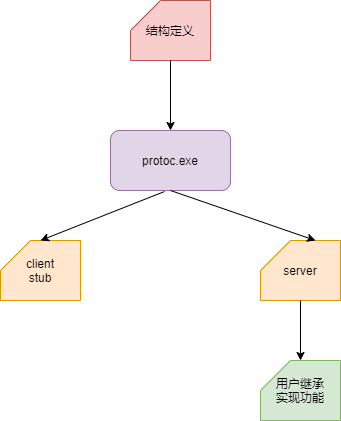
RPC交互流程
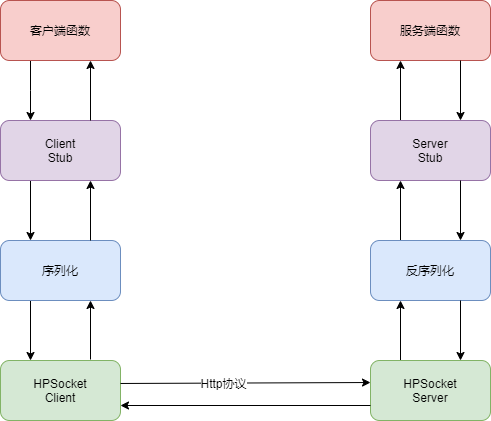
实现流程
第一步、定义protobuf结构
syntax = "proto3";

//支持rpc服务代码生成
option cc_generic_services = true;

//C#命名空间
option csharp_namespace = "Google.Protobuf.Auth";

package Auth;


//Rpc协议
message RpcProtocol
{
uint32 serviceId = 1;
uint32 methodId = 2;
bytes data = 3;
int32 falg = 4;
}


message UserInfo
{
    string phoneNum = 1;
    string password = 2;
}

message ResponseMsg
{
    int32 code = 1;
    bytes message = 2;
}

//鉴权服务
service Authentication {
  //注册申请
  rpc UserApplyReg(UserInfo) returns (ResponseMsg);
  //用户注册
  rpc  UserRegister(UserInfo) returns (ResponseMsg);
  //用户登陆
  rpc  UserLogin(UserInfo) returns (ResponseMsg);
}
第二步、服务端实现
#include <stdio.h>
#include "WebService.h"
#include "Authentication.h"
//Rcp 服务端演示
int main()
{
    //启动web接口线程
    WebService  *pSrvProc = new WebService();
    pSrvProc->RegisterService(new CAuthentication);

    CHttpServerPtr pHttpSrv(pSrvProc);

    if (pHttpSrv->Start("0.0.0.0", 9090))
    {
        printf("创建web server 成功");
    }
    else
    {
        printf("创建web server 失败");
    }

    while (true)
    {
        Sleep(10000);
    }
}
第三步、客户端实现
#include <iostream>
#include "RpcChannel.h"
#include "RpcController.h"
#include "proto\Authentication.pb.h"
//Rcp 客户端演示
int main()
{
    std::string strSrvAddr = "http://127.0.0.1:9090";
    CRpcChannel channel(strSrvAddr);

    CRpcController pController;
    Auth::Authentication::Stub stub(&channel);
    Auth::UserInfo req;
    Auth::ResponseMsg res;

    req.set_phonenum("10086");
    stub.UserApplyReg(&pController, &req, &res, NULL);
    std::cout << res.message() << std::endl;

    req.set_password("********");
    stub.UserRegister(&pController, &req, &res, NULL);
    std::cout << res.message() << std::endl;

    stub.UserLogin(&pController, &req, &res, NULL);
    std::cout << res.message() << std::endl;
}
核心代码
一、CRpcChannel 的实现,用于封装客户端与服务端交互流程
#include "RpcChannel.h"
#include "proto\Authentication.pb.h"
#include <google\protobuf\message_lite.h>
#include <google\protobuf\message.h>

#define PROTOBUF_PROTOCOL_FLAG 0xfafbfcfd

CRpcChannel::CRpcChannel(const std::string& srvAddr):m_strSrvAddr(srvAddr)
{
}

CRpcChannel::~CRpcChannel()
{
}

void CRpcChannel::CallMethod(const proto::MethodDescriptor* method,
    proto::RpcController* controller,
    const proto::Message* request,
    proto::Message* response,
    proto::Closure* done)
{
    Auth::RpcProtocol message;
    message.set_serviceid(method->service()->index());
    message.set_methodid(method->index());
    message.set_falg(PROTOBUF_PROTOCOL_FLAG);
    message.set_data(request->SerializeAsString());

    CHttpSyncClientPtr httpReq(nullptr);
    std::string strBody = message.SerializeAsString();
    int nSize = strBody.size();
    std::string strBodySize = std::to_string(nSize);

    THeader header[] = { { "Content-Type", "text/plain;charset=utf-8" },{ "Content-Length", strBodySize.c_str() } };

    int iHeaderCount = sizeof(header) / sizeof(THeader);

    if (!httpReq->OpenUrl("GET", m_strSrvAddr.c_str(), header, iHeaderCount, (const BYTE*)strBody.c_str(), strBody.size()))
    {
        printf("发送结果失败");
        return;
    }

    BYTE * respBody = nullptr;
    int len = 0;
    if (httpReq->GetResponseBody((LPCBYTE*)&respBody, &len) == FALSE)
        return;

    response->ParseFromString((char*)respBody);
}
二、服务器处理
EnHttpParseResult WebService::OnMessageComplete(IHttpServer * pSender, CONNID dwConnID)
{
    char* pszBuf = nullptr;
    pSender->GetConnectionExtra(dwConnID, (VOID**)&pszBuf);

    char szBuf[64] = { 0 };
    int nSize = sizeof(szBuf);
    USHORT nPort;
    pSender->GetRemoteAddress(dwConnID, szBuf, nSize, nPort);

    Auth::RpcProtocol protoMsg;
    if (!protoMsg.ParseFromString(pszBuf))
    {
        std::cout << "无效消息" << std::endl;
        return HPR_ERROR;
    }

    if (m_mapService.find(protoMsg.serviceid()) != m_mapService.end())
    {
        auto pRpcMonitor = m_mapService[protoMsg.serviceid()];
        const protoBuf::ServiceDescriptor *service_descriptor = pRpcMonitor->GetDescriptor();


        const protoBuf::MethodDescriptor *method_descriptor = service_descriptor->method(protoMsg.methodid());
        const protoBuf::Message& request_proto = pRpcMonitor->GetRequestPrototype(method_descriptor);
        const protoBuf::Message& response_proto = pRpcMonitor->GetResponsePrototype(method_descriptor);

        protoBuf::Message *reqMsg = request_proto.New();
        reqMsg->ParseFromString(protoMsg.data());
        protoBuf::Message *resMsg = response_proto.New();
        CRpcController pController(szBuf);
        pRpcMonitor->CallMethod(method_descriptor, &pController, reqMsg, resMsg, NULL);

        std::string strBody = resMsg->SerializeAsString();
        int nSize = strBody.size();
        std::string strBodySize = std::to_string(nSize);
        THeader header[] = { { "Content-Type", "text/plain;charset=utf-8" },{ "Content-Length", strBodySize.c_str() } };

        int iHeaderCount = sizeof(header) / sizeof(THeader);
        pSender->SendResponse(dwConnID,
            HSC_OK,
            "Http Server OK",
            header, iHeaderCount,
            (const BYTE*)strBody.c_str(),
            strBody.size());
    }
    return HPR_OK;
}
三、服务端业务实现
#include "Authentication.h"

void CAuthentication::UserApplyReg(::google::protobuf::RpcController * controller, const::Auth::UserInfo * request, ::Auth::ResponseMsg * response, ::google::protobuf::Closure * done)
{
    std::cout << "用户:" << request->phonenum() << "申请" << std::endl;
    response->set_code(0);
    response->set_message("允许申请");
}

void CAuthentication::UserRegister(::google::protobuf::RpcController * controller, const::Auth::UserInfo * request, ::Auth::ResponseMsg * response, ::google::protobuf::Closure * done)
{
    std::cout << "用户:" << request->phonenum() << ", 密码 " << request->password() << "正在注册" << std::endl;
    response->set_code(0);
    response->set_message("注册成功");
}

void CAuthentication::UserLogin(::google::protobuf::RpcController * controller, const::Auth::UserInfo * request, ::Auth::ResponseMsg * response, ::google::protobuf::Closure * done)
{
    std::cout << "用户:" << request->phonenum() << ", 密码 " << request->password() << "正在登陆" << std::endl;
    response->set_code(0);
    response->set_message("登陆成功");
}
至此一个简单的RPC交互流程就完成了
评论
登录后参与技术讨论,分享你的经验与见解。
登录 / 注册暂无评论