Golang 美化日志输出-Ketty

文章目录
Ketty
ketty 是一个Golang 开发的简单的日志美化输出 Logger。
Github
https://github.com/anqiansong/ketty
安装
$ go install github.com/anqiansong/ketty@latest快速开始
func main(){
    console.Info(`
    {
        "name":"Hello Ketty",
        "description":"a color logger",
        "author":"anqiansong",
        "category":"console",
        "github":"https://github.com/anqiansong/ketty",
        "useage":[
            "info",
            "debug"
        ]
    }`)
    console.Debug("Hello Ketty")
    console.Warn("Hello Ketty")
    console.Error(errors.New("error test"))
}
终端显示

Goland 显示
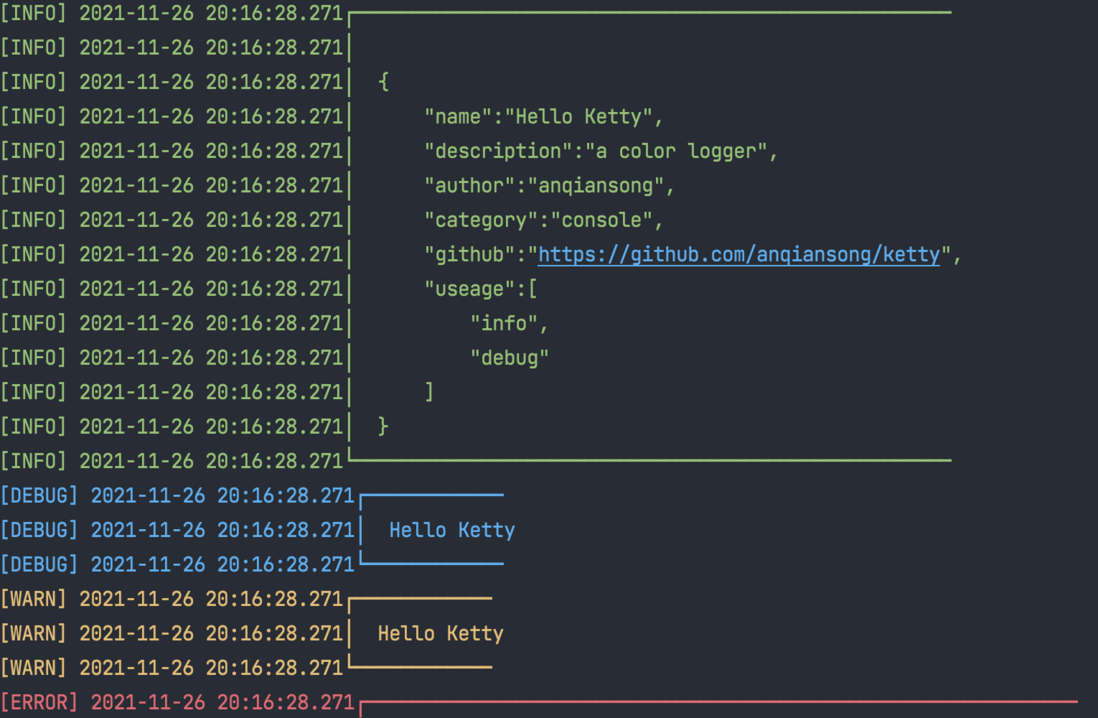
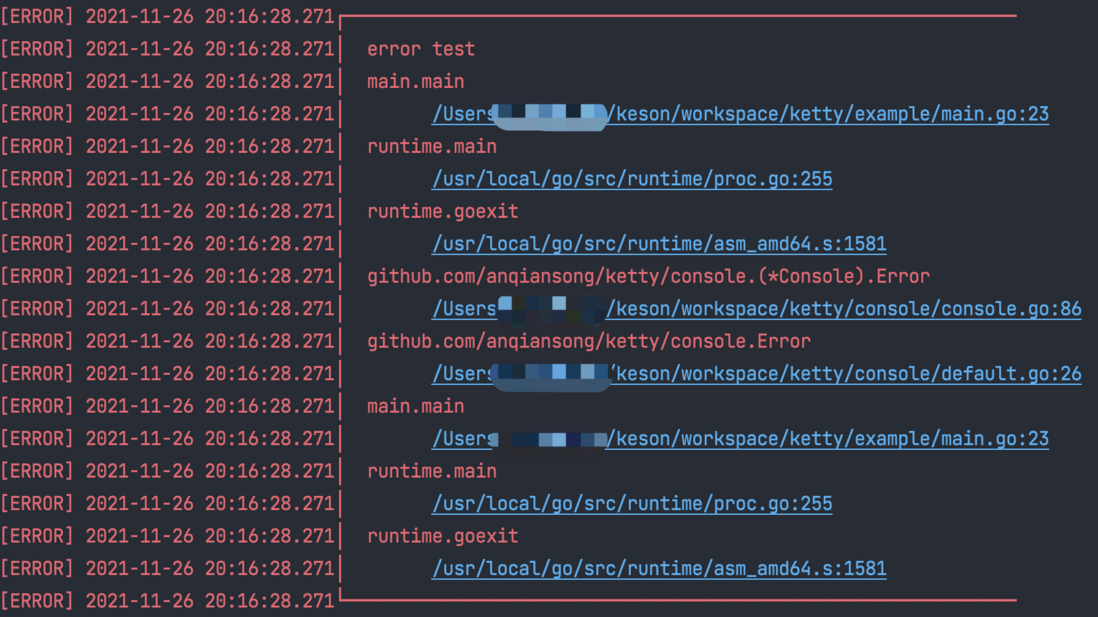
用法
直接使用
直接使用的 Console 实例支持一些默认配置项:
- 使用
frame.WithLineStyle作为边框 - 默认美化日志
func main(){
    console.Info("Hello ketty, This is info log")
    console.Debug("Hello ketty, This debug log")
    console.Warn("Hello ketty, This warn log")
    console.Error(errors.New("Hello ketty,This is an error"))
}
初始化
    // 替换默认的边框
    plusStyle := text.WithPlusStyle()
    c := console.NewConsole(console.WithTextOption(plusStyle))
Console 配置
    c.DisableBorder() // 禁用边框
    c.DisableColor() // 禁用颜色美化
打印 log
    // 输出 info 日志
    c.Info("Hello Ketty, It's now %q", time.Now())
边框样式
预设样式
WithLineStyle 默认样式
[INFO] 2021-11-26 22:29:14.508 ┌────────────────────────────────────────────────────────────────────────────
[INFO] 2021-11-26 22:29:14.508 │  Hello Ketty, It's now "2021-11-26 22:29:14.508085 +0800 CST m=+0.000229190"
[INFO] 2021-11-26 22:29:14.508 └────────────────────────────────────────────────────────────────────────────
WithDotStyle
[INFO] 2021-11-26 22:30:22.913 .............................................................................
[INFO] 2021-11-26 22:30:22.913 .  Hello Ketty, It's now "2021-11-26 22:30:22.913678 +0800 CST m=+0.000199931"
[INFO] 2021-11-26 22:30:22.913 .............................................................................
WithStarStyle
[INFO] 2021-11-26 22:31:00.699 *****************************************************************************
[INFO] 2021-11-26 22:31:00.699 *  Hello Ketty, It's now "2021-11-26 22:31:00.699094 +0800 CST m=+0.000186578"
[INFO] 2021-11-26 22:31:00.699 *****************************************************************************
WithPlusStyle
[INFO] 2021-11-26 22:31:26.952 +----------------------------------------------------------------------------
[INFO] 2021-11-26 22:31:26.952 |  Hello Ketty, It's now "2021-11-26 22:31:26.952376 +0800 CST m=+0.000168647"
[INFO] 2021-11-26 22:31:26.952 +----------------------------------------------------------------------------
WithFivePointedStarStyle
[INFO] 2021-11-26 22:31:58.146 ★★★★★★★★★★★★★★★★★★★★★★★★★★★★★★★★★★★★★★★★★★★★★★★★★★★★★★★★★★★★★★★★★★★★★★★★★★★★★
[INFO] 2021-11-26 22:31:58.146 ★  Hello Ketty, It's now "2021-11-26 22:31:58.146534 +0800 CST m=+0.000171850"
[INFO] 2021-11-26 22:31:58.146 ★★★★★★★★★★★★★★★★★★★★★★★★★★★★★★★★★★★★★★★★★★★★★★★★★★★★★★★★★★★★★★★★★★★★★★★★★★★★★
WithDoubleLine
[INFO] 2021-11-26 22:32:21.574 ╔════════════════════════════════════════════════════════════════════════════
[INFO] 2021-11-26 22:32:21.574 ║  Hello Ketty, It's now "2021-11-26 22:32:21.573911 +0800 CST m=+0.000152572"
[INFO] 2021-11-26 22:32:21.574 ╚════════════════════════════════════════════════════════════════════════════
DisableBorder
[INFO] 2021-11-26 22:33:01.695 Hello Ketty, It's now "2021-11-26 22:33:01.695338 +0800 CST m=+0.000156150"
自定义样式
WithCommonBorder
// 边框横向、众项、拐角均为一种符号
plusStyle := text.WithCommonBorder("x")
[INFO] 2021-11-26 22:34:01.437 xxxxxxxxxxxxxxxxxxxxxxxxxxxxxxxxxxxxxxxxxxxxxxxxxxxxxxxxxxxxxxxxxxxxxxxxxxxxx [INFO] 2021-11-26 22:34:01.437 x Hello Ketty, It's now "2021-11-26 22:34:01.437286 +0800 CST m=+0.000153825" [INFO] 2021-11-26 22:34:01.437 xxxxxxxxxxxxxxxxxxxxxxxxxxxxxxxxxxxxxxxxxxxxxxxxxxxxxxxxxxxxxxxxxxxxxxxxxxxxxWithBorder
  // arg1: 左上角符号
  // arg2: 左下角符号
  // arg3: 横向边框符号
  // arg4: 垂直边框符号
  plusStyle := text.WithBorder("=","=","-","|")
  c := console.NewConsole(console.WithTextOption(plusStyle))
[INFO] 2021-11-26 22:37:38.409 =---------------------------------------------------------------------------- [INFO] 2021-11-26 22:37:38.409 | Hello Ketty, It's now "2021-11-26 22:37:38.408952 +0800 CST m=+0.000155037" [INFO] 2021-11-26 22:37:38.409 =----------------------------------------------------------------------------
日志持久化
TODO
注意事项
Windows 不支持美化输出。
评论
登录后参与技术讨论,分享你的经验与见解。
登录 / 注册暂无评论