iOS - 公开的 Cocoapods 仓库创建(开源仓库)

文章目录
lsj-cocoapodsTest
Cocoapods 各种场景测试
CocoaPods 版本:1.15.2
芯片:Apple M1 Pro
公开的 Cocoapods 仓库创建(开源仓库)
这个场景,我们是为了提供给所有人更加便捷的集成我们的封装好的东西。
创建的方式,官网也有介绍:https://guides.cocoapods.org/
Input:
通过命令 pod lib create 你的仓库名称 创建仓库,我这里以 lsj-FileManager 作为我的仓库名称
pod lib create lsj-FileManagerOutput:使用的平台
What platform do you want to use?? [ iOS / macOS ]Input:
iOSOutput:选择语言
What language do you want to use?? [ Swift / ObjC ]Input:
ObjCOutput:是否创建演示应用程序Demo
Would you like to include a demo application with your library? [ Yes / No ]Input:
YesOutput:您将使用哪些测试框架?
Which testing frameworks will you use? [ Specta / Kiwi / None ]Input: 我个人认为 Xcode 的 XCTest 挺好的,后续也可以自己加入对应的 XCTest Target
NoneOutput:需要创建 UI 测试,后续也可以自行加入 Target
Would you like to do view based testing? [ Yes / No ]Input: 是否要进行基于视图的测试?
YesOutput:设置工程文件的前缀,这个根据自己的代码规范填写
What is your class prefix?Input:
LOutput:
Running pod install on your new library.

Analyzing dependencies
Downloading dependencies
Installing FBSnapshotTestCase (2.1.4)
Installing lsj-FileManager (0.1.0)
Generating Pods project
Integrating client project

[!] Please close any current Xcode sessions and use `lsj-FileManager.xcworkspace` for this project from now on.
Pod installation complete! There are 2 dependencies from the Podfile and 2 total pods installed.


[!] Your project does not explicitly specify the CocoaPods master specs repo. Since CDN is now used as the default, you may safely remove it from your repos directory via `pod repo remove master`. To suppress this warning please add `warn_for_unused_master_specs_repo => false` to your Podfile.

 Ace! you're ready to go!
 We will start you off by opening your project in Xcode
  open 'lsj-FileManager/Example/lsj-FileManager.xcworkspace'

To learn more about the template see `https://github.com/CocoaPods/pod-template.git`.
To learn more about creating a new pod, see `https://guides.cocoapods.org/making/making-a-cocoapod`.
到这里,仓库已经创建好了,终端会打开你的项目
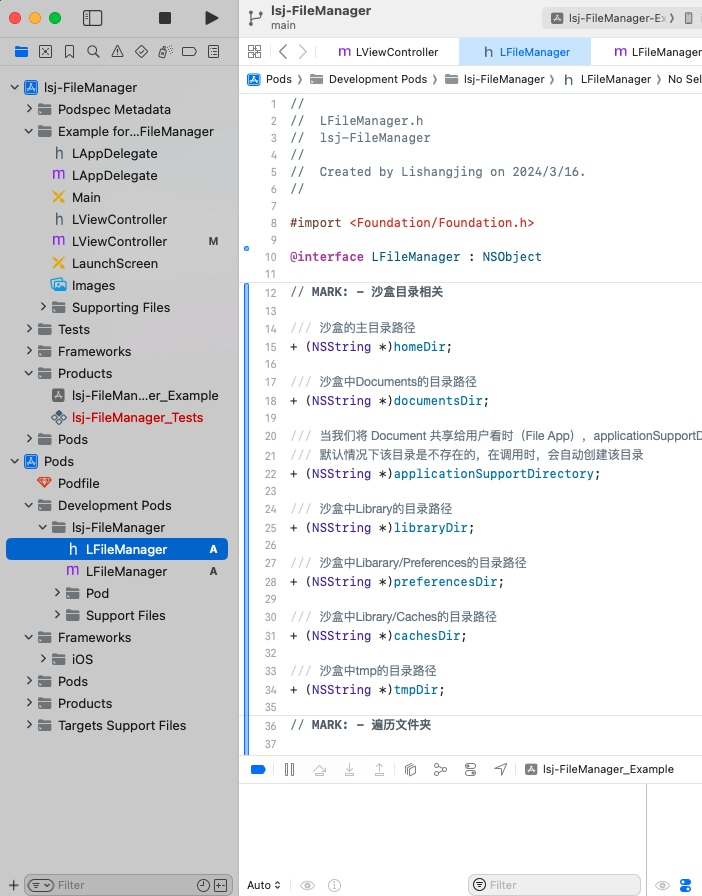
在仓库中,添加我们的代码
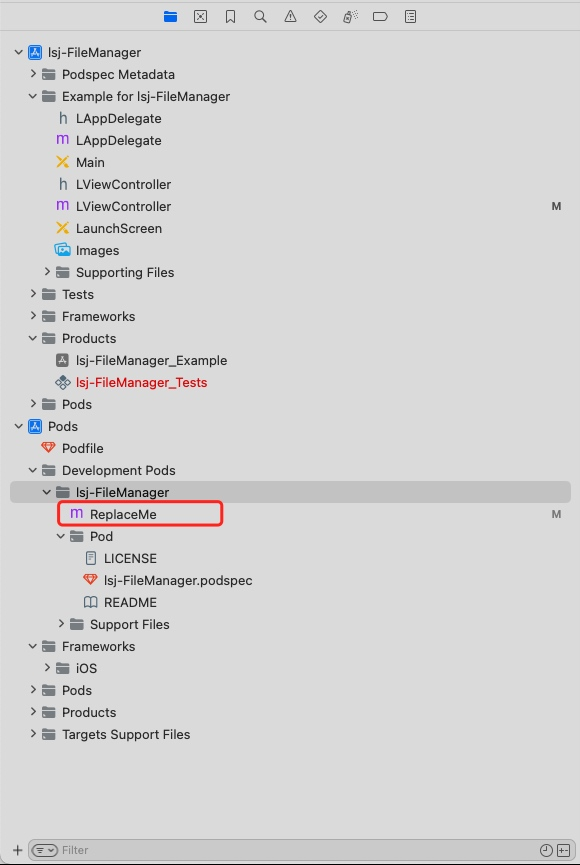
在工程的Pods/Development/Pods/lsj-FileManager/目录下,有一个 ReplaceMe 文件,
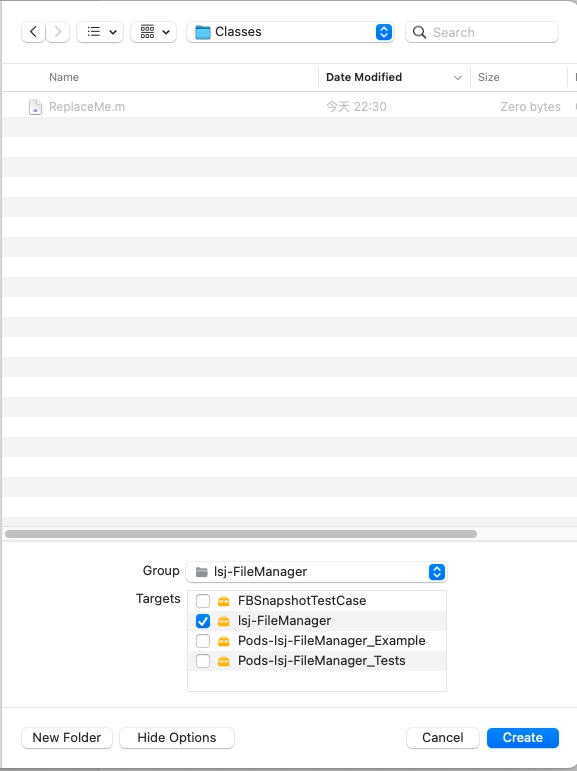
是存放我们文件的位置,不能直接在 lsj-FileManager 右键 new->File,
因为这是一个虚拟路径,需要我们手动导航进入 Classes 目录中,
可以通过右键 ReplaceMe 文件 Show In Finder,进入到 Classes ,获取路径
 |  |  |
|---|
在 Example 中去使用它,Example 项目安装你的pod,提供给用户使用 Demo
Input:进入 Example 目录,Pod install
cd Example
pod install
Output:
Analyzing dependencies
Downloading dependencies
Installing lsj-FileManager 0.1.0
Generating Pods project
Integrating client project
Pod installation complete! There are 2 dependencies from the Podfile and 2 total pods installed.
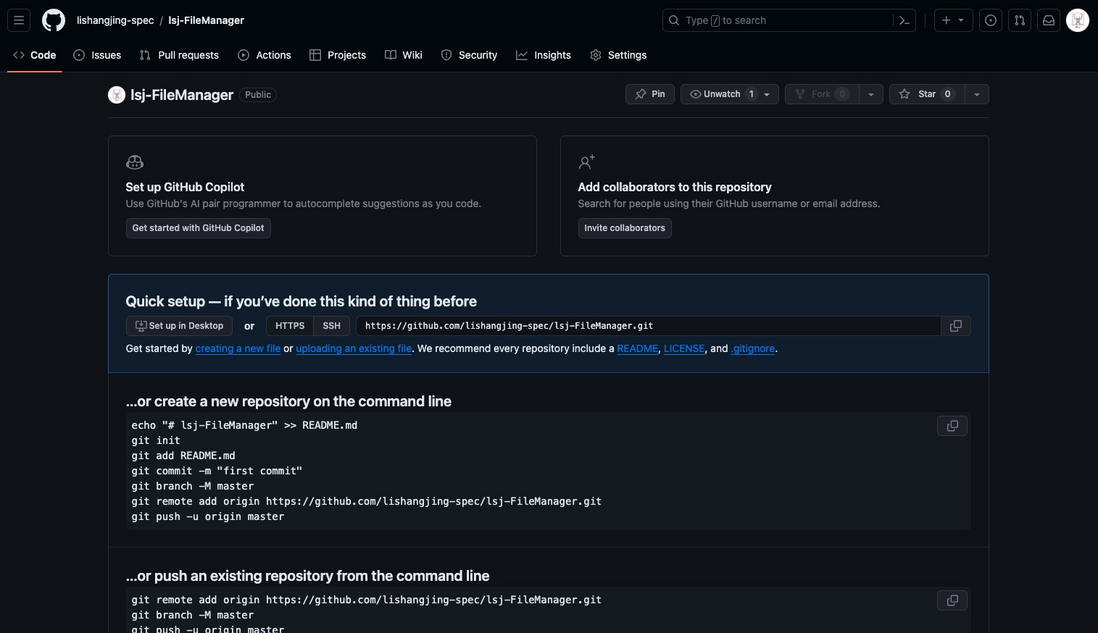
创建 Git 仓库(备用,后续填入 .podspec 文件中的 source 字段中)
校验我们的 .podspec 文件
Input:
pod lib lint lsj-FileManager.podspecOutput:summary: The summary is not meaningful 需要我们完善 summary
-> lsj-FileManager (0.1.0)
    - WARN  | summary: The summary is not meaningful.
    - NOTE  | url: The URL (https://github.com/lishangjing/lsj-FileManager) is not reachable.
    - NOTE  | xcodebuild:  note: Using codesigning identity override: -
    - NOTE  | [iOS] xcodebuild:  note: Building targets in dependency order
    - NOTE  | [iOS] xcodebuild:  note: Target dependency graph (3 targets)
    - NOTE  | [iOS] xcodebuild:  note: Signing static framework with --generate-pre-encrypt-hashes (in target 'Pods-App' from project 'Pods')
    - NOTE  | [iOS] xcodebuild:  /var/folders/cs/08c4rp4s4_l39wwhn08jt3sc0000gn/T/CocoaPods-Lint-20240317-8175-8r0xaa-lsj-FileManager/App.xcodeproj: warning: The iOS Simulator deployment target 'IPHONEOS_DEPLOYMENT_TARGET' is set to 10.0, but the range of supported deployment target versions is 12.0 to 17.0.99. (in target 'App' from project 'App')
    - NOTE  | [iOS] xcodebuild:  Pods.xcodeproj: warning: The iOS Simulator deployment target 'IPHONEOS_DEPLOYMENT_TARGET' is set to 10.0, but the range of supported deployment target versions is 12.0 to 17.0.99. (in target 'Pods-App' from project 'Pods')
    - NOTE  | [iOS] xcodebuild:  Pods.xcodeproj: warning: The iOS Simulator deployment target 'IPHONEOS_DEPLOYMENT_TARGET' is set to 10.0, but the range of supported deployment target versions is 12.0 to 17.0.99. (in target 'lsj-FileManager' from project 'Pods')

[!] lsj-FileManager did not pass validation, due to 1 warning (but you can use `--allow-warnings` to ignore it).
You can use the `--no-clean` option to inspect any issue.
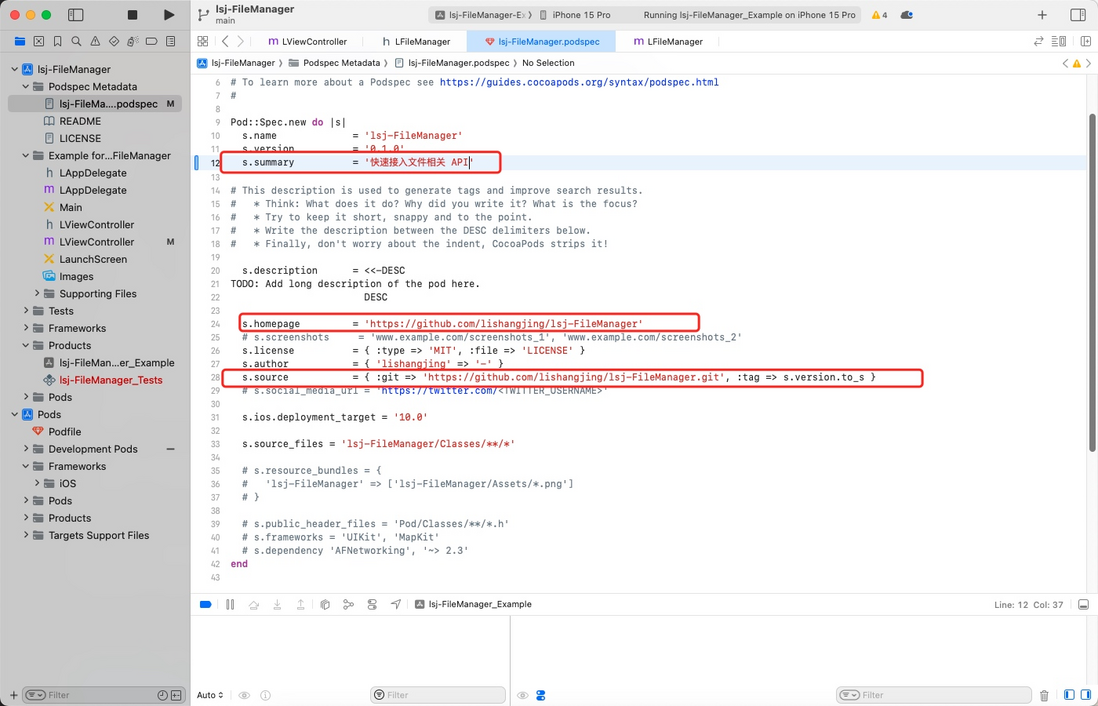
完善 .podspec 文件中的 s.summary 、 s.description
Input:
pod lib lint lsj-FileManager.podspecOutput:lsj-FileManager passed validation. 校验通过
 -> lsj-FileManager (0.1.0)
    - NOTE  | xcodebuild:  note: Using codesigning identity override: -
    - NOTE  | [iOS] xcodebuild:  note: Building targets in dependency order
    - NOTE  | [iOS] xcodebuild:  note: Target dependency graph (3 targets)
    - NOTE  | [iOS] xcodebuild:  note: Signing static framework with --generate-pre-encrypt-hashes (in target 'Pods-App' from project 'Pods')
    - NOTE  | [iOS] xcodebuild:  Pods.xcodeproj: warning: The iOS Simulator deployment target 'IPHONEOS_DEPLOYMENT_TARGET' is set to 10.0, but the range of supported deployment target versions is 12.0 to 17.0.99. (in target 'Pods-App' from project 'Pods')
    - NOTE  | [iOS] xcodebuild:  /var/folders/cs/08c4rp4s4_l39wwhn08jt3sc0000gn/T/CocoaPods-Lint-20240317-8554-8ralh0-lsj-FileManager/App.xcodeproj: warning: The iOS Simulator deployment target 'IPHONEOS_DEPLOYMENT_TARGET' is set to 10.0, but the range of supported deployment target versions is 12.0 to 17.0.99. (in target 'App' from project 'App')
    - NOTE  | [iOS] xcodebuild:  Pods.xcodeproj: warning: The iOS Simulator deployment target 'IPHONEOS_DEPLOYMENT_TARGET' is set to 10.0, but the range of supported deployment target versions is 12.0 to 17.0.99. (in target 'lsj-FileManager' from project 'Pods')

lsj-FileManager passed validation.
推送仓库代码到 Git
# 进如项目根目录
git init
git add .
git commit -m 'Initial Commit'
git remote add origin https://github.com/lishangjing-spec/lsj-FileManager.git
git branch -M master
git push -u origin master
在 .podspec 文件中我们可以看到
s.source = { :git => 'https://github.com/lishangjing-spec/lsj-FileManager.git', :tag => s.version.to_s }这里指的是,我们依赖的下载地址是:https://github.com/lishangjing-spec/lsj-FileManager.git
同时,指向的是:s.version tag
在 .podspec 中 s.version = 0.1.0 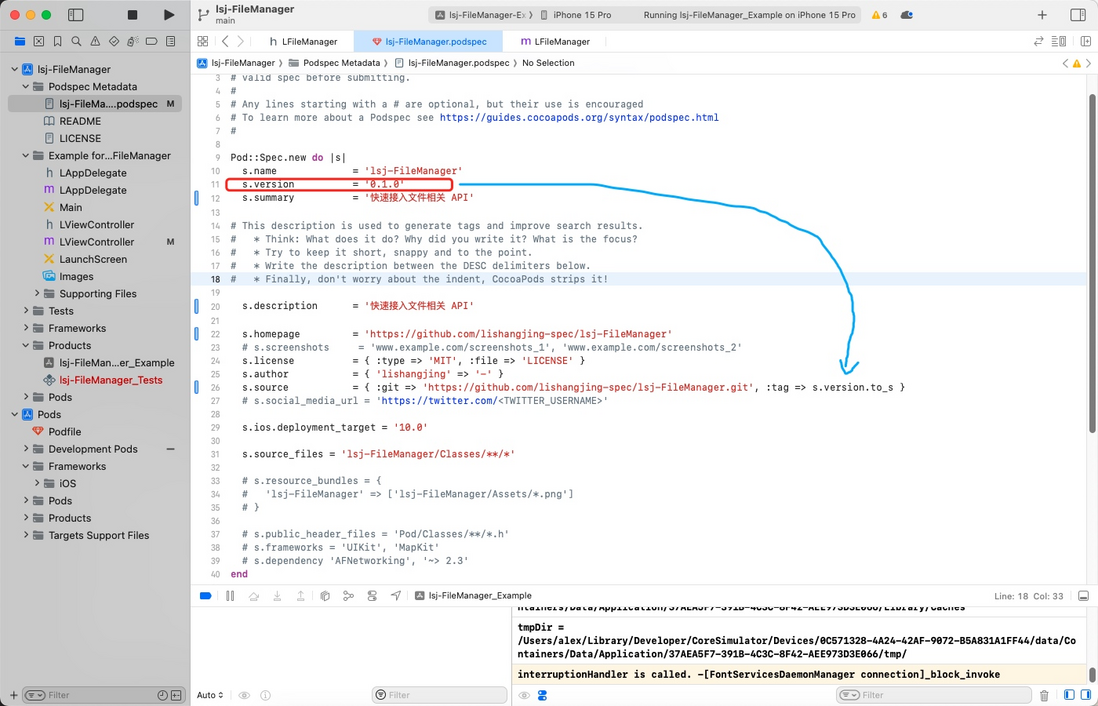
这是默认的设置,我们可以自行更改,也可以遵循这个规则
遵循规则,给我们最新的commit打上tag,让仓库能引用到我们的代码
Input:
git tag 0.1.0
git push origin 0.1.0
Output:
Total 0 (delta 0), reused 0 (delta 0), pack-reused 0
To github.com:lishangjing-spec/lsj-FileManager.git
 * [new tag]         0.1.0 -> 0.1.0
推送项目到 Cocoapods
Input:
pod trunk push lsj-FileManager.podspecOutput:
Updating spec repo `trunk`
Validating podspec
 -> lsj-FileManager
    - NOTE  | xcodebuild:  note: Using codesigning identity override: -
    - NOTE  | [iOS] xcodebuild:  note: Building targets in dependency order
    - NOTE  | [iOS] xcodebuild:  note: Target dependency graph (3 targets)
    - NOTE  | [iOS] xcodebuild:  note: Signing static framework with --generate-pre-encrypt-hashes (in target 'Pods-App' from project 'Pods')
    - NOTE  | [iOS] xcodebuild:  Pods.xcodeproj: warning: The iOS Simulator deployment target 'IPHONEOS_DEPLOYMENT_TARGET' is set to 10.0, but the range of supported deployment target versions is 12.0 to 17.0.99. (in target 'Pods-App' from project 'Pods')
    - NOTE  | [iOS] xcodebuild:  /var/folders/cs/08c4rp4s4_l39wwhn08jt3sc0000gn/T/CocoaPods-Lint-20240317-16091-pb1xlo-lsj-FileManager/App.xcodeproj: warning: The iOS Simulator deployment target 'IPHONEOS_DEPLOYMENT_TARGET' is set to 10.0, but the range of supported deployment target versions is 12.0 to 17.0.99. (in target 'App' from project 'App')
    - NOTE  | [iOS] xcodebuild:  Pods.xcodeproj: warning: The iOS Simulator deployment target 'IPHONEOS_DEPLOYMENT_TARGET' is set to 10.0, but the range of supported deployment target versions is 12.0 to 17.0.99. (in target 'lsj-FileManager' from project 'Pods')

Updating spec repo `trunk`

--------------------------------------------------------------------------------
 🎉  Congrats

 🚀  lsj-FileManager (0.1.0) successfully published
 📅  March 17th, 08:27
 🌎  https://cocoapods.org/pods/lsj-FileManager
 👍  Tell your friends!
上传完成
[F&A]
[!] Authentication token is invalid or unverified. Either verify it with the email that was sent or register a new session.
首次上传或过久没上传,需要重新注册
Input:
# 接受 Cocoapods 的邮箱,以及你的名称(例如:帅哥)
pod trunk register 'xxx@qq.com' 'Name'
Output:进入邮箱,找到并打开验证链接
[!] Please verify the session by clicking the link in the verification email that has been sent to xxx@qq.comInput:
pod trunk push XXXXX.podspec.podspec 文件的属性介绍
- s.name:名称
- s.version:版本号
- s.summary:总结
- s.description:描述
- s.homepage:仓库主页(作用于用户访问仓库首页)
- s.license:开源协议
- s.author:作者
- s.source:用户pod时,依赖拉取的地址
- s.ios.deployment_target:依赖支持的版本号
- s.source_files:项目文件路径
- s.resource_bundles:项目资源文件路径
- s.dependency:项目绑定的其他三方依赖
- s.frameworks:项目绑定的系统 Framework
评论
登录后参与技术讨论,分享你的经验与见解。
登录 / 注册暂无评论