【Java游戏】java俄罗斯方块!

文章目录
目录
一、心得
二、游戏实例
三、代码
一、心得
在学习Java的过程中,难免会遇到很多的问题,这些问题可能会困扰你许久,为此我有个Java学习交流群(925050116),里面都是思否的小伙伴,大家互相学习互相交流共同进步,每日分享不同的学习资料。
点击获取更多素材游戏源码!!百度盘链接
链接:http://pan.baidu.com/s/1mhQ9SYc 密码:9ujo
二、游戏实例
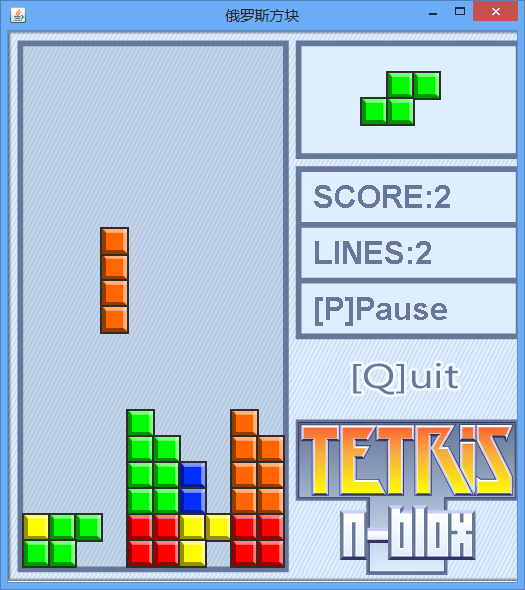
游戏截图


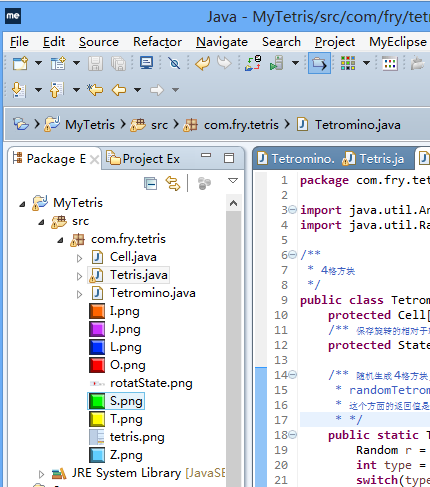
目录结构
三、代码
1、主界面 Tetris.java
package com.hsj.tetris;


import java.awt.Color;

import java.awt.Font;

import java.awt.Graphics;

import java.awt.Image;

import java.awt.event.KeyAdapter;

import java.awt.event.KeyEvent;

import java.util.Arrays;

import java.util.Timer;

import java.util.TimerTask;


import javax.imageio.ImageIO;

import javax.swing.JFrame;

import javax.swing.JPanel;

/**

 * 俄罗斯方块游戏面板

 *

 */

public class Tetris extends JPanel {

    /** 正在下落方块 */

    private Tetromino tetromino;

    /** 下一个下落方块 */

    private Tetromino nextOne;

    /** 行数 */

    public static final int ROWS = 20;

    /** 列数 */

    public static final int COLS = 10;

    /** 墙 */

    private Cell[][] wall = new Cell[ROWS][COLS];

    /** 消掉的行数 */

    private int lines;

    /** 分数 */

    private int score;


    public static final int CELL_SIZE = 26;


    private static Image background;//背景图片

    public static Image I;

    public static Image J;

    public static Image L;

    public static Image S;

    public static Image Z;

    public static Image O;

    public static Image T;

    static{//加载静态资源的,加载图片

        //建议将图片放到 Tetris.java 同包中!

        //从包中加载图片对象,使用Swing API实现

//        Toolkit toolkit = Toolkit.getDefaultToolkit();

//        background = toolkit.getImage(

//                Tetris.class.getResource("tetris.png"));

//        T = toolkit.getImage(Tetris.class.getResource("T.png"));

//        S = toolkit.getImage(Tetris.class.getResource("S.png"));

//        Z = toolkit.getImage(Tetris.class.getResource("Z.png"));

//        L = toolkit.getImage(Tetris.class.getResource("L.png"));

//        J = toolkit.getImage(Tetris.class.getResource("J.png"));

//        I = toolkit.getImage(Tetris.class.getResource("I.png"));

//        O = toolkit.getImage(Tetris.class.getResource("O.png"));

        //import javax.imageio.ImageIO;

        try{

            background = ImageIO.read(

                Tetris.class.getResource("tetris.png"));

            T=ImageIO.read(Tetris.class.getResource("T.png"));

            I=ImageIO.read(Tetris.class.getResource("I.png"));

            S=ImageIO.read(Tetris.class.getResource("S.png"));

            Z=ImageIO.read(Tetris.class.getResource("Z.png"));

            L=ImageIO.read(Tetris.class.getResource("L.png"));

            J=ImageIO.read(Tetris.class.getResource("J.png"));

            O=ImageIO.read(Tetris.class.getResource("O.png"));

        }catch(Exception e){

            e.printStackTrace();

        }

    }


    public void action(){

        //tetromino = Tetromino.randomTetromino();

        //nextOne = Tetromino.randomTetromino();

        //wall[19][2] = new Cell(19,2,Tetris.T);

        startAction();

        repaint();

        KeyAdapter l = new KeyAdapter() {

            public void keyPressed(KeyEvent e) {

                int key = e.getKeyCode();

                if(key == KeyEvent.VK_Q){

                    System.exit(0);//退出当前的Java进程

                }

                if(gameOver){

                    if(key==KeyEvent.VK_S){

                        startAction();

                    }

                    return;

                }

                //如果暂停并且按键是[C]就继续动作

                if(pause){//pause = false

                    if(key==KeyEvent.VK_C){    continueAction();    }

                    return;

                }

                //否则处理其它按键

                switch(key){

                case KeyEvent.VK_RIGHT: moveRightAction(); break;

                case KeyEvent.VK_LEFT: moveLeftAction(); break;

                case KeyEvent.VK_DOWN: softDropAction() ; break;

                case KeyEvent.VK_UP: rotateRightAction() ; break;

                case KeyEvent.VK_Z: rotateLeftAction() ; break;

                case KeyEvent.VK_SPACE: hardDropAction() ; break;

                case KeyEvent.VK_P: pauseAction() ; break;

                }

                repaint();

            }

        };

        this.requestFocus();

        this.addKeyListener(l);

    }


    public void paint(Graphics g){

        g.drawImage(background, 0, 0, null);//使用this 作为观察者

        g.translate(15, 15);//平移绘图坐标系

        paintTetromino(g);//绘制正在下落的方块

        paintWall(g);//画墙

        paintNextOne(g);

        paintScore(g);

    }

    public static final int FONT_COLOR = 0x667799;

    public static final int FONT_SIZE = 0x20;

    private void paintScore(Graphics g) {

        Font f = getFont();//获取当前的 面板默认字体

        Font font = new Font(

                f.getName(), Font.BOLD, FONT_SIZE);

        int x = 290;

        int y = 162;

        g.setColor(new Color(FONT_COLOR));

        g.setFont(font);

        String str = "SCORE:"+this.score;

        g.drawString(str, x, y);

        y+=56;

        str = "LINES:"+this.lines;

        g.drawString(str, x, y);

        y+=56;

        str = "[P]Pause";

        if(pause){str = "[C]Continue";}

        if(gameOver){    str = "[S]Start!";}

        g.drawString(str, x, y);

    }


    private void paintNextOne(Graphics g) {

        Cell[] cells = nextOne.getCells();

        for(int i=0; i<cells.length; i++){

            Cell c = cells[i];

            int x = (c.getCol()+10) * CELL_SIZE-1;

            int y = (c.getRow()+1) * CELL_SIZE-1;

            g.drawImage(c.getImage(), x, y, null);

        }

    }


    private void paintTetromino(Graphics g) {

        Cell[] cells = tetromino.getCells();

        for(int i=0; i<cells.length; i++){

            Cell c = cells[i];

            int x = c.getCol() * CELL_SIZE-1;

            int y = c.getRow() * CELL_SIZE-1;

            //g.setColor(new Color(c.getColor()));

            //g.fillRect(x, y, CELL_SIZE, CELL_SIZE);

            g.drawImage(c.getImage(), x, y, null);

        }

    }


    //在 Tetris 类 中添加 方法 paintWall

    private void paintWall(Graphics g){

        for(int row=0; row<wall.length; row++){

            //迭代每一行, i = 0 1 2 ... 19

            Cell[] line = wall[row];

            //line.length = 10

            for(int col=0; col<line.length; col++){

                Cell cell = line[col];

                int x = col*CELL_SIZE;

                int y = row*CELL_SIZE;

                if(cell==null){

                    //g.setColor(new Color(0));

                    //画方形

                    //g.drawRect(x, y, CELL_SIZE, CELL_SIZE);

                }else{

                    g.drawImage(cell.getImage(), x-1, y-1, null);

                }

            }

        }

    }

    /**

     * 在 Tetris(俄罗斯方块) 类中增加方法

     * 这个方法的功能是:软下落的动作 控制流程

     * 完成功能:如果能够下落就下落,否则就着陆到墙上,

     *   而新的方块出现并开始落下。

     */

    public void softDropAction(){

        if(tetrominoCanDrop()){

            tetromino.softDrop();

        }else{

            tetrominoLandToWall();

            destroyLines();//破坏满的行

            checkGameOver();

            tetromino = nextOne;

            nextOne = Tetromino.randomTetromino();

        }

    }

    /** 销毁已经满的行,并且计分

     * 1)迭代每一行

     * 2)如果(检查)某行满是格子了 就销毁这行

     **/

    public void destroyLines(){

        int lines = 0;

        for(int row = 0; row<wall.length; row++){

            if(fullCells(row)){

                deleteRow(row);

                lines++;

            }

        }

        // lines = ?

        this.lines += lines;//0 1 2 3 4

        this.score += SCORE_TABLE[lines];

    }

    private static final int[] SCORE_TABLE={0,1,10,30,200};

    //                                      0 1  2  3  4


    public boolean fullCells(int row){

        Cell[] line = wall[row];

        for(int i=0; i<line.length; i++){

            if(line[i]==null){//如果有空格式就不是满行

                return false;

            }

        }

        return true;

    }

    public void deleteRow(int row){

        for(int i=row; i>=1; i--){

            //复制 [i-1] -> [i]

            System.arraycopy(wall[i-1], 0, wall[i], 0, COLS);

        }

        Arrays.fill(wall[0], null);

    }


    /** 检查当前的4格方块能否继续下落 */

    public boolean tetrominoCanDrop(){

        Cell[] cells = tetromino.getCells();

        for(int i = 0; i<cells.length; i++){

            Cell cell = cells[i];

            int row = cell.getRow(); int col = cell.getCol();

            if(row == ROWS-1){return false;}//到底就不能下降了

        }

        for(int i = 0; i<cells.length; i++){

            Cell cell = cells[i];

            int row = cell.getRow(); int col = cell.getCol();

            if(wall[row+1][col] != null){

                return false;//下方墙上有方块就不能下降了

            }

        }

        return true;

    }

    /** 4格方块着陆到墙上 */

    public void tetrominoLandToWall(){

        Cell[] cells = tetromino.getCells();

        for(int i=0; i<cells.length; i++){

            Cell cell = cells[i];

            int row = cell.getRow();

            int col = cell.getCol();

            wall[row][col] = cell;

        }

    }


    public void moveRightAction(){

        tetromino.moveRight();

        if(outOfBound() || coincide()){

            tetromino.moveLeft();

        }

    }

    public void moveLeftAction(){

        tetromino.moveLeft();

        if(outOfBound() || coincide()){

            tetromino.moveRight();

        }

    }

    /** ... */

    private boolean outOfBound(){

        Cell[] cells = tetromino.getCells();

        for(int i=0; i<cells.length; i++){

            Cell cell = cells[i];

            int col = cell.getCol();

            if(col<0 || col>=COLS){

                return true;//出界了

            }

        }

        return false;

    }

    private boolean coincide(){

        Cell[] cells = tetromino.getCells();

        //for each 循环、迭代,简化了"数组迭代书写"

        for(Cell cell: cells){//Java 5 以后提供增强版for循环

            int row = cell.getRow();

            int col = cell.getCol();

            if(row<0 || row>=ROWS || col<0 || col>=COLS ||

                    wall[row][col]!=null){

                return true; //墙上有格子对象,发生重合

            }

        }

        return false;

    }

    /** 向右旋转动作 */

    public void rotateRightAction(){

        //旋转之前

        //System.out.println(tetromino);

        tetromino.rotateRight();

        //System.out.println(tetromino);

        //旋转之后

        if(outOfBound() || coincide()){

            tetromino.rotateLeft();

        }

    }


    /** Tetris 类中添加的方法 */

    public void rotateLeftAction(){

        tetromino.rotateLeft();

        if(outOfBound() || coincide()){

            tetromino.rotateRight();

        }

    }

    public void hardDropAction(){

        while(tetrominoCanDrop()){

            tetromino.softDrop();

        }

        tetrominoLandToWall();

        destroyLines();

        checkGameOver();

        tetromino = nextOne;

        nextOne = Tetromino.randomTetromino();

    }


    private boolean pause;

    private boolean gameOver;

    private Timer timer;

    /** Tetris 类中添加的方法, 用于启动游戏 */

    public void startAction(){

        clearWall();

        tetromino = Tetromino.randomTetromino();

        nextOne = Tetromino.randomTetromino();

        lines = 0; score = 0;    pause=false; gameOver=false;

        timer = new Timer();

        timer.schedule(new TimerTask(){

            public void run() {

                softDropAction();

                repaint();

            }

        }, 700, 700);

    }


    private void clearWall(){

        //将墙的每一行的每个格子清理为null

        for(int row=0; row<ROWS; row++){

            Arrays.fill(wall[row], null);

        }

    }


    /** 在Tetris 类中添加方法  */

    public void pauseAction(){

        timer.cancel(); //停止定时器

        pause = true;

        repaint();

    }

    public void continueAction(){

        timer = new Timer();

        timer.schedule(new TimerTask() {

            public void run() {

                softDropAction();

                repaint();

            }

        }, 700, 700);

        pause = false;

        repaint();

    }

    /** 在 Tetris 类中添加 方法 */

    public void checkGameOver(){

        if(wall[0][4]==null){

            return;

        }

        gameOver = true;

        timer.cancel();

        repaint();

    }


    public static void main(String[] args) {

        JFrame frame = new JFrame();

        Tetris tetris = new Tetris();

        frame.add(tetris);

        frame.setSize(525, 550);

        frame.setUndecorated(false);//true去掉窗口框!

        frame.setTitle("俄罗斯方块");

        frame.setDefaultCloseOperation(JFrame.EXIT_ON_CLOSE);

        //Location 位置 RelativeTo相对于

        frame.setLocationRelativeTo(null);//使当前窗口居中

        frame.setVisible(true);

        tetris.action();

    }

}
二、Cell.java
package com.fry.tetris;


import java.awt.Image;


/**

 * 格子

 * 每一个小格子,就有所在的行 列 和图片

 */

public class Cell {

    private int row;

    private int col;

    //private int color;

    private Image image;//格子的贴图


    public Cell() {

    }


    public Cell(int row, int col, Image image) {

        super();

        this.row = row;

        this.col = col;

        this.image = image;

    }


    public int getRow() {

        return row;

    }


    public void setRow(int row) {

        this.row = row;

    }


    public int getCol() {

        return col;

    }


    public void setCol(int col) {

        this.col = col;

    }


    public Image getImage() {

        return image;

    }


    public void setImage(Image image) {

        this.image = image;

    }


    public void moveRight(){

        col++;

        //System.out.println("Cell moveRight()" + col);

    }


    public void moveLeft(){

        col--;

    }


    public void moveDown(){

        row++;

    }


    @Override

    public String toString() {

        return "["+row+","+col+"]";

    }

}
三、功能实现 Tetromino.java
package com.fry.tetris;


import java.util.Arrays;

import java.util.Random;


/**

 * 4格方块

 */

public class Tetromino {

    protected Cell[] cells = new Cell[4];

    /** 保存旋转的相对于轴位置状态 */

    protected State[] states;


    /** 随机生成 4格方块, 使用简单工厂方法模式!

     * randomTetromino 随机生成一个四格方块

     * 这个方面的返回值是多态的!

     * */

    public static Tetromino randomTetromino(){

        Random r = new Random();

        int type = r.nextInt(7);

        switch(type){

        case 0: return new T();

        case 1: return new I();

        case 2: return new J();

        case 3: return new L();

        case 4: return new O();

        case 5: return new S();

        case 6: return new Z();

        }

        return null;

    }


    public Cell[] getCells() {

        return cells;

    }


    /** 下落 */

    public void softDrop(){

        for(int i=0; i<cells.length; i++){

            cells[i].moveDown();

        }

    }

    public void moveRight(){

        //System.out.println("moveRight()");

        for(int i=0; i<cells.length; i++){

            this.cells[i].moveRight();

        }

    }

    public void moveLeft(){

        for(int i=0; i<cells.length; i++){

            cells[i].moveLeft();

        }

    }

    private int index = 100000;

    /** 在 Tetromino 上添加方法  */

    public void rotateRight() {

        index++;//index = 10001

        // index % states.length = 10001 % 4 = 1

        State s = states[index%states.length];//s1

        // [0] + s1 = [1]

        Cell o = cells[0];//获取当前的轴

        //轴与相对位置的和作为旋转以后的格子位置

        cells[1].setRow(o.getRow()+s.row1);

        cells[1].setCol(o.getCol()+s.col1);

        cells[2].setRow(o.getRow()+s.row2);

        cells[2].setCol(o.getCol()+s.col2);

        cells[3].setRow(o.getRow()+s.row3);

        cells[3].setCol(o.getCol()+s.col3);

    }

    /** 在 Tetromino 上添加方法  */

    public void rotateLeft() {

        index--;//index = 10001

        // index % states.length = 10001 % 4 = 1

        State s = states[index%states.length];//s1

        // [0] + s1 = [1]

        Cell o = cells[0];//获取当前的轴

        cells[1].setRow(o.getRow()+s.row1);

        cells[1].setCol(o.getCol()+s.col1);

        cells[2].setRow(o.getRow()+s.row2);

        cells[2].setCol(o.getCol()+s.col2);

        cells[3].setRow(o.getRow()+s.row3);

        cells[3].setCol(o.getCol()+s.col3);

    }


    @Override

    public String toString() {

        return Arrays.toString(cells);

    }


    /** Tetromino 类中添加的 内部类 用于记录旋转状态 */

    protected class State{

        int row0,col0,row1,col1,row2,col2,row3,col3;


        public State(int row0, int col0, int row1, int col1,

                int row2, int col2,

                int row3, int col3) {

            this.row0 = row0;

            this.col0 = col0;

            this.row1 = row1;

            this.col1 = col1;

            this.row2 = row2;

            this.col2 = col2;

            this.row3 = row3;

            this.col3 = col3;

        }

    }


}//Tetromino 类的结束

class T extends Tetromino{

    public T() {

        cells[0] = new Cell(0, 4, Tetris.T);

        cells[1] = new Cell(0, 3, Tetris.T);

        cells[2] = new Cell(0, 5, Tetris.T);

        cells[3] = new Cell(1, 4, Tetris.T);

        states = new State[]{

                new State(0,0, 0,-1, 0,1, 1, 0),

                new State(0,0, -1,0, 1,0, 0,-1),

                new State(0,0, 0,1,  0,-1, -1,0),

                new State(0,0, 1,0, -1,0, 0,1)};

    }

}

class I extends Tetromino{

    public I() {

        cells[0] = new Cell(0, 4, Tetris.I);

        cells[1] = new Cell(0, 3, Tetris.I);

        cells[2] = new Cell(0, 5, Tetris.I);

        cells[3] = new Cell(0, 6, Tetris.I);

        states = new State[]{

                new State(0,0, 0,1, 0,-1, 0,-2),

                new State(0,0, -1,0, 1,0,2,0)};

    }

}

class L extends Tetromino {

    public L() {

        cells[0] = new Cell(0, 4, Tetris.L);

        cells[1] = new Cell(0, 3, Tetris.L);

        cells[2] = new Cell(0, 5, Tetris.L);

        cells[3] = new Cell(1, 3, Tetris.L);

        states = new State[]{

                new State(0,0, 0,-1, 0,1, 1,-1 ),

                new State(0,0, -1,0, 1,0, -1,-1),

                new State(0,0, 0,1, 0,-1, -1,1),

                new State(0,0, 1,0, -1,0, 1,1)};

    }

}


class J extends Tetromino {

    public J() {

        cells[0] = new Cell(0, 4, Tetris.J);

        cells[1] = new Cell(0, 3, Tetris.J);

        cells[2] = new Cell(0, 5, Tetris.J);

        cells[3] = new Cell(1, 5, Tetris.J);

        states = new State[]{

                new State(0,0, 0,-1, 0,1, 1,1),

                new State(0,0, -1,0, 1,0, 1,-1),

                new State(0,0, 0,1, 0,-1, -1,-1),

                new State(0,0, 1,0, -1,0, -1,1 )};

    }

}


class S extends Tetromino {

    public S() {

        cells[0] = new Cell(0, 4, Tetris.S);

        cells[1] = new Cell(0, 5, Tetris.S);

        cells[2] = new Cell(1, 3, Tetris.S);

        cells[3] = new Cell(1, 4, Tetris.S);

        states = new State[]{

            new State(0,0, 0,1, 1,-1, 1,0 ),

            new State(0,0, -1,0, 1,1, 0,1 )};

    }

}


class Z extends Tetromino {

    public Z() {

        cells[0] = new Cell(1, 4, Tetris.Z);

        cells[1] = new Cell(0, 3, Tetris.Z);

        cells[2] = new Cell(0, 4, Tetris.Z);

        cells[3] = new Cell(1, 5, Tetris.Z);

        states = new State[]{

                new State(0,0, -1,-1, -1,0, 0,1 ),

                new State(0,0, -1,1, 0,1, 1,0 )};

    }

}


class O extends Tetromino {

    public O() {

        cells[0] = new Cell(0, 4, Tetris.O);

        cells[1] = new Cell(0, 5, Tetris.O);

        cells[2] = new Cell(1, 4, Tetris.O);

        cells[3] = new Cell(1, 5, Tetris.O);

        states = new State[]{

                new State(0,0, 0,1, 1,0, 1,1 ),

                new State(0,0, 0,1, 1,0, 1,1 )};

    }

}
评论
登录后参与技术讨论,分享你的经验与见解。
登录 / 注册暂无评论