SpringBoot + Mybatis 增删改查

文章目录
准备工作
1. MySQL(5.7)
2. JDK (1.8)
3. Maven (3.6.3)
4. STS(4.7.1)
数据库初始化
第一步:快捷键 wind + R 打开 cmd
在mysql控制台,然后按如下步骤执行goods.sql文件
mysql –uroot –proot第二步:设置控制台编码方式。
set names utf8;第三步:执行goods.sql文件(切记不要打开文件复制到mysql客户端运行)。
source d:/goods.sql其中 goods.sql 文件内容如下:
drop database if exists dbgoods;
create database dbgoods default character set utf8;
use dbgoods;
create table tb_goods(
     id bigint primary key auto_increment,
     name varchar(100) not null,
     remark text,
     createdTime datetime not null
)engine=InnoDB;
insert into tb_goods values (null,'java','very good',now());
insert into tb_goods values (null,'mysql','RDBMS',now());
insert into tb_goods values (null,'Oracle','RDBMS',now());
insert into tb_goods values (null,'java','very good',now());
insert into tb_goods values (null,'mysql','RDBMS',now());
insert into tb_goods values (null,'Oracle','RDBMS',now());
insert into tb_goods values (null,'java','very good',now());
创建项目并添加依赖
第一步:基于start.spring.io创建项目并设置基本信息
第二步:创建项目时指定项目核心依赖 !
第三步:项目创造以后分析其结构
项目配置文件内容初始化
#spring datasource
server.port=80

server.servlet.context-path=/
spring.main.banner-mode=off
spring.datasource.url=jdbc:mysql:///dbgoods?serverTimezone=GMT%2B8&characterEncoding=utf8
spring.datasource.username=root
spring.datasource.password=root

#spring mybatis
mybatis.mapper-locations=classpath:/mapper/*/*.xml

#spring web
spring.thymeleaf.cache=false
spring.thymeleaf.prefix=classpath:/templates/pages/
spring.thymeleaf.suffix=.html

#Spring log
logging.level.com.cy=debug
项目API架构设计
其API架构设计,如下所示:
src/main/java
com.cy      //入口
控制层
com.cy.pj.goods.controller
    GoodsController.java
业务层
com.cy.pj.goods.service
    GoodsService.java
com.cy.pj.goods.service.impl
    GoodsServiceImpl.java
数据层
com.cy.pj.goods.dao
    GoodsDao.java
com.cy.pj.goods.pojo
    Goods.java
商品查询业务实现
业务描述
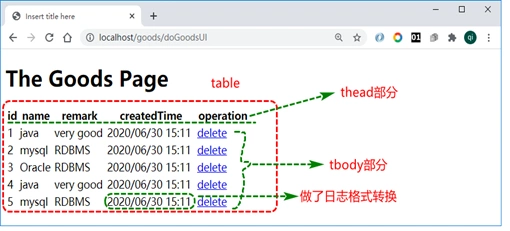
从商品库查询商品信息,转化为商品信息呈现在页面上,如下所示:
业务时序分析
查询所有商品信息,其业务时序分析,如下所示:

执行的时候是控制层到数据层, 写代码的时候是数据层到控制层
Pojo类定义
定义商品对象,用于封装从数据库查询到的商品信息。
package com.cy.pj.goods.pojo;
//存储数据
import java.util.Date;

//import lombok.AllArgsConstructor;
//import lombok.Getter;
//import lombok.NoArgsConstructor;
//import lombok.Setter;
//import lombok.ToString;
   //添加此注解会在Goods类中自动添加set,get,toString方法

//@Setter
//@Getter
//@ToString

//@AllArgsConstructor  //添加基于全部属性构建的构造函数
//@NoArgsConstructor //添加无参构造函数
public class Goods {
    private Long id;
    private String name;
    private String remark;
    private Date createdTime;
    public Long getId() {
        return id;
    }
    public void setId(Long id) {
        this.id = id;
    }
    public String getName() {
        return name;
    }
    public void setName(String name) {
        this.name = name;
    }
    public String getRemark() {
        return remark;
    }
    public void setRemark(String remark) {
        this.remark = remark;
    }
    public Date getCreatedTime() {
        return createdTime;
    }
    public void setCreatedTime(Date createdTime) {
        this.createdTime = createdTime;
    }
    @Override
    public String toString() {
        return "Goods [id=" + id + ", name=" + name + ", remark=" + remark + ", createdTime=" + createdTime + "]";
    }


}
### Dao 接口方法及映射定义
在GoodsDao接口中定义商品查询方法以及SQL映射,基于此方法及SQL映射获取所有商品信息。代码如下:
package com.cy.pj.goods.dao;
import java.util.List;
import org.apache.ibatis.annotations.Select;
import com.cy.pj.goods.pojo.Goods;

@Mapper
public interface GoodsDao {
      //1,查询操作
    @Select("select id,name,remark,createdTime from tb_goods")
    List<Goods> findGoods();
}
Service接口方法定义及实现
GoodsService接口及商品查询方法定义
package com.cy.pj.goods.service;
import java.util.List;
import com.cy.pj.goods.pojo.Goods;
public interface GoodsService {
     /** 1, 查询所有商品类 */
    List<Goods> findGoods();
}
GoodsService接口实现类GoodsServiceImpl定义及方法实现
package com.cy.pj.goods.service;
import java.util.List;
import com.cy.pj.goods.pojo.Goods;
@Service
public class GoodsServiceImpl implements GoodsService {
/**
    * 关联数据层对象,获取数据
    */
     @Autowired
     private GoodsDao goodsDao;
    /**1,查询操作*/
    @Override
    public List<Goods> findGoods() {
        long t1=System.currentTimeMillis();
        List<Goods> list=goodsDao.findGoods();
        long t2=System.currentTimeMillis();
        log.info("findGoods().time:{}",(t2-t1));
            return list;


    }
}
Controller对象方法定义及实现
定义GoodsController类,并添加doGoodsUI方法,添加查询商品信息代码,并将查询到的商品信息存储到model,并返回goods页面。
package com.cy.pj.goods.controller;
import java.util.List;

import org.springframework.beans.factory.annotation.Autowired;
import org.springframework.stereotype.Controller;
import org.springframework.ui.Model;
import com.cy.pj.goods.pojo.Goods;
import com.cy.pj.goods.service.GoodsService;
@Controller //@Service,@Component
@RequestMapping("/goods/")
public class GoodsController {
    //has a+di
    //调业务层
    @Autowired
    private GoodsService goodsService;

    //1, 查找数据并把查询到的数据存储到model中
    @RequestMapping("doFindGoods")
    public String doFindGoods(Model model) {
     //调用业务层方法获取商品信息
        List<Goods> list = goodsService.findGoods();
        //将数据存储到请求作用域
        model.addAttribute("list",list);
        return "goods";  //viewname
    }

}
Goods商品列表页面设计及实现
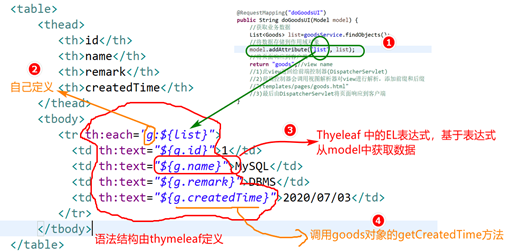
在templates/pages目录中添加goods.html页面,并在body中添加html元素,在运行内部使用thymeleaf标签属性获取数据,代码如下:
Src/main/resources----->
  templates---->
        pages--->
                goods.html
<table width="50%">
        <thead>
           <th>id</th>
           <th>name</th>
           <th>remark</th>
           <th>createdTime</th>
           <th>operation</th>
        </thead>
        <tbody>
           <tr th:each="g:${list}">
             <td th:text="${g.id}">1</td>
             <td th:text="${g.name}">MySQL</td>
             <td th:text="${g.remark}">DBMS</td>
             <td th:text="${#dates.format(g.createdTime, 'yyyy/MM/dd HH:mm')}">2020/07/03</td>
             <td><a>delete</a></td>
           </tr>
        </tbody>
  </table>
thymeleaf 是一种模板引擎,此引擎以html为模板,可以添加自定义标签属性,可以将服务端model中数据填充在页面上,然后实现与用于交互。其官网为thymeleaf.org
Goods页面上数据呈现分析:
启动Tomcat进行访问测试分析
首先,启动tomcat,然后在打开浏览器,在地址栏输入访问地址,获取服务端数据并进行呈现,如图所示: 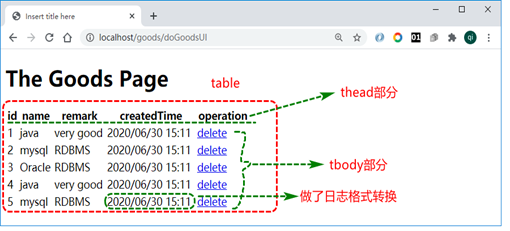
项目启动及运行过程中BUG及问题分析
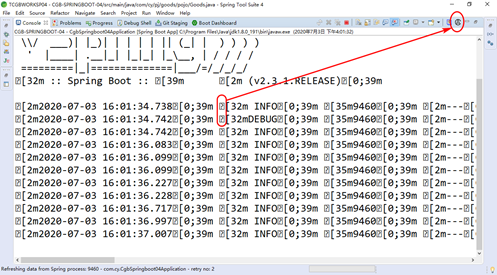
- 控制台“?”符号,如图所示:
- 数据库连不上,如图所示:

- 服务启动失败,如图所示:
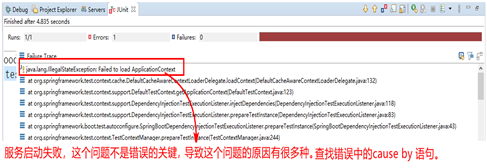
- SQL语法问题,如图所示:
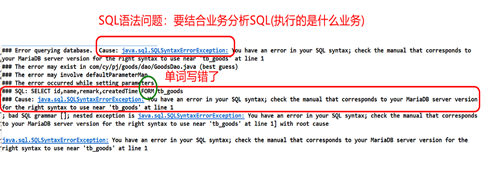
- 模板不存在错误,如图所示:

- 日期格式不正确,如图所示:
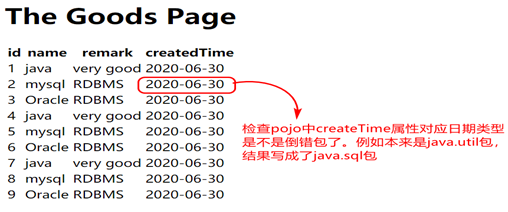
- 页面上${}内容错误,如图所示:

- 页面日期格式不正确,如图所示:

- 依赖注入失败,如图所示:

- 空指针异常(NullPointerException),如图所示:
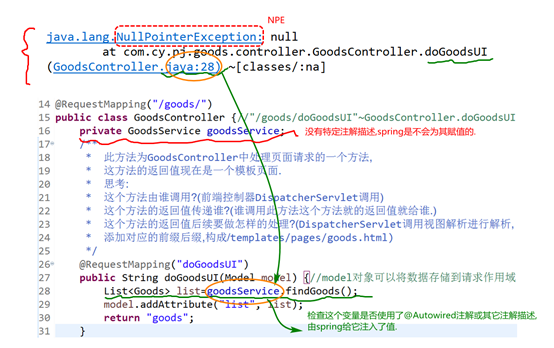
商品删除业务实现
业务描述
从商品库查询商品信息后,点击页面上删除超链接,基于id删除当前行记录,如图所示:

业务时序分析
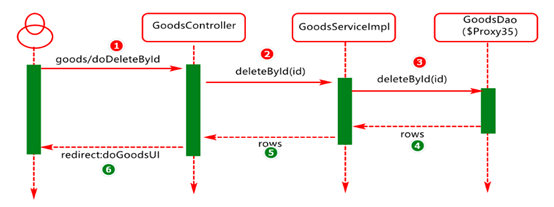
在商品呈现页面,用户执行删除操作,其删除时序如图所示:
Dao接口方法及映射定义
在GoodsDao接口中定义商品删除方法以及SQL映射,代码如下:
//2,删除操作
    @Delete("delete from tb_goods where id=#{id}")
    int deleteById(Integer id);
Service接口方法定义及实现
在GoodsService接口中添加删除方法,代码如下:
/** 2, 删除操作*/
    int deleteById(Integer id);
在GoodsService的实现类GoodsServiceImpl中添加deleteById方法实现。代码如下。
/** 2,删除操作*/
    @Override
    public int deleteById(Integer id) {
        long t1=System.currentTimeMillis();
        int rows = goodsDao.deleteById(id);
        long t2=System.currentTimeMillis();
        System.out.println("execute time:"+(t2-t1));
        return rows;
    }
Controller对象方法定义及实现
在GoodsController中的添加doDeleteById方法,代码如下:
   //2,添加删除方法doDeleteById
    @RequestMapping("doDeleteById/{id}")
    public String doDeleteById(@PathVariable Integer id) {
        goodsService.deleteById(id);
        return "redirect:/goods/doFindGoods";
    }
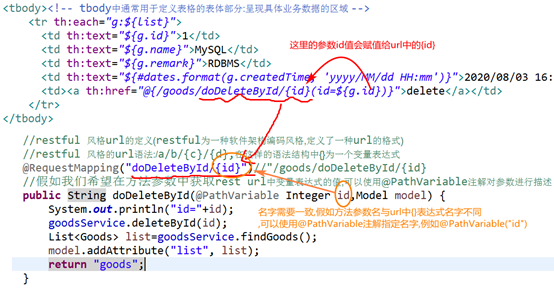
说明:Restful 风格为一种软件架构编码风格,定义了一种url的格式,其url语法为/a/b/{c}/{d},在这样的语法结构中{}为一个变量表达式。假如我们希望在方法参数中获取rest url中变量表达式的值,可以使用@PathVariable注解对参数进行描述。
Goods页面上删除超链接定义
在goods.html页面中添加删除超链接,如图所示:

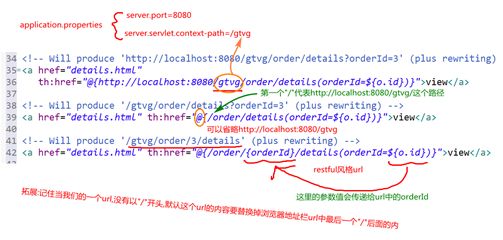
Thymeleaf 官方th:href应用说明,如图所示:
删除操作中,客户端与服务端代码关联说明,如图所示:
启动tomcat服务器进行访问测试分析
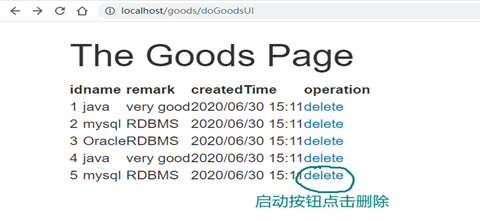
首先,启动tomcat,然后在打开浏览器,在地址栏输入访问地址,获取服务端数据并进行呈现,接下来点击页面上的删除按钮,如图所示:
删除成功以后,的页面如图所示:

项目启动及运行过程中的Bug及问题分析
- SQL映射元素定义问题,如图所示:
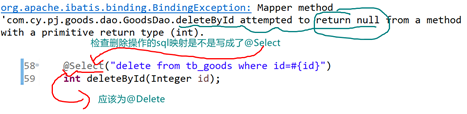
- 客户端请求参数与服务端参数不匹配,如图所示:

商品添加业务实现
业务描述
在Goods列表页面,添加添加按钮,进行添加页面,然后在添加页面输入商品相关信息,然后保存到数据库,如图所示:

商品添加页面,设计如图所示:

业务时序分析
在商品添加页面,输入商品信息,然后提交到服务端进行保存,其时序分析如图所示: 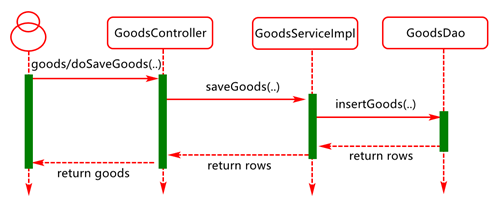
Dao接口方法及映射定义
在GoodsDao中添加用于保存商品信息的接口方法以及SQL映射,代码如下:
//3,添加操作
    @Insert("insert into tb_goods(name,remark,createdTime)values(#{name},#{remark},now())")
    int insertObject(Goods entity);
说明:当SQL语句比较复杂时,也可以将SQL定义到映射文件(xml文件)中。
Service接口方法定义及实现
在GoodsService接口中添加业务方法,用于实现商品信息添加,代码如下:
/** 3,添加业务*/
    int saveGoods(Goods entity);
在GoodsSerivceImpl类中添加接口方法实现,代码如下:
   /** 3,添加操作*/
    @Override
    public int saveGoods(Goods entity) {
        int rows = goodsDao.insertObject(entity);
        return rows;
    }
Controller对象方法定义及实现
在GoodsController类中添加用于处理商品添加请求的方法,代码如下:
//3.1,添加操作---处理商品添加请求的
    @RequestMapping("doSaveGoods")
    public String doSavaGoods(Goods entity) {
        goodsService.saveGoods(entity);
        return "redirect:/goods/doFindGoods";
    }
在GoodsController类中添加用于返回商品添加页面的方法,代码如下:
  //3.2 ,返回商品添加页面的
    @RequestMapping("doGoodsAddUI")
    public String doGoodsAddUI() {
        return "goods-add";
    }
Goods添加页面设计及实现
在templates的pages目录中添加goods-add.html页面,代码如下
<!DOCTYPE html>
<html>
<head>
<meta charset="UTF-8">
<title>Insert title here</title>
<style type="text/css">
    ul li{list-style-type: none}
</style>
</head>
<body>
    <h1>The Goods Add Page</h1>

    <form th:action="@{/goods/doSaveGoods}" method="post">
        <ul>
            <li>name:
            <li><input type="text" name="name">
            <li>remark:
            <li><textarea rows="5" cols="50" name="remark"></textarea>
            <li><input type="submit" value="Save">
        </ul>

    </form>
</body>
</html>
在goods.html页面中添加,超链接可以跳转到添加页面,关键代码如下:
<a th:href="@{/goods/doGoodsAddUI}">添加商品</a>启动Tomcat服务器进行访问测试分析
第一步:启动web服务器,检测启动过程是否OK,假如没有问题进入下一步。
第二步:打开浏览器在地址里输入http://localhost/goods/doGood...),出现如下界面,如图所示: 
第三步:在添加页面中填写表单,然后点击save按钮将表单数据提交到服务端,如图所示: 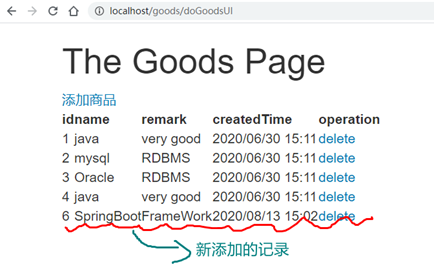
第四步:添加页面中表单数据提交过程分析,如图所示: 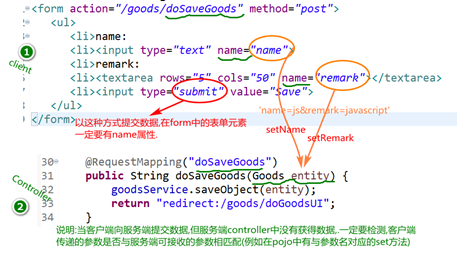
项目启动及运行过程中的Bug及问题分析
- 客户端显示400异常,如图所示:

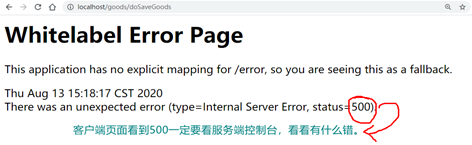
- 保存时500异常,如图所示:
- 数据库完整性约束异常,如图所示:

商品修改业务实现
业务描述
在商品列表页面,点击update选项,基于商品id查询当前行记录然后将其更新到goods-update页面,如图所示: 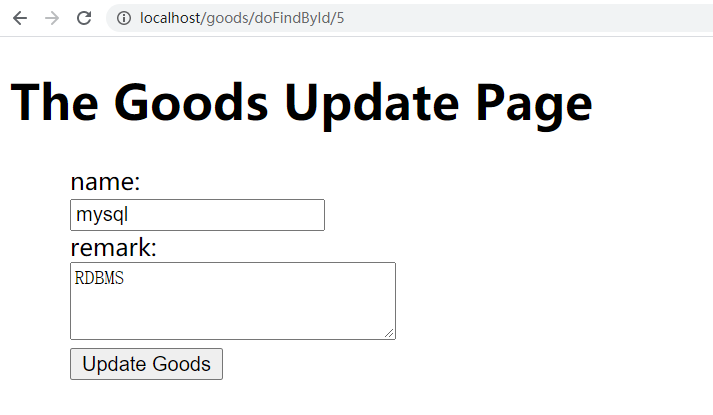
在update页面选中,修改商品信息,然后点击 update goods 将表单数据提交到服务端进行更新
业务时序分析
基于id查询商品信息的时序设计 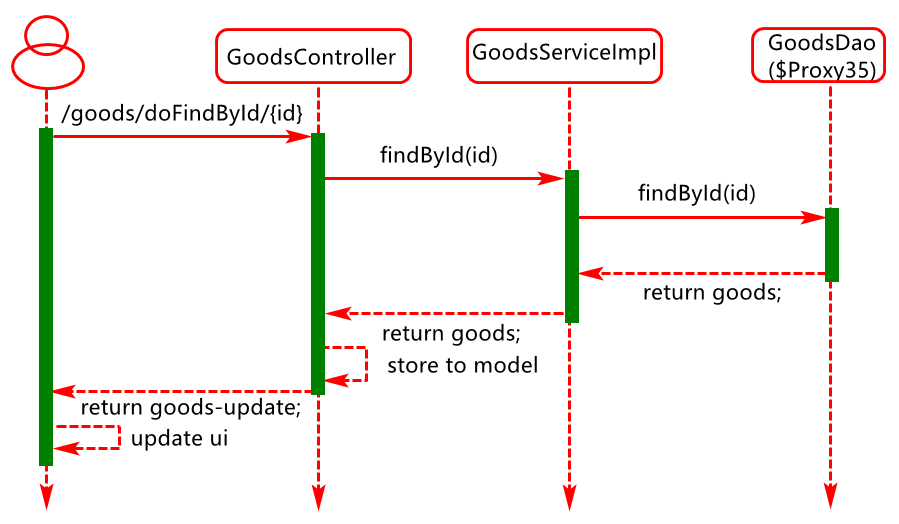
将goods-update页面中的数据提交到服务端进行更新的时序设计
Dao接口方法及映射定义
在GoodsDao中添加基于id查询商品信息的方法及SQL映射,代码如下:
修改操作
//4,修改操作
       /** 基于id查询商品信息,*/
    @Select("select * from tb_goods where id=#{id}")
    Goods findById(Integer id);
在GoodsDao中添加基于id执行Goods商品更新的方法及SQL映射,代码如下:
 /** 基于id执行商品更新的方法*/
    @Update("update tb_goods set name=#{name},remark=#{remark} where id=#{id}")
    int updateGoods(Goods goods);
Service接口方法定义及实现
在GoodsService 中添加基于id查询商品信息和更新商品信息的方法,代码如下:
/** 4,修改业务*/
    Goods findById(Integer id);
    int updateGoods(Goods goods);
在GoodsServiceImpl中基于id查询商品信息和更新商品信息的方法,代码如下:
    /**
     * 4,修改操作
     *
     *  4.1  基于id 查询商品新
     */
    @Override
    public Goods findById(Integer id) {

        return goodsDao.findById(id);
    }
@Override
public int updateGoods(Goods goods) {

    return goodsDao.updateGoods(goods);
}
Controller对象方法定义及实现
在GoodsController中添加基于id查询商品信息的方法,代码如下:
   /**
     * 4, 修改操作
     *
     * 4.1  基于id查询商品信息
     */
    @RequestMapping("/doFindById/{id}")
    public String doFindById(@PathVariable Integer id,Model model) {
        Goods goods=goodsService.findById(id);
        model.addAttribute("goods", goods);
        return "goods-update";
    }
在GoodsController中添加更新商品信息的方法,代码如下:
    @RequestMapping("doUpdateGoods")
    public String doUpdateGoods(Goods goods) {
        goodsService.updateGoods(goods);
        return "redirect:/goods/doFindGoods";
    }
Goods修改页面设计及实现
在templates目录中添加goods-update.html页面,代码设计如下:
<!DOCTYPE html>
<html>
<head>
<meta charset="UTF-8">
<title>Insert title here</title>
<style type="text/css">
     ul li{list-style-type: none}
</style>
</head>
<body>
    <h1>The Goods Update Page</h1>
     <form th:action="@{/goods/doUpdateGoods}" method="post">
     <input type="hidden" name="id" th:value="${goods.id}">
        <ul>
            <li>name:
            <li><input type="text" name="name" th:value="${goods.name}">
            <li>remark:
            <li><textarea rows="3" cols="30" name="remark" th:text="${goods.remark}"></textarea>
            <li><input type="submit" value="Update Goods">
        </ul>

    </form>
</body>
</html>
最终的goods.html页面
<!DOCTYPE html>
<html>
<head>
<meta charset="UTF-8">
<title>Insert title here</title>
</head>
<body>
    <h1>The Goods Page</h1>
    <a th:href="@{/goods/doGoodsAddUI}">添加商品</a>
    <table>
        <thead>
            <tr>
                <th>id</th>
                <th>name</th>
                <th>remark</th>
                <th>createdTime</th>
                <th colspan="2">operation</th>
            </tr>

        </thead>
        <tbody>
            <tr th:each="g:${list}">
                <td th:text="${g.id}">1</td>
                <td th:text="${g.name}">AAA</td>
                <td th:text="${g.remark}">AAAA</td>
                <td th:text="${#dates.format(g.createdTime,'yyyy/MM/dd HH:mm')}">2020/09/01</td>
                <td><a th:href="@{/goods/doDeleteById/{id}(id=${g.id})}">delete</a></td>
                <td><a th:href="@{/goods/doFindById/{id}(id=${g.id})}">update</a></td>

            </tr>
        </tbody>
    </table>
</body>
</html>
启动Tomcat服务进行访问测试分析
启动tomcat服务,访问商品列表页面,如图所示:

在列表页面,点击update选项,进入更新页面

在更新页面更新表单数据,然后提交,进入列表页面查看更新结果,如图所示:

项目启动及运行过程中的BUG及问题分析
- 页面设计分析,如图所示:

- 页面源码分析,如图所示:

评论
登录后参与技术讨论,分享你的经验与见解。
登录 / 注册暂无评论