uni-app技术分享| uni-app转小程序_实时音视频

文章目录
微信小程序 实现实时音视频与 uniapp 转码成微信小程序 实现实时音视频两者是一样的,区别仅仅是一个是原生小程序一个是 uniapp 转码成小程序
本文使用uniapp转码成小程序实现音视频通话
前提
- 确保微信开发平台 =》开发 =》开发管理 =》接口设置 的 实时播放音视频流与实时录制音视频流开启

- 线上版本配置 anyRTC 相关的服务器域名(本地调试可设置不校验域名)
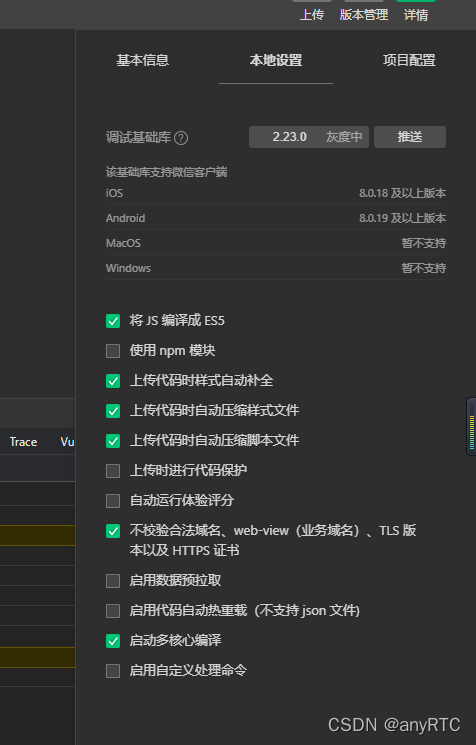
如图所示:小程序原生本地设置不校验域名
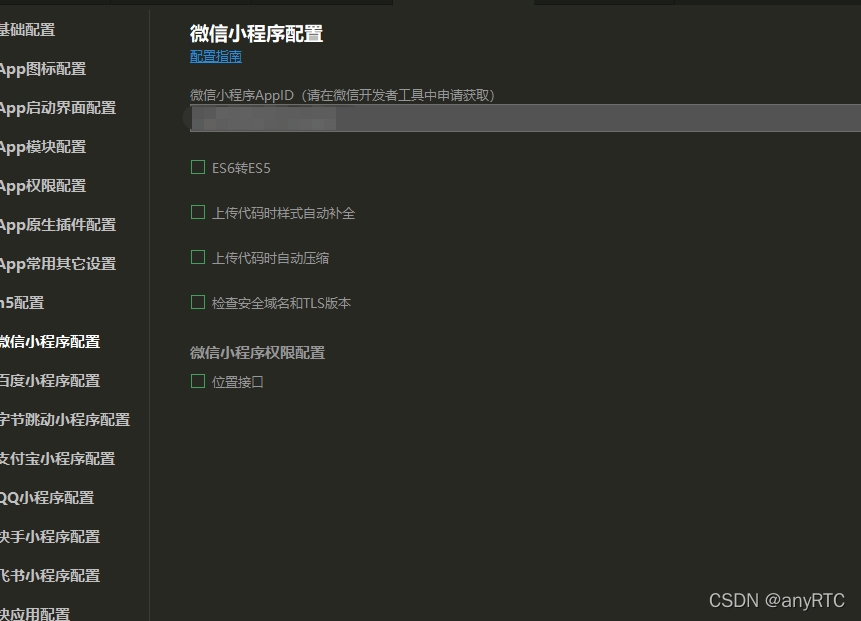
- uniapp 转小程序可以在小程序编辑器中配置也可在 uniapp 的 manifest.json 中配置
代码逻辑
- 引入anyRTC 小程序版的实时音视频 SDK
- 初始化 SDK
- 加入相同的频道并将自己的视频流发布出去
根据相关事件回调处理相关逻辑
必须填写 appid (在 anyRTC 控制台的项目管理中获取)
用户 uid 类型必须为字符串并且不重复
只有加入同一频道房间(类型必须为字符串)才可进行通话
代码实现
npm 引入 ar-rtc-miniapp
npm i ar-rtc-miniapp
- 封装 rtc.js
  ```javascript
    // 引入 RTC
    import ArRTC from "ar-rtc-miniapp";
    console.log("ArRTC 版本", ArRTC);
    // 定义
    let Store = {
        appId: '',
        // 本地用户uid
        userId: "",
        // 频道房间
        channelId: "",

        // RTC 客户端
        rtcClient: null,
        // 本地录制地址(小程序特有推流)
        livePusherUrl: "",
        // 远端播放(小程序特有拉流)
        livePlayerUrl: "",
    };
    // 初始化 RTC
    const InItRTC = async (info) => {
       Store = Object.assign(Store, info)
       // 创建RTC客户端
       Store.rtcClient = new ArRTC.client();
       // 初始化
       await Store.rtcClient.init(Store.appId);
       // 已添加远端音视频流
       Store.rtcClient.on('stream-added', rtcEvent.userPublished);
       // 已删除远端音视频流
       Store.rtcClient.on('stream-removed', rtcEvent.userUnpublished);
       // 通知应用程序发生错误
       Store.rtcClient.on('error', rtcEvent.error);
       // 更新 Url 地址
       Store.rtcClient.on('update-url', rtcEvent.updateUrl);
       // 远端视频已旋转
       Store.rtcClient.on('video-rotation', rtcEvent.videoRotation);
       // 远端用户已停止发送音频流
       Store.rtcClient.on('mute-audio', rtcEvent.muteAudio);
       // 远端用户已停止发送视频流
       Store.rtcClient.on('mute-video', rtcEvent.muteVideo);
       // 远端用户已恢复发送音频流
       Store.rtcClient.on('unmute-audio', rtcEvent.unmuteAudio);
       // 远端用户已恢复发送视频流
       Store.rtcClient.on('unmute-video', rtcEvent.unmuteAudio);
       return
   }
  // RTC 监听事件处理
  const rtcEvent = {
      // RTC SDK 监听用户发布
      userPublished: ({uid}) => {
        console.log("RTC SDK 监听用户发布", uid);
        if (Store.Mode == 0) {
            uni.showLoading({
                title: '远端加载中',
                mask: true,
            })
        }

       // 订阅远端用户发布音视频
       Store.rtcClient.subscribe(uid, (url) => {
           console.log("远端用户发布音视频", url);
           // 向视频页面发送远端拉流地址
           uni.$emit("livePusherUrlEvent", {
               livePlayerUrl: url
           });
       }, (err) => {
        console.log("订阅远端用户发布音视频失败", err);
       })
   },
       // RTC SDK 监听用户取消发布
       userUnpublished: ({uid }) => {
           console.log("RTC SDK 监听用户取消发布", uid);
       },
     // 更新 Url 地址
     updateUrl: ({
          uid,
          url
      }) => {
          console.log("包含远端用户的 ID 和更新后的拉流地址", uid, url);
          // 向视频页面发送远端拉流地址
          uni.$emit("livePusherUrlEvent", {
              livePlayerUrl: url
          });
      },
      // 视频的旋转信息以及远端用户的 ID
      videoRotation: ({
          uid,
          rotation
      }) => {
          console.log("视频的旋转信息以及远端用户的 ID", uid, rotation);
      },
      // 远端用户已停止发送音频流
      muteAudio: ({
          uid
      }) => {
          console.log("远端用户已停止发送音频流", uid);
      },
      // 远端用户已停止发送视频流
      muteVideo: ({
          uid
      }) => {
          console.log("远端用户已停止发送视频流", uid);
      },
      // 远端用户已恢复发送音频流
      unmuteAudio: ({
          uid
      }) => {
          console.log("远端用户已恢复发送音频流", uid);
      },
      // 远端用户已恢复发送视频流
      unmuteAudio: ({
          uid
      }) => {
          console.log("远端用户已恢复发送视频流", uid);
      },
      // 通知应用程序发生错误。 该回调中会包含详细的错误码和错误信息
      error: ({
          code,
          reason
      }) => {
          console.log("错误码:" + code, "错误信息:" + reason);
      },
     }
 // RTC 内部逻辑
 const rtcInternal = {
     // 加入频道
     joinChannel: () => {
         console.log("加入频道", Store.rtcClient);
         return Store.rtcClient.join(undefined, Store.channelId,      Store.userId, () => {
        // uni.showModal({
        //     title: '加入频道'
        // })
        console.log("加入频道成功", Store.rtcClient);
        // 发布视频
        rtcInternal.publishTrack();

    }, (err) => {
        console.log("加入频道失败");
    });
},
// 离开频道
leaveChannel: (sendfase = true) => {
    console.log("RTC 离开频道", Store);

},
// 发布本地音视频
publishTrack: () => {
    Store.rtcClient.publish((url) => {
        console.log("发布本地音视频", url);
        // 本地录制地址(小程序特有推流)
        Store.livePusherUrl = url;
        // 向视频页面发送本地推流地址
        uni.$emit("livePusherUrlEvent", {
            livePusherUrl: url
        });
    }, ({
        code,
        reason
    }) => {
        console.log("发布本地音视频失败", code, reason);
    })
   },
  }
     module.exports = {
        InItRTC,
        rtcInternal,
     }
 ```
3. 页面调用
页面
 <!-- 本地录制 -->
 <live-pusher v-if="livePusherUrl" :url="livePusherUrl" mode="RTC" autopush @statechange="statechange" @error="error" style="height: 100%;width: 100%;" />
 <!-- 远端播放 -->
 <live-player v-if="livePlayerUrl" :src="livePlayerUrl" mode="RTC" autoplay @statechange="statechange" style="height: 100%;width: 100%;position: absolute;z-index: -100;" />
页面逻辑
import RTC from "../rtc.js";
export default {
  data() {
      return {
          // 可用宽度
          windowWidth: "",
          // 本地录制地址(小程序特有推流)
          livePusherUrl: "",
          // 远端播放(小程序特有拉流)
          livePlayerUrl: "",
      }
  },
  async onLoad() {
      // 初始化 RTC
      await ArRTC.InItRTC({
                  appId: "------------anyRTC 控制台项目管理中获取"
                  userId: "----------------自定义",
                  channelId: "----------自定义"
              });
      // 加入频道
      await ArRTC.rtcInternal.joinChannel();

  const _this = this;
      // // 推拉流变更
      uni.$on("livePusherUrlEvent", (data) => {
          if (data.livePusherUrl) {
          _this.livePusherUrl = data.livePusherUrl
          }

          if (data.livePlayerUrl) {
              _this.livePlayerUrl = data.livePlayerUrl
          }

      });
      // 获取页面宽度
      try {
          const res = uni.getSystemInfoSync();
          this.windowWidth = res.windowWidth;

      } catch (e) {
          // error
      }
  },
  onUnload() {
      // uni.$off()
  },
  methods: {
      // 组件状态
      statechange(e) {
          console.log('组件状态:', e)
      },
      // 组件错误
      error(e) {
          console.log("组件错误", e);
      }
  }
}

评论
登录后参与技术讨论,分享你的经验与见解。
登录 / 注册暂无评论