git_status.ps1

文章目录
这是一篇关于 powershell prompt的笔记!
首先,我需要新建一个powershell文件,就命名为git_status.ps1 把
touch git_status.ps1新建工作目录
$mypath = "$HOME/Desktop"我之前的 powershell prompt 是这样的
Johnny ω SierewMonitor (master ●●●| ●●●) λ pwd

Path
----
D:\WorkSpace_C++\SierewMonitor


Johnny ω SierewMonitor (master ●●●| ●●●) λ
我遇到的问题是 (master ●●●| ●●●) 输出总是很慢,后来定位到 posh-git 的 Get-GitStatus 命令。
Get-GitStatus 命令是一个函数,其代码位于
C:\Users\<UserName>\Documents\WindowsPowerShell\Modules\posh-git\GitUtils.ps1具体如下:
function Get-GitStatus($gitDir = (Get-GitDirectory)) {
    $settings = $Global:GitPromptSettings
    $enabled = (-not $settings) -or $settings.EnablePromptStatus
    if ($enabled -and $gitDir)
    {
        if($settings.Debug) {
            $sw = [Diagnostics.Stopwatch]::StartNew(); Write-Host ''
        } else {
            $sw = $null
        }
        $branch = $null
        $aheadBy = 0
        $behindBy = 0
        $indexAdded = @()
        $indexModified = @()
        $indexDeleted = @()
        $indexUnmerged = @()
        $filesAdded = @()
        $filesModified = @()
        $filesDeleted = @()
        $filesUnmerged = @()
        $stashCount = 0

        if($settings.EnableFileStatus -and !$(InDisabledRepository)) {
            dbg 'Getting status' $sw
            $status = git -c color.status=false status --short --branch 2>$null
            $stashCount = $null | git stash list 2>$null | measure-object | select -expand Count
        } else {
            $status = @()
        }

        dbg 'Parsing status' $sw
        $status | foreach {
            dbg "Status: $_" $sw
            if($_) {
                switch -regex ($_) {
                    '^(?<index>[^#])(?<working>.) (?<path1>.*?)(?: -> (?<path2>.*))?$' {
                        switch ($matches['index']) {
                            'A' { $indexAdded += $matches['path1'] }
                            'M' { $indexModified += $matches['path1'] }
                            'R' { $indexModified += $matches['path1'] }
                            'C' { $indexModified += $matches['path1'] }
                            'D' { $indexDeleted += $matches['path1'] }
                            'U' { $indexUnmerged += $matches['path1'] }
                        }
                        switch ($matches['working']) {
                            '?' { $filesAdded += $matches['path1'] }
                            'A' { $filesAdded += $matches['path1'] }
                            'M' { $filesModified += $matches['path1'] }
                            'D' { $filesDeleted += $matches['path1'] }
                            'U' { $filesUnmerged += $matches['path1'] }
                        }
                    }

                    '^## (?<branch>\S+?)(?:\.\.\.(?<upstream>\S+))?(?: \[(?:ahead (?<ahead>\d+))?(?:, )?(?:behind (?<behind>\d+))?\])?$' {
                        $branch = $matches['branch']
                        $upstream = $matches['upstream']
                        $aheadBy = [int]$matches['ahead']
                        $behindBy = [int]$matches['behind']
                    }

                    '^## Initial commit on (?<branch>\S+)$' {
                        $branch = $matches['branch']
                    }
                }
            }
        }

        if(!$branch) { $branch = Get-GitBranch $gitDir $sw }
        dbg 'Building status object' $sw
        $indexPaths = $indexAdded + $indexModified + $indexDeleted + $indexUnmerged
        $workingPaths = $filesAdded + $filesModified + $filesDeleted + $filesUnmerged
        $index = New-Object PSObject @(,@($indexPaths | ?{ $_ } | Select -Unique)) |
            Add-Member -PassThru NoteProperty Added    $indexAdded |
            Add-Member -PassThru NoteProperty Modified $indexModified |
            Add-Member -PassThru NoteProperty Deleted  $indexDeleted |
            Add-Member -PassThru NoteProperty Unmerged $indexUnmerged
        $working = New-Object PSObject @(,@($workingPaths | ?{ $_ } | Select -Unique)) |
            Add-Member -PassThru NoteProperty Added    $filesAdded |
            Add-Member -PassThru NoteProperty Modified $filesModified |
            Add-Member -PassThru NoteProperty Deleted  $filesDeleted |
            Add-Member -PassThru NoteProperty Unmerged $filesUnmerged

        $result = New-Object PSObject -Property @{
            GitDir          = $gitDir
            Branch          = $branch
            AheadBy         = $aheadBy
            BehindBy        = $behindBy
            Upstream        = $upstream
            HasIndex        = [bool]$index
            Index           = $index
            HasWorking      = [bool]$working
            Working         = $working
            HasUntracked    = [bool]$filesAdded
            StashCount      = $stashCount
        }

        dbg 'Finished' $sw
        if($sw) { $sw.Stop() }
        return $result
    }
}
因此, (master ●●●| ●●●) 输出总是很慢的问题,等价就是 Get-GitStatus 运行很慢的问题。
拷贝 Get-GitStatus 到 git_status.ps1, 并重命名为 MyGet-GitStatus;
添加 writegitprompt
function writegitprompt($status){
    if ($status) {
         write-host ' (' -nonewline
         write-host ($status.Branch) -nonewline
         write-host ' ' -nonewline
         if($status.HasWorking) {
             write-host "$([char]0x25CF)" -nonewline -ForegroundColor @{$true='Green';$false='DarkGray'}[$status.Working.Added -and $status.Working.Added.Count -ge 0]
             write-host "$([char]0x25CF)" -nonewline -ForegroundColor @{$true=(@{$true='Red';$false='Yellow'}[$status.Working.Unmerged -and $status.Working.Unmerged.Count -ge 0]);$false=(@{$true='Red';$false='DarkGray'}[$status.Working.Unmerged -and $status.Working.Unmerged.Count -ge 0])}[$status.Working.Modified -and $status.Working.Modified.Count -ge 0]
             write-host "$([char]0x25CF)" -nonewline -ForegroundColor @{$true='Red';$false='DarkGray'}[$status.Working.Deleted -and $status.Working.Deleted.Count -ge 0]
         } else {
             write-host "$([char]0x25CF)$([char]0x25CF)$([char]0x25CF)" -nonewline -ForegroundColor DarkGray
         }
         if($status.HasIndex) {
             write-host "| " -nonewline
             write-host "$([char]0x25CF)" -nonewline -ForegroundColor @{$true='Green';$false='DarkGray'}[$status.Index.Added -and $status.Index.Added.Count -ge 0]
             write-host "$([char]0x25CF)" -nonewline -ForegroundColor @{$true=(@{$true='Red';$false='Yellow'}[$status.Index.Unmerged -and $status.Index.Unmerged.Count -ge 0]);$false=(@{$true='Red';$false='DarkGray'}[$status.Working.Unmerged -and $status.Working.Unmerged.Count -ge 0])}[$status.Index.Modified -and $status.Index.Modified.Count -ge 0]
             write-host "$([char]0x25CF)" -nonewline -ForegroundColor @{$true='Red';$false='DarkGray'}[$status.Index.Deleted -and $status.Index.Deleted.Count -ge 0]
         }
         write-host ')' -nonewline
    }
}
添加检查当前时间的函数,用于调试
function getTickCount {
    $millisecondsUptime = [Environment]::TickCount
    "# Now $millisecondsUptime ms "
}
添加功能测试代码段
echo ""
echo "========="
echo "workdir is $args"
echo ""

$status = MyGet-GitStatus $args


echo "========="
echo "MyGet-GitStatus: "
echo $status

echo "========="
echo "prompt: "
echo ""
writegitprompt ($status)

echo " "
逐步检查 MyGet-GitStatus 代码
发现语句
$stashCount = $null | git stash list 2>$null | measure-object | select -expand Count运行时间较长,我的机器上大约 200ms
注释之,MyGet-GitStatus运行加快很多
其后检查 writegitprompt 函数,发现其仅处理 MyGet-GitStatus 返回结果的一部分,即
 # $status.Branch
 # $status.HasWorking
 # status.HasIndex
 # $status.Index
于是修改 MyGet-GitStatus, 返回对象仅给出
        $result = New-Object PSObject -Property @{
            #GitDir          = $gitDir
            Branch          = $branch
            #AheadBy         = $aheadBy
            #BehindBy        = $behindBy
            #Upstream        = $upstream
            HasIndex        = [bool]$index
            Index           = $index
            HasWorking      = [bool]$working
            Working         = $working
            #HasUntracked    = [bool]$filesAdded
            #StashCount      = $stashCount
        }
上图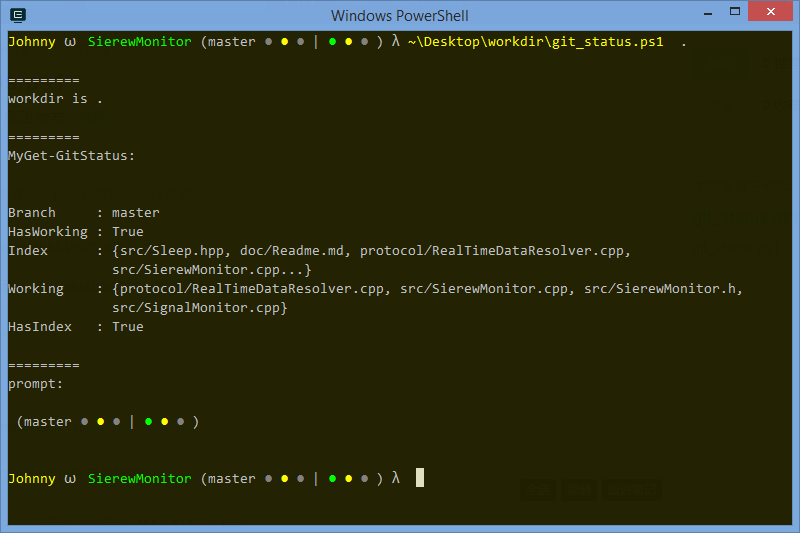
评论
登录后参与技术讨论,分享你的经验与见解。
登录 / 注册暂无评论