Android UI基础 仿闲鱼发布页

文章目录
Android UI基础 仿闲鱼发布页
https://xueqiu.com/5459405965...
https://xueqiu.com/5459405965...
https://xueqiu.com/5459405965...
https://xueqiu.com/5459405965...
https://xueqiu.com/5459405965...
https://xueqiu.com/5459405965...
https://xueqiu.com/5459405965...
https://xueqiu.com/5459405965...
https://xueqiu.com/5459405965...
https://xueqiu.com/5459405965...
https://xueqiu.com/5459405965...
https://xueqiu.com/5459405965...
https://xueqiu.com/5459405965...
https://xueqiu.com/5459405965...
https://xueqiu.com/5459405965...
https://xueqiu.com/5459405965...
https://xueqiu.com/5459405965...
https://xueqiu.com/5459405965...
https://xueqiu.com/5459405965...
https://xueqiu.com/5459405965...
https://xueqiu.com/5459405965...
https://xueqiu.com/5459405965...
https://xueqiu.com/5459405965...
https://xueqiu.com/5459405965...
实现图: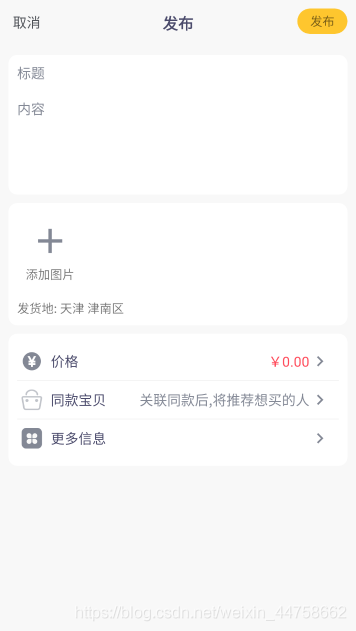
 源码地址:
https://download.csdn.net/download/weixin_44758662/12819060
代码太长不好看
建议直接复制运行,需要可收藏
用到的资源在最下面
`<?xml version="1.0" encoding="utf-8"?>
<androidx.constraintlayout.widget.ConstraintLayout xmlns:android="http://schemas.android.com/apk/res/android"
    xmlns:app="http://schemas.android.com/apk/res-auto"
    xmlns:tools="http://schemas.android.com/tools"
    android:layout_width="match_parent"
    android:layout_height="match_parent"
    android:background="@color/colo_bac"
    tools:context=".DemoActivity">

    <RelativeLayout
        android:id="@+id/relativeLayout"
        android:layout_width="match_parent"
        android:layout_height="wrap_content"
        android:padding="10dp"
        app:layout_constraintBottom_toBottomOf="parent"
        app:layout_constraintEnd_toEndOf="parent"
        app:layout_constraintStart_toStartOf="parent"
        app:layout_constraintTop_toTopOf="parent"
        app:layout_constraintVertical_bias="0.0">

        <TextView
            android:layout_width="wrap_content"
            android:layout_height="wrap_content"
            android:padding="5dp"
            android:text="取消"
            android:textColor="@color/text_black"
            android:textSize="16sp" />

        <TextView
            android:layout_width="wrap_content"
            android:layout_height="wrap_content"
            android:layout_centerInParent="true"
            android:padding="5dp"
            android:text="发布"
            android:textColor="@color/text_main"
            android:textSize="18sp"
            android:textStyle="bold" />

        <TextView
            android:layout_width="wrap_content"
            android:layout_height="wrap_content"
            android:layout_alignParentEnd="true"
            android:background="@drawable/shape_yellow"
            android:paddingStart="15dp"
            android:paddingTop="5dp"
            android:paddingEnd="15dp"
            android:paddingBottom="5dp"
            android:text="发布"
            android:textSize="14sp" />
    </RelativeLayout>

    <LinearLayout
        android:id="@+id/linearLayout"
        android:layout_width="match_parent"
        android:layout_height="wrap_content"
        android:layout_margin="10dp"
        android:background="@drawable/shape_white"
        android:orientation="vertical"
        app:layout_constraintBottom_toBottomOf="parent"
        app:layout_constraintEnd_toEndOf="parent"
        app:layout_constraintStart_toStartOf="parent"
        app:layout_constraintTop_toBottomOf="@+id/relativeLayout"
        app:layout_constraintVertical_bias="0.0">

        <EditText
            android:layout_width="match_parent"
            android:layout_height="wrap_content"
            android:background="@null"
            android:hint="标题"
            android:padding="10dp"
            android:textColor="@color/text_main"
            android:textColorHint="@color/text_main1"
            android:textSize="16sp" />

        <EditText
            android:layout_width="match_parent"
            android:layout_height="120dp"
            android:background="@null"
            android:gravity="start|top"
            android:hint="内容"
            android:padding="10dp"
            android:textColor="@color/text_main"
            android:textColorHint="@color/text_main1"
            android:textSize="16sp" />
    </LinearLayout>

    <LinearLayout
        android:id="@+id/linearLayout2"
        android:layout_width="match_parent"
        android:layout_height="wrap_content"
        android:layout_margin="10dp"
        android:background="@drawable/shape_white"
        android:orientation="vertical"
        android:padding="10dp"
        app:layout_constraintBottom_toBottomOf="parent"
        app:layout_constraintEnd_toEndOf="parent"
        app:layout_constraintStart_toStartOf="parent"
        app:layout_constraintTop_toBottomOf="@+id/linearLayout"
        app:layout_constraintVertical_bias="0.0">

        <TextView
            android:layout_width="wrap_content"
            android:layout_height="wrap_content"
            android:drawableTop="@drawable/ic_add_black_48dp"
            android:drawablePadding="5dp"
            android:padding="10dp"
            android:text="添加图片" />

        <TextView
            android:layout_width="wrap_content"
            android:layout_height="wrap_content"
            android:layout_marginTop="10dp"
            android:text="发货地: 天津 津南区" />
    </LinearLayout>

    <LinearLayout
        android:layout_width="match_parent"
        android:layout_height="wrap_content"
        android:layout_margin="10dp"
        android:background="@drawable/shape_white"
        android:orientation="vertical"
        android:padding="10dp"
        app:layout_constraintBottom_toBottomOf="parent"
        app:layout_constraintEnd_toEndOf="parent"
        app:layout_constraintStart_toStartOf="parent"
        app:layout_constraintTop_toBottomOf="@+id/linearLayout2"
        app:layout_constraintVertical_bias="0.0">

        <LinearLayout
            android:layout_width="match_parent"
            android:layout_height="wrap_content"
            android:orientation="horizontal"
            android:padding="5dp">

            <ImageView
                android:layout_width="wrap_content"
                android:layout_height="wrap_content"
                android:layout_gravity="center_vertical"
                android:src="@drawable/icon_money" />

            <TextView
                android:layout_width="wrap_content"
                android:layout_height="wrap_content"
                android:layout_marginStart="5dp"

                android:padding="5dp"
                android:text="价格"
                android:textColor="@color/text_main"
                android:textSize="16sp" />

            <TextView
                android:layout_width="match_parent"
                android:layout_height="wrap_content"
                android:drawableEnd="@drawable/ic_right_24dp"
                android:gravity="end|center_vertical"
                android:padding="5dp"
                android:text="¥0.00"
                android:textColor="@color/colo_money"
                android:textSize="16sp" />
        </LinearLayout>

        <View
            android:layout_width="match_parent"
            android:layout_height="2px"
            android:background="@color/color_link" />

        <LinearLayout
            android:layout_width="match_parent"
            android:layout_height="wrap_content"
            android:orientation="horizontal"
            android:padding="5dp">

            <ImageView
                android:layout_width="wrap_content"
                android:layout_height="wrap_content"
                android:layout_gravity="center_vertical"
                android:src="@drawable/icon_same" />

            <TextView
                android:layout_width="wrap_content"
                android:layout_height="wrap_content"
                android:layout_marginStart="5dp"
                android:padding="5dp"
                android:text="同款宝贝"
                android:textColor="@color/text_main"
                android:textSize="16sp" />

            <TextView
                android:layout_width="match_parent"
                android:layout_height="wrap_content"
                android:drawableEnd="@drawable/ic_right_24dp"
                android:gravity="end|center_vertical"
                android:padding="5dp"
                android:text="关联同款后,将推荐想买的人"
                android:textColor="@color/text_main1"
                android:textSize="16sp" />
        </LinearLayout>

        <View
            android:layout_width="match_parent"
            android:layout_height="2px"
            android:background="@color/color_link" />

        <LinearLayout
            android:layout_width="match_parent"
            android:layout_height="wrap_content"
            android:orientation="horizontal"
            android:padding="5dp">

            <ImageView
                android:layout_width="wrap_content"
                android:layout_height="wrap_content"
                android:layout_gravity="center_vertical"
                android:src="@drawable/icon_more" />

            <TextView
                android:layout_width="match_parent"
                android:layout_height="wrap_content"
                android:drawableEnd="@drawable/ic_right_24dp"
                android:gravity="center_vertical"
                android:layout_marginStart="5dp"
                android:padding="5dp"
                android:text="更多信息"
                android:textColor="@color/text_main"
                android:textSize="16sp" />
        </LinearLayout>
    </LinearLayout>


</androidx.constraintlayout.widget.ConstraintLayout>`

*   1
*   2
*   3
*   4
*   5
*   6
*   7
*   8
*   9
*   10
*   11
*   12
*   13
*   14
*   15
*   16
*   17
*   18
*   19
*   20
*   21
*   22
*   23
*   24
*   25
*   26
*   27
*   28
*   29
*   30
*   31
*   32
*   33
*   34
*   35
*   36
*   37
*   38
*   39
*   40
*   41
*   42
*   43
*   44
*   45
*   46
*   47
*   48
*   49
*   50
*   51
*   52
*   53
*   54
*   55
*   56
*   57
*   58
*   59
*   60
*   61
*   62
*   63
*   64
*   65
*   66
*   67
*   68
*   69
*   70
*   71
*   72
*   73
*   74
*   75
*   76
*   77
*   78
*   79
*   80
*   81
*   82
*   83
*   84
*   85
*   86
*   87
*   88
*   89
*   90
*   91
*   92
*   93
*   94
*   95
*   96
*   97
*   98
*   99
*   100
*   101
*   102
*   103
*   104
*   105
*   106
*   107
*   108
*   109
*   110
*   111
*   112
*   113
*   114
*   115
*   116
*   117
*   118
*   119
*   120
*   121
*   122
*   123
*   124
*   125
*   126
*   127
*   128
*   129
*   130
*   131
*   132
*   133
*   134
*   135
*   136
*   137
*   138
*   139
*   140
*   141
*   142
*   143
*   144
*   145
*   146
*   147
*   148
*   149
*   150
*   151
*   152
*   153
*   154
*   155
*   156
*   157
*   158
*   159
*   160
*   161
*   162
*   163
*   164
*   165
*   166
*   167
*   168
*   169
*   170
*   171
*   172
*   173
*   174
*   175
*   176
*   177
*   178
*   179
*   180
*   181
*   182
*   183
*   184
*   185
*   186
*   187
*   188
*   189
*   190
*   191
*   192
*   193
*   194
*   195
*   196
*   197
*   198
*   199
*   200
*   201
*   202
*   203
*   204
*   205
*   206
*   207
*   208
*   209
*   210
*   211
*   212
*   213
*   214
*   215
*   216
*   217
*   218
*   219
*   220
*   221
*   222
*   223
*   224
*   225
*   226
*   227
*   228
*   229
*   230
使用到的资源:
color :
`<?xml version="1.0" encoding="utf-8"?>
<resources>
<color name="text_main">#49496a</color>
    <color name="text_main1">#838895</color>
    <color name="text_black">#4E5157</color>
    <color name="colo_money">#ff4757</color>
    <color name="colo_blue">#2196F3</color>
    <color name="color_link">#f0f0f0</color>
    <color name="colo_white">#fff</color>
    <color name="colo_bac">#f8f8f8</color>
    <color name="colo_yellow">#FEC62E</color>
    <color name="colo_red">#E53935</color>
    </resources>`

*   1
*   2
*   3
*   4
*   5
*   6
*   7
*   8
*   9
*   10
*   11
*   12
*   13
使用到的图片,我使用的是矢量图:
矢量图最大特点:用户可以任意缩放图像显示,而不会破坏图像的清晰度、细节等。
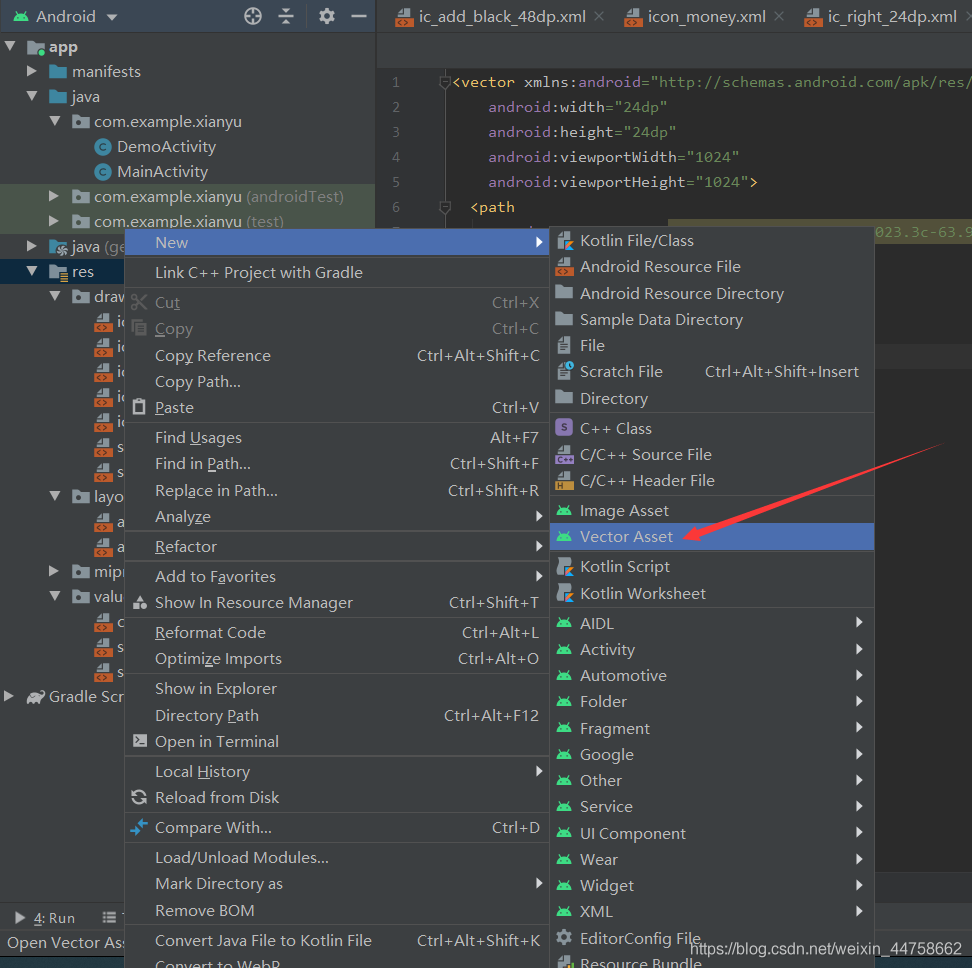 可以选择Clip Art 也可以选择网上下载的然后local file(图片格式为SVG,PSD)本地导入
使用: android:src="@drawable/icon_money" /> 即可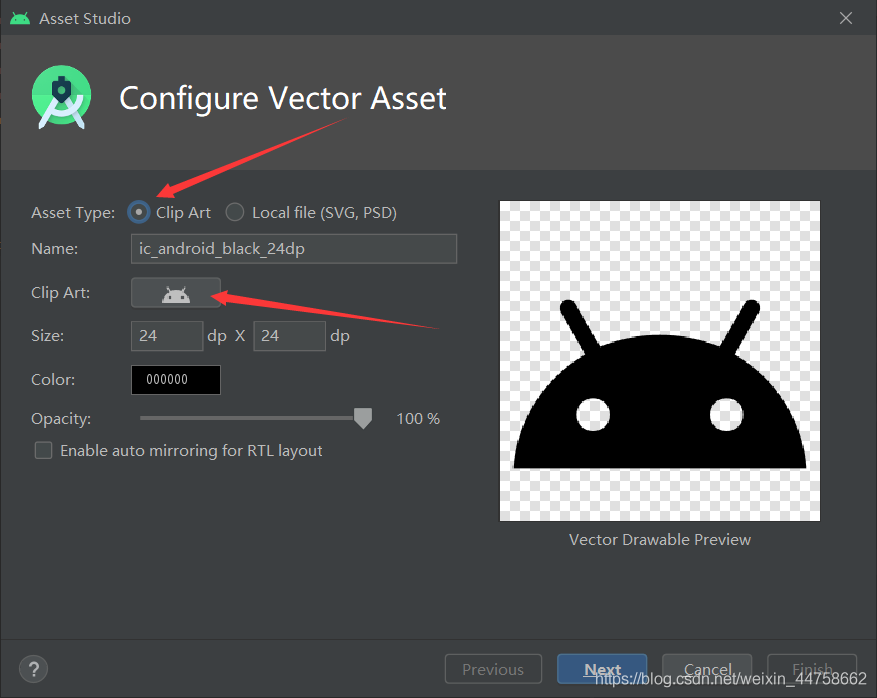
评论
登录后参与技术讨论,分享你的经验与见解。
登录 / 注册暂无评论