zsh配置spaceship theme

文章目录
zsh基础配置看这篇.Mac配置zsh
配置效果

插件安装
# Clone this repo:

export ZSH_CUSTOM=~/.oh-my-zsh/custom

git clone https://github.com/spaceship-prompt/spaceship-prompt.git "$ZSH_CUSTOM/themes/spaceship-prompt" --depth=1

# Symlink spaceship.zsh-theme to your oh-my-zsh custom themes directory:

ln -s "$ZSH_CUSTOM/themes/spaceship-prompt/spaceship.zsh-theme" "$ZSH_CUSTOM/themes/spaceship.zsh-theme"

vim ~/.zshrc, set ZSH_THEME="spaceship"
配置字体
字体安装见上一篇文章.
选择字体: Meslo LG M DZ for Powerline
自定义git user信息展示
git clone https://github.com/brucejcw/spaceship-git-user.git "$ZSH/plugins/spaceship-git-user"
修改.zshrc
vim ~/.zshrc
添加pluginplugins=(... spaceship-git-user)
在source命令之后添加spaceship add git_user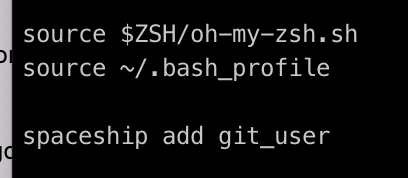
评论
登录后参与技术讨论,分享你的经验与见解。
登录 / 注册暂无评论