解决由于“mysql8默认排序规则”导致“外健不兼容”问题

文章目录
问题复现
新到手一个Java17 + mysql8的项目,使用开源工具flyway进行数据库的版本控制。
装环境,启动。
在flyway更新数据库的过程中报错,启动失败。
错误信息:
Migration V3.1.21__add_coupon_temp.sql failed
---------------------------------------------
SQL State  : HY000
Error Code : 3780
Message    : Referencing column 'client_id' and referenced column 'id' in foreign key constraint 'FKiywe9ktoq9d997123pmqdlmg5' are incompatible.
Location   : db/migration/V3.1.21__add_coupon_temp.sql (/Users/user/api/target/classes/db/migration/V3.1.21__add_coupon_temp.sql)
Line       : 3
Statement  : alter table coupon_temp add constraint FKiywe9ktoq9d997123pmqdlmg5 foreign key (client_id) references client (id)
关键信息是这一条:
Referencing column 'client_id' and referenced column 'id' in foreign key constraint 'FKiywe9ktoq9d997123pmqdlmg5' are incompatible.
翻译过来就是:
引用列“客户端ID”和引用列“ID”在外健约束中不兼容。
导致此版本的flyway变更失败。
原因分析
- 主键与外键字段数据类型不一致
- 主键与外键字段数据类型一致,但两个数据表的字符集或排序规则不一致。
经检查,外健关联的两个列的字符集均为varchar(255),并且创建表的SQL语句中指定了字符集utf8mb4,因此猜测是排序规则不一致。
查看表结构,发现部分数据表的Collation是utf8mb4_0900_ai_ci,而另一部分是utf8mb4_general_ci
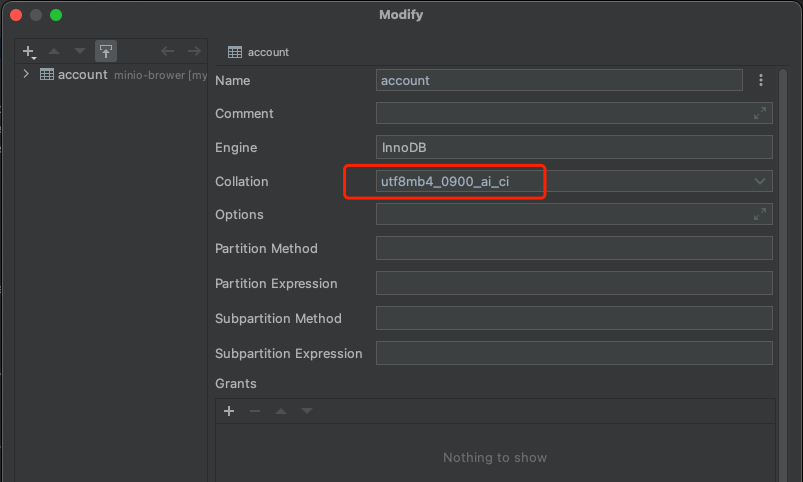
(为避免盗版问题,本文使用JetBarins系列的DataGrip,如使用NaviCat操作类似)
问题就出在这里。为什么排序规则会变呢?
Mysql8的默认排序规则
当设置表的默认字符集为utf8mb4字符集但未明确指定排序规则时:
- 在MySQL 5.7版本中,默认排序规则为utf8mb4_general_ci。
- 在MySQL 8.0版本中,默认排序规则为utf8mb4_0900_ai_ci。
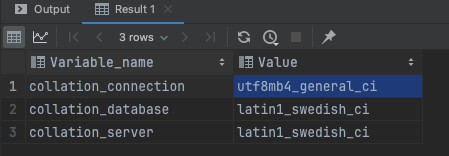
我们分别在两个版本中使用show variables where Variable_name like '%collation%';验证一下
其中,5.7版本:
8.2版本:
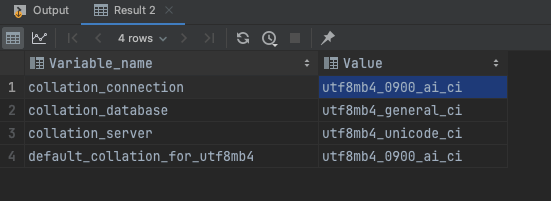
因此,使用mysql8版本,设置字符集为utf8mb4,并且没有设置排列规则时,就会使用utf8mb4_0900_ai_ci了,而部分表在设计SQL时手动指定了排列规则,这就是为什么查看时会出现两种规则都有的情况了。
修改Mysql8的默认规则
我们把collation_connection和default_collation_for_utf8mb4改掉应该就没问题了
set global collation_connection = utf8mb4_general_ci;
set global default_collation_for_utf8mb4 = utf8mb4_general_ci;断开会话并重新连接后,再次使用show variables where Variable_name like '%collation%';查看,已经是我们想要的结果:

此时,drop掉出问题的数据表,重新启动后端,执行flyway,启动成功。

参考资料
https://www.cnblogs.com/gaogao67/p/14721829.html
https://www.cnblogs.com/hdwang/p/16739147.html
评论
登录后参与技术讨论,分享你的经验与见解。
登录 / 注册暂无评论