跨系统登录的实战案例(多入口登录系统)

文章目录
最近遇到一个头疼的需求,就是通过门户网站登录到后台管理系统,门户网站相当于后台管理系统的另一个入口,记录一下一步一坑的血泪史
     登录,调登录接口,必须要给后台传入响应的参数,成功后,后台会返回成功
 的消息和一系列参数,我的系统中用户id和token令牌是登录跳转页面要携带的必
 须参数
  于是乎,门户网站登录成功后,我就用localstorage存储登录成功后的信息,
  再跳转我要登录的后台管理系统成功登陆的界面url,失败!!!!
  后来打开控制台发现,门户网站存进去的localstorage的token和userId在
  后台管理系统界面为空~~~
  于是乎想到第二招,在后台管理系统创建一个空白页,门户网站登陆后直接跳转到
  后台管理系统的空白页,通过url将token和userId传过来
  再取到参数,存进localstorage,再在空白页直接跳转登录页,成功~~~
上代码
门户系统 vue写的
//调登录接口 传参数 (此处封装axios接口 不赘述axios)
login(this.ruleForm.phone,newpassword)
      .then(res=>{
      console.log(res.data.data.accessToken)//打印是否拿到token
      if(res.data.data.accessToken&&this.islogin) {//登陆成功并且有token 存储
      let tokens=res.data.data.accessToken
      let phone=this.ruleForm.phone
      let userId=res.data.data.userId
 //跳转后台管理系统地址,并且将token,userId传入 注意要加密传输 此处不赘述
 window.open(`你的系统登录地址?token=${tokens}&phone=${phone}&password=${newpassword}&salt=${data.salt}&userId=${userId}`)
后台管理系统 react写的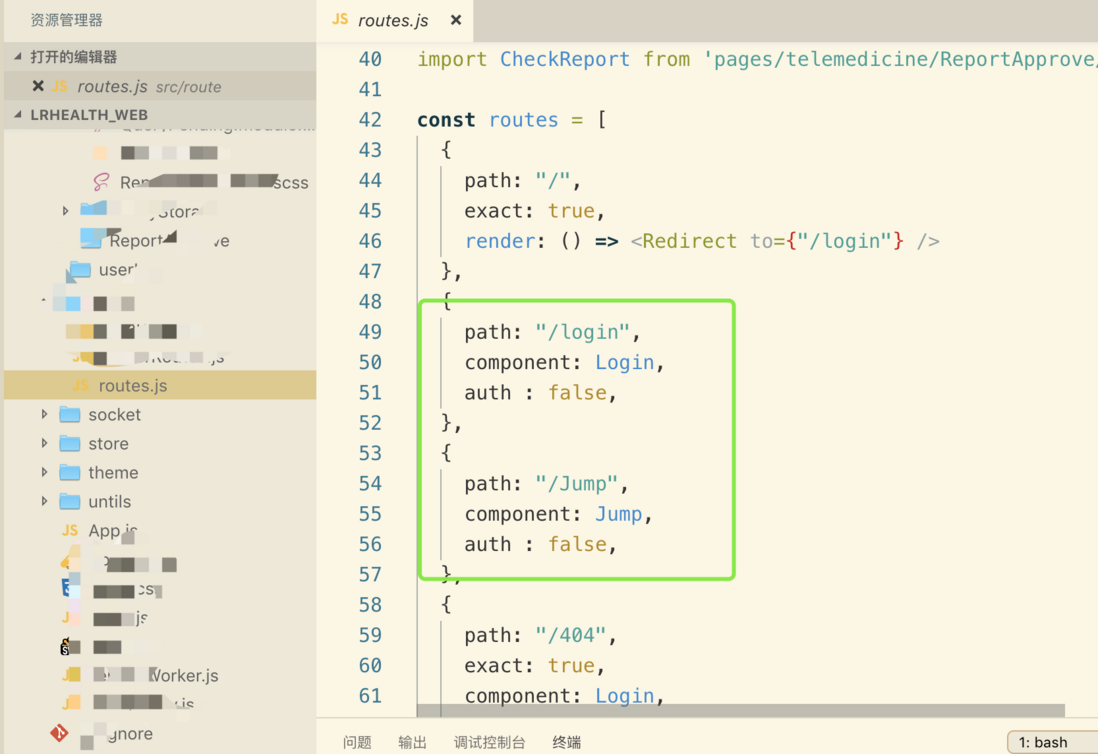
我要跳转的是jump页面,路由配置这里要配置一级路由 跟login同级别
代码
class jump extends Component {
    constructor(props){
        super(props)
        console.log(this.props)
        this.state={
            url:'',
            token:'',
            password:'',
            //存储传过来的参数
            params:this.props.location.search
        }
    }
    render() {

        return (
            <div>
                登陆登陆登陆!!!!
            </div>
        );
        }
        componentDidMount(){
           //将路径接收过来的参数转为数组
            let str = this.props.location.search
                let arr = str.split("?")[1].split("&");   //先通过?分解得到?后面的所需字符串,再将其通过&分解开存放在数组里
                let obj = {};
                for (let i of arr) {
                obj[i.split("=")[0]] = i.split("=")[1];  //对数组每项用=分解开,=前为对象属性名,=后为属性值
                }
                console.log(obj);
                 if( obj.token&&obj.userId){//确定接收的token和id不为空 再将token和userId存储到本地

                    localStorage.setItem('token', obj.token);
                    localStorage.setItem('userId', obj.userId);

                 }
                  //获取本地存储的token 和id 跳登陆
                 let token=localStorage.getItem('token')
                 let userId=localStorage.getItem('userId')
                 //打印取到的值
                 console.log(token,userId,'打印本地登陆需要信息')
                 if(token&&userId){//如果不为空 跳转后台系统登录成功后 我的工作台页面页 成功!!!
                    this.props.history.push({ pathname: '/userInfo/myHome/myWorkbench' })
                 }

        }
    }

export default jump;
分享完毕,希望能帮到大家
评论
登录后参与技术讨论,分享你的经验与见解。
登录 / 注册暂无评论