keepAlive

文章目录
导航tab栏切换
案例
委托管理下的所有子菜单切换

参考代码
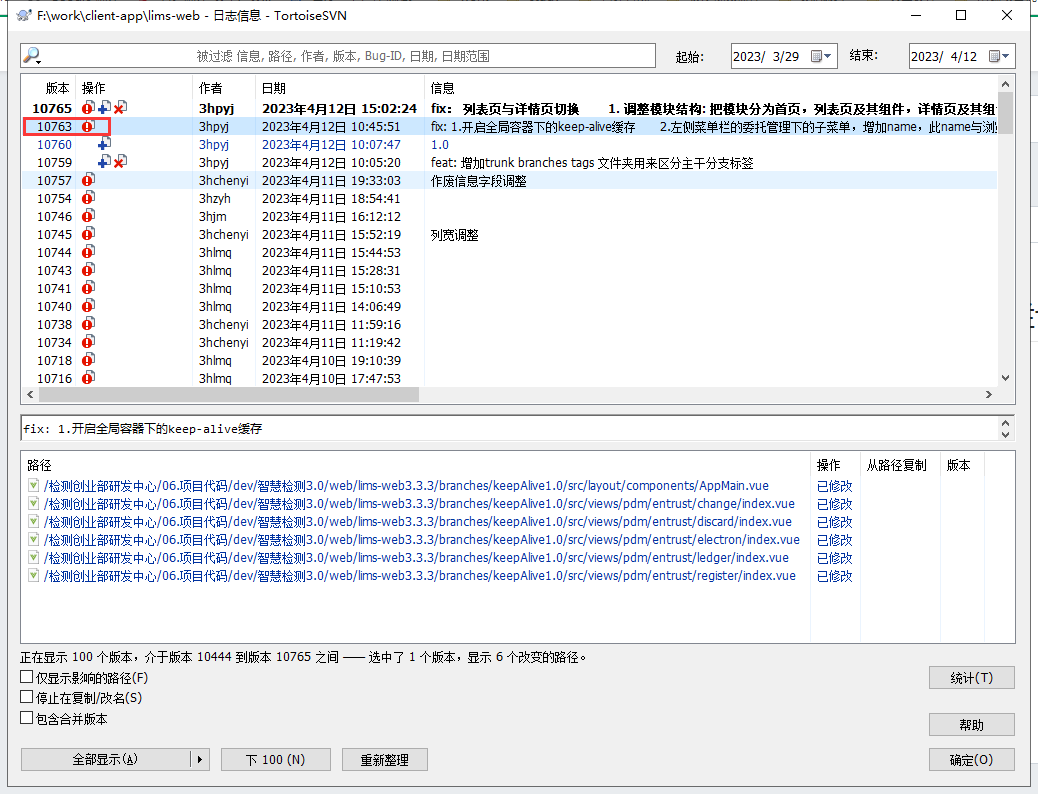
svn提交记录
分支: branches\keepAlive1.0
版本: 10763
指南
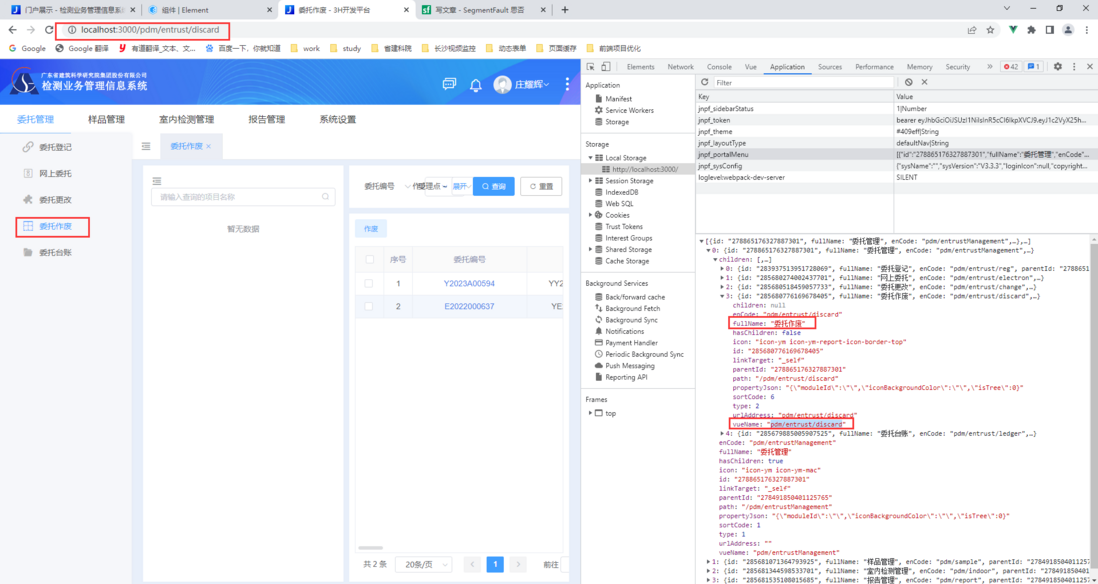
例如我现在要给委托作废页面增加缓存- 找到页面
url对应的vueName
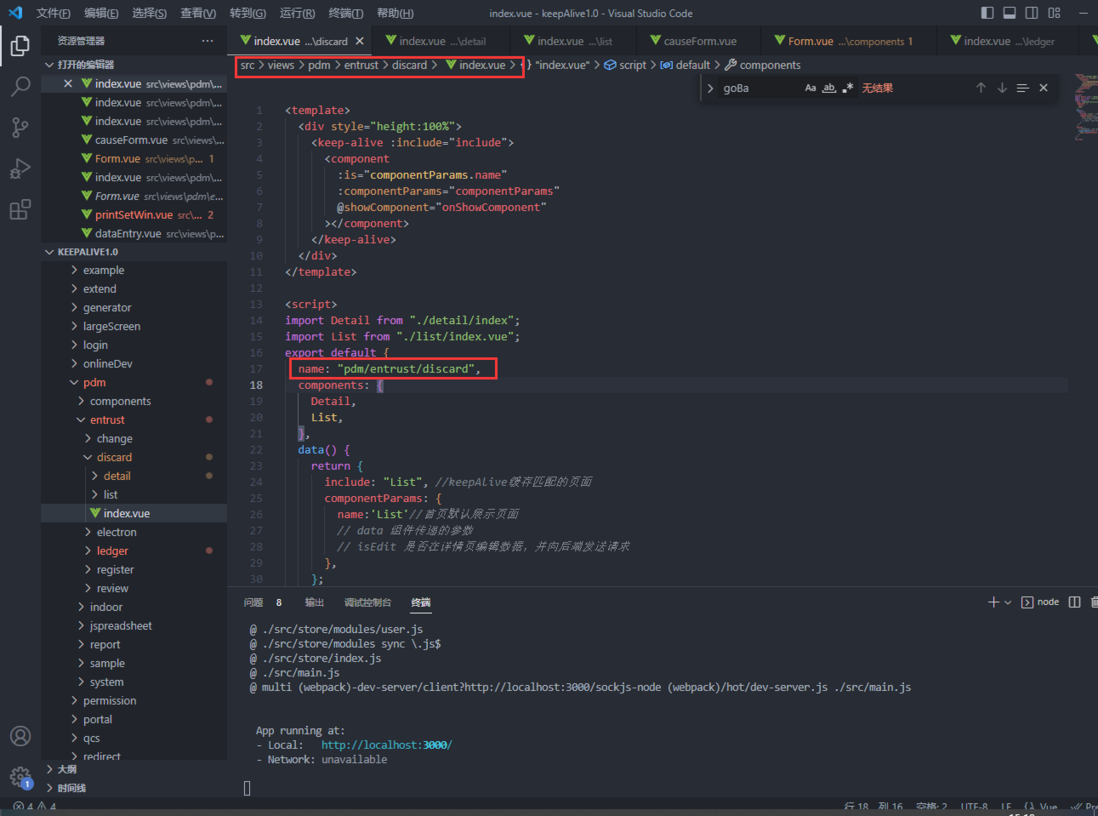
- 在
委托作废增加name属性
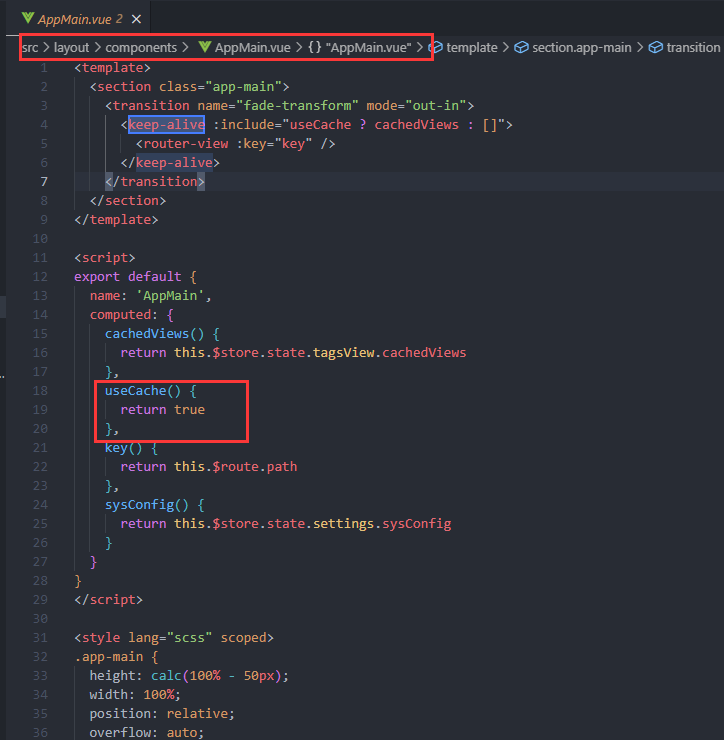
- 全局容器包裹的路由开启缓存
列表与详情切换
案例
委托作废的列表页与详情页切换

参考代码
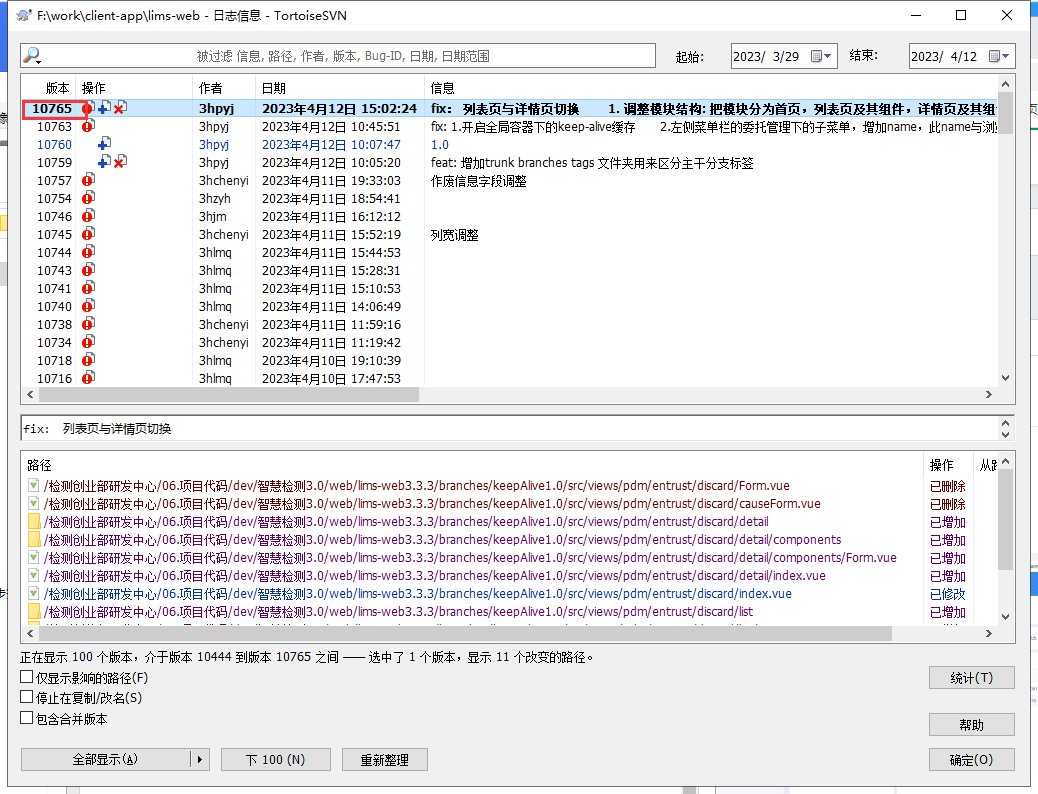
svn提交记录
分支: branches\keepAlive1.0
版本: 10765
指南
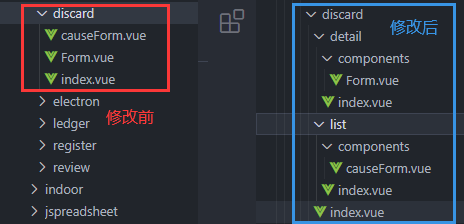
文件夹结构变更
修改前:
- index: 列表页
- Form: 详情页
- causeForm: 列表页弹窗
修改后:
- index: 首页
- list/index: 列表页的首页
- list/components/causeForm: 列表页的弹窗
- detail/index: 详情页首页
- detail/components/Form: 详情页默认展示页(可以根据详情页内有tab切换组件自由组件)
重点配置说明
首页
<template>
  <div style="height:100%">
    <keep-alive :include="include">
      <component
        :is="componentParams.name"
        :componentParams="componentParams"
        @showComponent="onShowComponent"
      ></component>
    </keep-alive>
  </div>
</template>

<script>
import Detail from "./detail/index";
import List from "./list/index.vue";
export default {
  name: "pdm/entrust/discard",
  components: {
    Detail,
    List,
  },
  data() {
    return {
      include: "List", //keepAlive缓存匹配的页面
      componentParams: {
        name:'List'//首页默认展示页面
        // data 组件传递的参数
        // isEdit 是否在详情页编辑数据,并向后端发送请求
      },
    };
  },
  methods: {
    // 接收子组件传递的参数
    onShowComponent(val) {
      this.componentParams = val;
    },
  },
};
</script>
列表页
接收参数
  props:{
    componentParams: {
      type: Object,
      default() {
        return {};
      },
    },
  },
跳转详情页
methods:{
  searchEntrust() {
        this.$emit("showComponent", {
          name: "Detail",
          data: searchEntrustData, //要传递的参数
        });
  }
}
是否从详情页编辑数据,跳转回来
  activated(){
    // 1.此判断为从详情页面编辑数据再跳转回列表页,
    // 2.如果有在详情情编辑数据,并向后端的发送请求,则传isEdit:true,刷新数据
    // if (this.componentParams.isEdit) {
    // this.initData();
    // }
  },
详情页
列表跳转详情默认不缓存,一般传id过来,请求详情接口
接收参数
  props:{
    componentParams: {
      type: Object,
      default() {
        return {};
      },
    },
  },
请求详情接口
  created() {
    const searchEntrustData = this.componentParams.data
    this.init(searchEntrustData[0].id,true,searchEntrustData[0],searchEntrustData)
  },
组件tab栏切换
问题
组件tab栏切换卡,页面很久才渲染完成,存在性能问题,需要修改页面结构
旧版
- 页面的tab结构,初始化时会默认请求所有的tab的相关接口,初始化应该只请求选中tab页面下的接口,切换到其它tab时,才去请求对应的接口,实现按需加载
- tab切换时,可根据需要设置缓存,按实际情况是否再请去请求

新版
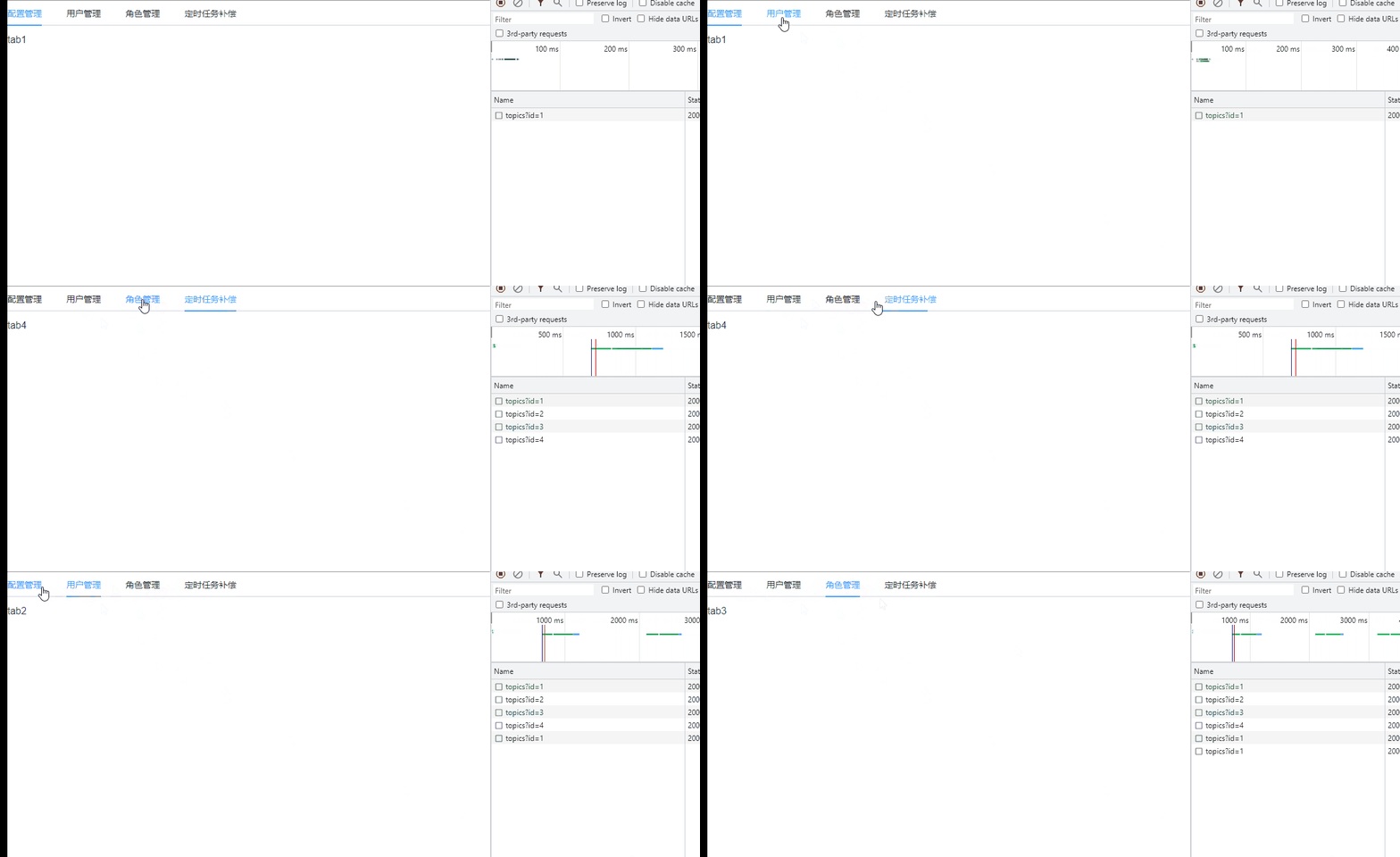
- 初始时只请求了选中的tab下的接口,其它tab下的接口没有去请求
tab1设置了不缓存,不管是否展示过,切换到tab1时都会去请求接口tab2,tab3,tab4设置了缓存,即展示过后,再切换时不再请求接口
案例代码
父组件
<template>
  <el-tabs v-model="activeName" @tab-click="handleClick">
    <el-tab-pane
      v-for="item in tabs"
      :key="item.name"
      :label="item.label"
      :name="item.name"
    >
      <keep-alive>
        <component
          v-if="activeName == item.name"
          :is="item.component"
        ></component>
      </keep-alive>
    </el-tab-pane>
  </el-tabs>
</template>
<script>
import tab1 from "@/components/tabs/tabs1.vue";
import tab2 from "@/components/tabs/tabs2.vue";
import tab3 from "@/components/tabs/tabs3.vue";
import tab4 from "@/components/tabs/tabs4.vue";
export default {
  name: "TabView",
  components: {
    tab1,
    tab2,
    tab3,
    tab4,
  },
  data() {
    return {
      activeName: "first",
      tabs: [
        {
          label: "配置管理",
          name: "first",
          component: "tab1",
        },
        {
          label: "用户管理",
          name: "second",
          component: "tab2",
        },
        {
          label: "角色管理",
          name: "third",
          component: "tab3",
        },
        {
          label: "定时任务补偿",
          name: "fourth",
          component: "tab4",
        },
      ],
    };
  },
  methods: {
    handleClick(tab, event) {
      console.log(tab, event);
    },
  },
};
</script>
子组件:tab1
<template>
  <div>tab1</div>
</template>
<script>
export default {
  props: {
    activeName: {
      type: String,
      default: "",
    },
  },
  name: "TabView1",
  data() {
    return {};
  },
  methods: {
    init() {
      this.$axios.get("https://cnodejs.org/api/v1/topics?id=1");
    },
  },
  activated() {
    // 每次进来都会请求
    this.init();
  },
};
</script>
子组件: tab2,tab3,tab4
tab2,tab3,tab4结构一样,参考下面的tab2
<template>
  <div>tab2</div>
</template>
<script>
export default {
  name: "TabView2",
  data() {
    return {};
  },
  methods: {
    init() {
      this.$axios.get("https://cnodejs.org/api/v1/topics?id=2");
    },
  },
  created() {
    this.init();
  },
};
</script>
评论
登录后参与技术讨论,分享你的经验与见解。
登录 / 注册暂无评论