Vue 中英文转换 vue-i18n 的使用

文章目录
一、安装
npm install vue-i18n二、使用
在 src 下创建 lang 文件夹。
1、准备语言包
本例我准备了两种语言包,分别是中文和英文:zn、en。在 lang 下创建两个文件,zn.js 和 en.js。
// zn.js
export default {
  main:{
    message:"消息",
    display:"展示"
  }
};
// en.js
export default {
main:{
message:"message",
display:"display"
}
}2、准备翻译的语言环境
在 lang 下创建 index.js,使用如上的两种语言包
import Vue from "vue";
import VueI18n from 'vue-i18n'
import zn from "./zn"
import en from "./en"
Vue.use(VueI18n);   // 全局注册国际化包

// 准备翻译的语言环境信息
const i18n = new VueI18n({
  locale: "zn",   // 初始化中文
  messages: {
    "zn":zn,
    "en":en
  }
});

export default i18n
3、实现语言翻译
在 main.js 中将 i18n 注入 vue 中
import i18n from './lang'
new Vue({
  el: '#app',
  router,
  store,
  i18n,   // 注入,不能缺少
  components: { App },
  template: '<App/>'
})
使用方式
(1)直接使用
<template>
  <div style="width: 100%;">
    <div>
      <div>
        <span>{{$t('main.message')}}</span>
      </div>
    </div>
  </div>
</template>
(2) 语言切换
<template>
  <div style="width: 100%;">
    <div>
      <div>
        <span>{{$t('main.message')}}</span>
        <button @click="changeLang">切换语言</button>
      </div>
    </div>
  </div>
</template>

<script>
export default {
  methods: {
    changeLang() {
      if(this.$i18n.locale === 'zn'){   // 判断当前语言
        this.$i18n.locale = 'en'   // 设置当前语言
      } else {
        this.$i18n.locale = 'zn'
      }
    }
  }
}
</script>
三、整合 ElementUI 语言包
我们可以整合 ElementUI 中存在的语言包。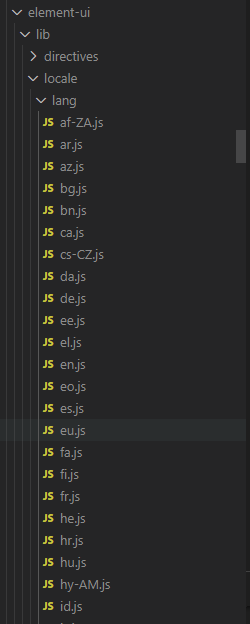
1、扩展中文
// zn.js
import zhLocale from 'element-ui/lib/locale/lang/zh-CN'   //引入element语言包
export default {
  main:{
    message:"消息",
    display:"展示"
  },
  ...zhLocale
};
2、扩展英文
// en.js
import enLocale from 'element-ui/lib/locale/lang/en'   //引入element语言包
export default {
  main:{
    message:"message",
    display:"display"
  },
  ...enLocale
}
根据上图(语言包)取可翻译字段
<p>{{$t('el.colorpicker.confirm')}}</p>

// 中文“确定”,英文“OK”
四、问题记录

报错的原因主要是因为当前使用的版本不匹配,解决方案入下。
npm install vue-i18n@8》》》vue-i18n使用方案梳理,可供参考使用
评论
登录后参与技术讨论,分享你的经验与见解。
登录 / 注册暂无评论