sourceTree 添加 ssh key 方法

文章目录
1.使用 git 客户的生成公私钥:id_rsa、id_rsa.pub
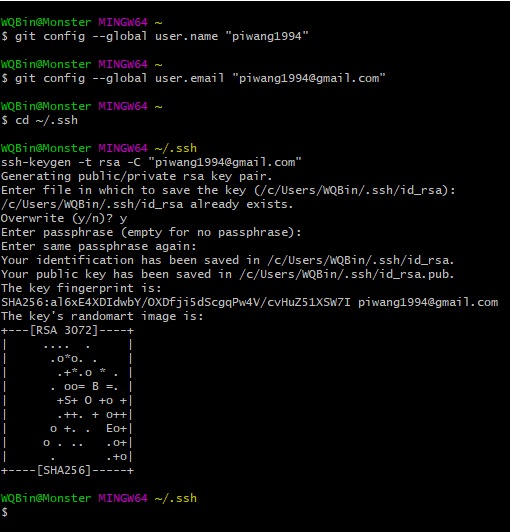
1.1设置Git的user name和email:
$ git config --global user.name "xxx" $ git config \--global user.email "xxx.mail@xxx.com"
1.2.生成SSH密钥过程:
1.2.1.检查是不是已经存在密钥(能进去说明已经存在,就删掉文件夹,重新创建):
cd ~/.ssh1.3.生成 SSH 密钥:
$ ssh-keygen -t rsa -C "xxx.mail@xxx.com"
按3个回车,密码为空。
1.4.文件存放位置 ~/.ssh,如果是window的话就在:C:\Users\Administrator.ssh 下面,当然如果你不是 Administrator 用户的话,需要换成对应的用户。
)
)

2.设置 SourceTree 的 SSH客户端
配置SourceTree 的 SSH 客户的为:OpenSSH
1.1.工具->选项 )

1.2.设置 OpenSSH,这时候,SSH 密钥这一栏自然会去选择当前用户下的 .ssh 目录下的 id\_rsa 这个私钥:)

3.添加 ~/.ssh/id_rsa.pub 文件内容到 git 服务器里面去
3.1.比如你的 git 服务是 github,那么你需要在 https://github.com/settings/keys 里面添加 SSH key ,粘贴id_rsa.pub 到 下面的粘贴板,title随便命名。
)


)

3.2测试
$ ssh git@github.com
PTY allocation request failed on channel 0 Hi piwang1994! You've successfully authenticated, but GitHub does not provide shell access.
Connection to github.com closed.
)

4.SourceTree 来下载 git 项目
- 复制你的 git 地址:https://github.com/piwang1994/big12
- 从 SourceTree 里面新建一个地址,这时候你发现你本地已经可以下载远程的 git 代码

结果:
)

5.补充说明
1.ssh-keygen 是公钥私钥的非对称加密方式:
- 1.1公钥:用于向外发布,任何人都能获取。
- 1.2.私钥:要自己保存,切勿给别人
2.公钥私钥加解密的原理
- 2.1.客户端把自己的公钥存放到要链接的远程主机上(相当于我们把自己的 id_rsa.pub 存放到 git 服务器上)
- 2.2.客户端要链接远程主机的时候,远程主机会向客户的发送一条随机的字符串,客户的收到字符串之后使用自己的私钥对字符串加密然后发送到远程主机,远程主机根据自己存放的公钥对这个字符串进行解密,如果解密成功证明客户端是可信的,直接允许登录,不在要求登录。
本文转自 https://www.cnblogs.com/wqbin/p/11070273.html,如有侵权,请联系删除。
评论
登录后参与技术讨论,分享你的经验与见解。
登录 / 注册⭐️ Admin快速开发: https://show.cool-admin.com/
赞 0⭐️ 官方文档: https://cool-js.com
赞 0⭐️ chatgpt在线体验: https://cool-js.com/ai/chat-vip/index.html?r=helloworld
赞 0