vue 项目部署后 刷新一下 页面找不到 解决

文章目录
1.修改配置router的参数 (效果不好)
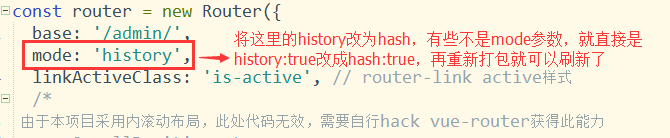
2. (不能解决 出现403)
后端配置例子

Apache

<IfModule mod_rewrite.c>
  RewriteEngine On
  RewriteBase /
  RewriteRule ^index\.html$ - [L]
  RewriteCond %{REQUEST_FILENAME} !-f
  RewriteCond %{REQUEST_FILENAME} !-d
  RewriteRule . /index.html [L]
</IfModule>
3.发现这个配置依然有问题 继续排坑
在httpd.conf找了一下,权限配置的问题,XAMPP默认的设置是这样的:
#
AllowOverride none
Require all denied
修改成下面
Options FollowSymLinks AllowOverride None Order deny,allow Deny from all4.还是不行 继续排坑 最终解决!
<Directory "D:/Documents/abc/php/basic/web">
    Options Indexes FollowSymLinks Includes ExecCGI
    AllowOverride All
    Require all granted
</Directory>
5.补充 根本原因
01.httpd-vhosts.conf的配置
NameVirtualHost *:9090
<VirtualHost *:9090>
ServerAdmin webmaster@dummy-host.localhost
DocumentRoot "D:\work\web\vue-cli-work\dist"
ServerName www.tongtong.com
ServerAlias *.www.tongtong.com
ErrorLog "logs/localhost-error_log"
02. .htaccess文件的 增加 注意不要有后缀
<IfModule mod_rewrite.c>
RewriteEngine On
RewriteBase /
RewriteRule ^index.html$ - [L]
RewriteCond %{REQUEST_FILENAME} !-f
RewriteCond %{REQUEST_FILENAME} !-d
RewriteRule . /index.html [L]
评论
登录后参与技术讨论,分享你的经验与见解。
登录 / 注册⭐️ Admin快速开发: https://show.cool-admin.com/
赞 0⭐️ 官方文档: https://cool-js.com
赞 0⭐️ chatgpt在线体验: https://cool-js.com/ai/chat-vip/index.html?r=helloworld
赞 0