Spring Cloud (10) —— Gateway 的应用

文章目录
关于
gateway filter 的应用:限流、熔断降级、重试
global filter 的应用:鉴权、
限流
使用 Filter 中的 RequestRateLimiter 实现。
-
在
pom中增加 redis 的依赖<dependency> <groupId>org.springframework.boot</groupId> <artifactId>spring-boot-starter-data-redis-reactive</artifactId> </dependency> -
在
application.yml中增加 redis 的配置spring: redis: host: localhost #password: port: 6379 -
在
application.yml中增加 gateway 的限流配置- id: request-rate-limiter uri: lb://album-provider predicates: -Path:/book/** filters: - name: RequestRateLimiter # 起限流作用的 Filter 类 args: redis-rate-limiter.replenishRate: 10 # 允许每秒处理请求的个数 redis-rate-limiter.burstCapacity: 20 # 令牌桶的容量,允许在一秒钟内完成的最大请求数 key-resolver: "#{@userKeyResolver}" # 使用 SpEL 按名称引用 bean以上设置,瞬时最大 20 并发,随后维持在 10 并发
-
启动类中增加配置 bean 的代码
// 返回了一个 lambda 表达式,该表达式是 KeyResolver 接口的一个实现 // exchange : 在调用时, exchange 会被赋值为 ServerWebExchange 类型的变量 @Bean KeyResolver userKeyResolver() { return exchange -> Mono.just(exchange.getRequest().getQueryParams().getFirst("user")); } -
另外增加一个 bean ,采用的 ip 来限流
@Bean public KeyResolver ipKeyResolver() { return exchange -> Mono.just(exchange.getRequest().getRemoteAddress().getHostName()); } -
此时启动会报错
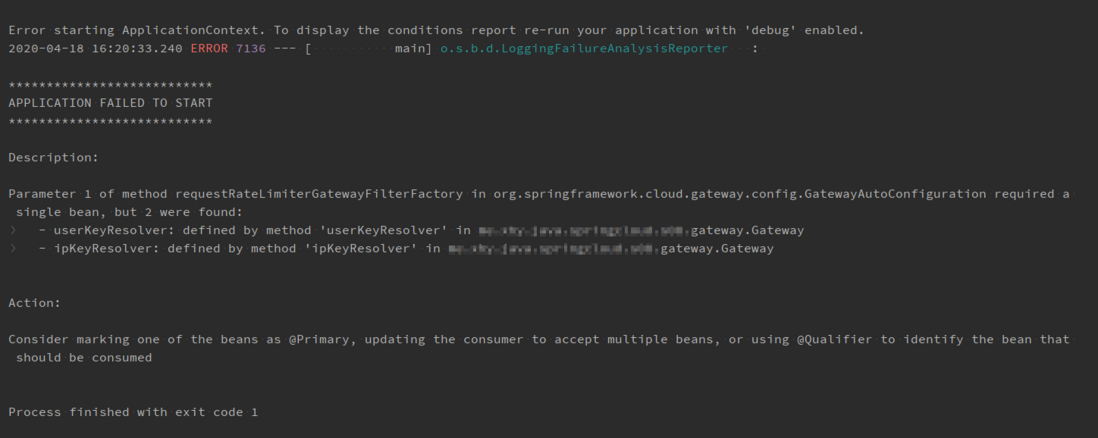
按照官网的描述,这里会按名字匹配KeyResolver,但是通过报错信息来看,明显是按类型匹配的。`keyResolver` is a bean that implements the `KeyResolver` interface. In configuration, reference the bean by name using SpEL. `#{@myKeyResolver}` is a SpEL expression that references a bean named `myKeyResolver`. The following listing shows the `KeyResolver`通过报错信息的提示,在某一个
@Bean上增加@Primary注解试试——可解决。 - 访问
http://localhost:32001/book/books
超过流量限制被拒绝的访问,client 会收到
429 的 HTTP 状态码。
熔断降级——很遗憾,这部分没有测试出预期效果,在发生访问超时和访问量超限的情况下,都没有触发熔断降级
Gateway 的熔断是依赖 Hystrix 的熔断,在流量过大时进行服务降级。
-
在
pom中添加依赖<dependency> <groupId>org.springframework.cloud</groupId> <artifactId>spring-cloud-starter-netflix-hystrix</artifactId> </dependency> -
在
application.yml中添加熔断降级spring: cloud: gateway: routes: - id: request-hystrix-album uri: lb://album-provider predicates: \\- Path=/album/** filters: - name: Hystrix # 起熔断作用的 Filter 类 args: name: fallbackcmd
  redis:
    host: localhost
    #password:
    port: 6379
eureka:
  instance:
    ip-address: ${spring.cloud.client.ip-address}:${server.port}
    prefer-ip-address: true
  client:
    service-url:
      defaultZone: http://user:123123@eureka-server-1:34001/eureka/,http://user:123123@eureka-server-2:34002/eureka/,http://user:123123@eureka-server-3:34003/eureka/
hystrix:
  command:
    default:
      execution:
        isolation:
          strategy: SEMAPHORE # 使用信号量策略
          thread:
            interruptOnTimeout: false # 是否开启超时,默认false,不建议开启
            timeoutInMilliseconds: 1 # 0.5 秒超时
  threadpool:
    default:
      coreSize: 2
  shareSecurityContext: true
circuitBreaker:
  enabled: true # 是否开启熔断,默认值为 true
  requestVolumeThreshold: 20 # 设置在一个滚动窗口中,打开断路器的最少请求数。 在已给窗口期失败多少个才会打开断路器。窗口设置属性 metrics.rollingStats.timeInMilliseconds , 断开的时间 sleepWindowInMilliseconds
  sleepWindowInMilliseconds: 5000 # 同上面 hystrix 中的配置
  errorThresholdPercentage: 50 # 开启熔断的失败率,默认值为 50%
```
以上配置,当 album-provider 发生大于 0.5s 的延迟,或并发访问量超过 10 时,请求将被降级。
-
增加
Controller处理降级后的重定向@RestController public class AlbumProviderFallback { @RequestMapping("/album-fallback") public String albumFallback() { return "The request is circuited and the reply comes from the gateway"; } } -
测试
- 访问
http://localhost:32001/album/server-port-delay该接口延迟1s返回 - 访问
http://localhost:32001/album/track快速刷新,使访问量大于2/s
- 访问
以上两种测试均没有得到预期效果。
评论
登录后参与技术讨论,分享你的经验与见解。
登录 / 注册暂无评论