动态表单表格

文章目录
介绍
通过 JSON 生成具有动态渲染、数据收集、验证和提交功能的表单生成组件
优势: 自定义拓展表单,json与拖拽可相互转换
劣势: 市场上的开源库,表格table相关基本都是收费或不成熟的,需要自己去拓展

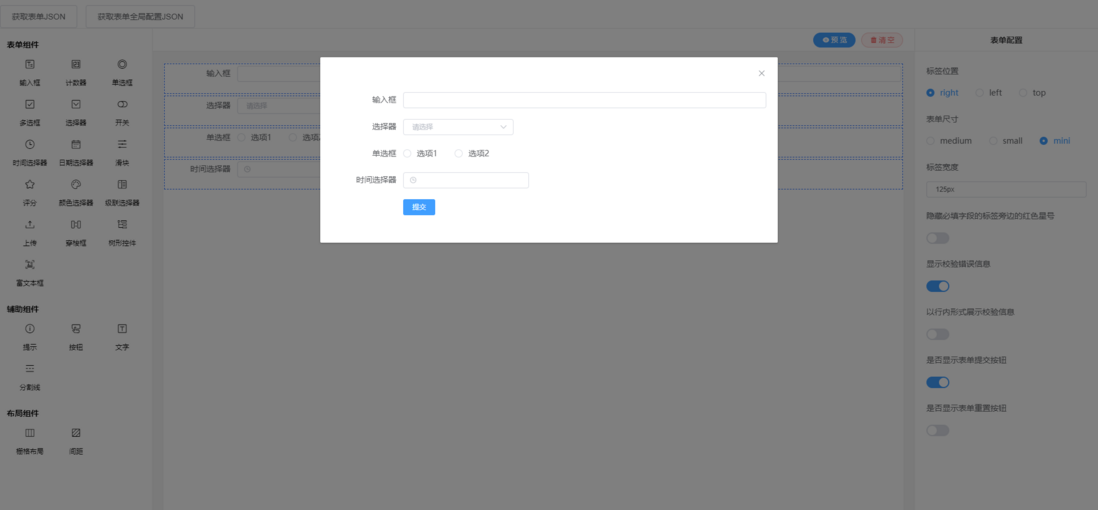
启动
安装依赖
npm i @form-create/element-ui@^2.5.12 //vue2使用2.x版本引入
//main.js
import formCreate from "@form-create/element-ui";
Vue.use(formCreate);
使用
<template>
  <div>
    <div>
      <form-create
        :rule="rule"
        v-model="fApi"
        :option="options"
        :value.sync="value"
      />
    </div>
    <div>value:{{ value }}</div>
  </div>
</template>

<script>
  export default {
      data() {
          return {
              //实例对象
              fApi: {},
              //表单数据
              value: {},
              //表单生成规则
              rule: [
                  {
                      type: 'input',
                      field: 'goods_name',
                      title: '商品名称'
                  },
                  {
                      type: 'datePicker',
                      field: 'created_at',
                      title: '创建时间'
                  }
              ],
              //组件参数配置
              option: {
                  //表单提交事件
                  onSubmit: function (formData) {
                      alert(JSON.stringify(formData))
                  }
              }
          }
      }
  }
</script>
教程
基础
布局
与elementUI中的col一样的使用规则
        {
          type: "input",
          field: "inputssa",
          title: "委托编号",
          value: "E202200503",
          col: {
            span: 6
        },
校验规则
默认
effect
        {
          type: "input",
          field: "inputssa",
          title: "委托编号",
          value: "E202200503",
          effect: {
            required: "请输入"
          }
        },
自定义函数
        {
          type: "inputNumber",
          field: "number1",
          title: "自定义检验",
          validate: [{ validator: checkAge, trigger: "blur" }],
        },
var checkAge = (rule, value, callback) => {
if (!value) {
return callback(new Error("年龄不能为空"));
}
if (!Number.isInteger(value)) {
callback(new Error("请输入数字值"));
} else {
if (value < 18) {
callback(new Error("必须年满18岁"));
} else {
callback();
}
}
};事件监听
关键字on
        {
          type: "input",
          field: "inputssa",
          title: "委托编号",
          value: "E202200503",
          on: {
            change: val => {
              console.log("val", val);
            }
          },
        },
组件联动
内置
        {
          type: "rate",
          field: "star",
          title: "表单联动显示隐藏",
          value: 5,
          control: [
            {
              handle(val) {
                return val < 3;
              },
              rule: [
                {
                  type: "input",
                  field: "info",
                  title: "差评原因",
                  value: "default info"
                }
              ]
            }
          ]
        },
自定义函数
其中自定义函数,可以暴露在生命周期mounted挂载中,可以处理前端自定义函数,或后端返回函数前端调用
<template>
    <form-create :rule="rule" v-model="fApi" :option="options"/>
</template>

<script>
    export default {
        data(){
            return {
                fApi:{},
                options:{
                    onSubmit:(formData)=>{
                        alert(JSON.stringify(formData))
                    }
                },
                rule:[
                    {
                        type:'input',
                        field:'inputField',
                        title:'change 事件',
                        emit:['change', 'blur'],
                        emitPrefix:'prefix1'
                    },
                    {
                        type:'input',
                        field:'inputField2',
                        title:'blur 事件',
                        emit:['blur'],
                    }
                ]
            }

        },
        methods:{
            change(){ //自定义函数
                alert(`change!![${this.fApi.getValue('inputField')}]`)
            },
            blur(){
                alert('blur!')
            }
        },
        mounted(){
            // 监听
            this.fApi.on('prefix1-change',this.change)
            this.fApi.on('input-field2-blur',this.blur)
        }
    }
</script>
公共配置
      options: {
        onSubmit: formData => {
          alert(JSON.stringify(formData));
        },
        global: {
          "*": {
            props: {
              size: "mini"
            },
            col: {
              span: 24
            }
          }
        }
      },
修改表单规则
获取实例
//to do
this.fApi
获取规则
// to do
this.rule
进阶
自定义表单
template>
    <form-create :rule="rule" v-model="fApi" :option="options"/>
</template>

<script>
    formCreate.component('inputBtn', {
        data: function () {
            return {
                num: this.value,
            }
        },
        render($h){
            return $h('ElButton',{
                props:{
                    disabled: this.disabled,
                    long: true
                },
                on:{
                    click:()=>{
                        this.onClick()
                    }
                }
            },['计数器'+this.num])
        },
        props:{
            //预定义
            disabled:Boolean,
            value:Number,
        },
        watch:{
            value(n){
                //同步 value 的值
                this.num = n
            }
        },
        methods: {
            onClick: function () {
                this.num++
                //更新组件内部的值
                this.$emit('input',this.num)
            },
        },
    })

    export default {
        data(){
            return {
                fApi:{},
                options:{
                    onSubmit:(formData)=>{
                        alert(JSON.stringify(formData))
                    },
                    resetBtn:true
                },
                rule:[
                    {
                        type:'inputBtn',
                        field:'btn',
                        title:'自定义表单组件',
                        value:10,
                        update(val, rule, api){
                            api.setValue('input', '' + val);
                        }
                    },
                    {
                        type:'input',
                        field:'input',
                        title: '修改计数器的值',
                        value: '',
                        children: [
                            {
                                type:'ElButton',
                                slot:'append',
                                inject: true,
                                on: {
                                    click(inject){
                                        inject.$f.setValue('btn', parseInt(inject.$f.getValue('input')) || 0)
                                    }
                                },
                                children: ['修改']
                            }
                        ]
                    }
                ]
            }
        }
    }
</script>
使用elementUI内置组件
表格
<template>
  <div>
    <div>
      <form-create
        :rule="rule"
        v-model="fApi"
        :option="options"
        :value.sync="value"
      />
    </div>
    <div>value:{{ value }}</div>
  </div>
</template>

<script>
export default {
  data() {
    return {
      fApi: {},
      value: {},
      rule: [
        {
          type: "el-table",
          field: " el-table",
          props: {
            data: [
              {
                date: "2016-05-02",
                name: "王小虎",
                address: "上海市普陀区金沙江路 1518 弄"
              },
              {
                date: "2016-05-04",
                name: "王小虎",
                address: "上海市普陀区金沙江路 1517 弄"
              },
              {
                date: "2016-05-01",
                name: "王小虎",
                address: "上海市普陀区金沙江路 1519 弄"
              },
              {
                date: "2016-05-03",
                name: "王小虎",
                address: "上海市普陀区金沙江路 1516 弄"
              }
            ]
          },
          children: [
            {
              type: "el-table-column",
              props: {
                type: "selection",
                width: "55"
              }
            },
            {
              type: "el-table-column",
              props: {
                prop: "date",
                label: "日期"
              }
            },
            {
              type: "el-table-column",
              props: {
                prop: "name",
                label: "姓名"
              }
            },
            {
              type: "el-table-column",
              props: {
                prop: "address",
                label: "地址"
              }
            },
            {
              type: "el-table-column",
              props: {
                prop: "el-input11",
                label: "输入框"
              },
              children: [
                {
                  type: "el-input",
                  props: {
                    size: "mini"
                  },
                  field: "elInputss",
                  value: "",
                  on: {
                    input: (val, rule) => {
                      console.log("val--1", val);
                      console.log("rule--1", rule);
                      console.log("this-1", this);
                    }
                  },
                  update(val, rule) {
                    console.log("val--2", val);
                    console.log("rule--2", rule);
                  }
                }
              ]
            },
            {
              type: "el-table-column",
              props: {
                prop: "opeartion",
                label: "选择框"
              },
              children: [
                {
                  type: "select",
                  field: "cate_id",
                  title: "产品分类",
                  value: ["104"],
                  options: [
                    { value: "104", label: "生态蔬菜", disabled: false },
                    { value: "105", label: "新鲜水果", disabled: false }
                  ]
                }
              ]
            },
            {
              type: "el-table-column",
              props: {
                prop: "opeartion",
                label: "开关"
              },
              children: [
                {
                  type: "switch",
                  title: "是否上架",
                  field: "is_show",
                  value: "1",
                  props: {
                    activeValue: "1",
                    inactiveValue: "0"
                  }
                }
              ]
            },
            {
              type: "el-table-column",
              props: {
                prop: "opeartion",
                label: "操作"
              },
              children: [
                {
                  type: "el-button",
                  props: {
                    size: "mini"
                  },
                  children: ["编辑"]
                },
                {
                  type: "el-button",
                  props: {
                    size: "mini"
                  },
                  children: ["删除"]
                }
              ]
            }
          ]
        }
      ]
    };
  }
};
</script>

拖拽表单
安装依赖
npm install @form-create/designer --save引入
import FcDesigner from "@form-create/designer";
Vue.use(FcDesigner);
使用
<template>
  <div class="desiginer-box">
    <div>
      <el-button @click="handleButton1">获取表单JSON</el-button>
      <el-button @click="handleButton2">获取表单全局配置JSON</el-button>
    </div>
    <fc-designer ref="designer" height="100%" />
  </div>
</template>

<script>
export default {
  data() {
    return {};
  },
  mounted() {},
  methods: {
    handleButton1() {
      const res = this.$refs.designer.getRule();
      console.log("res", res);
    },
    handleButton2() {
      const res = this.$refs.designer.getOption();
      console.log("res", res);
    }
  }
};
</script>
<style>
.desiginer-box {
  position: fixed;
  left: 0;
  right: 0;
  bottom: 0;
  top: 50px;
}
</style>
评论
登录后参与技术讨论,分享你的经验与见解。
登录 / 注册暂无评论