springcloud教程之高可用注册中心

文章目录
1.问题
当有成千上万个服务的时候,单注册中心负载太高,如果单注册中心出现了问题,那影响是非常大的,所以考虑多注册中心。下面就创建两个注册中心。
2.操作
修改application.yml文件
注册中心1
spring:
  application:
    name: EurekaRigstryCenterApplication
server:
  port: 8083

eureka:
  instance:
    hostname: localhost
  client:
#    registerWithEureka: false 向eureka进行注册
#    fetchRegistry: false
    serviceUrl:
      defaultZone: http://${eureka.instance.hostname}:8082/eureka/
      #8082为注册中心2的端口
注册中心2
spring:
  application:
    name: EurekaRigstryCenterApplication
server:
  port: 8082

eureka:
  instance:
    hostname: localhost
  client:
#    registerWithEureka: false
#    fetchRegistry: false
    serviceUrl:
      defaultZone: http://${eureka.instance.hostname}:8083/eureka/
      #同上
其他配置相同
package service;


import org.springframework.boot.SpringApplication;
import org.springframework.boot.autoconfigure.SpringBootApplication;
import org.springframework.cloud.netflix.eureka.server.EnableEurekaServer;

@SpringBootApplication //springboot注解
@EnableEurekaServer //eureka 注册中心
public class EurekaRigstryCenterApplication {
    public static void main(String[] args) {
        SpringApplication.run(EurekaRigstryCenterApplication.class); //启动项目
    }
}
服务注册配置
eureka:
  client:
    service-url:
      defaultZone: http://localhost:8083/eureka/,http://localhost:8082/eureka/
      #填写注册中心地址,以,分割
注册中心1
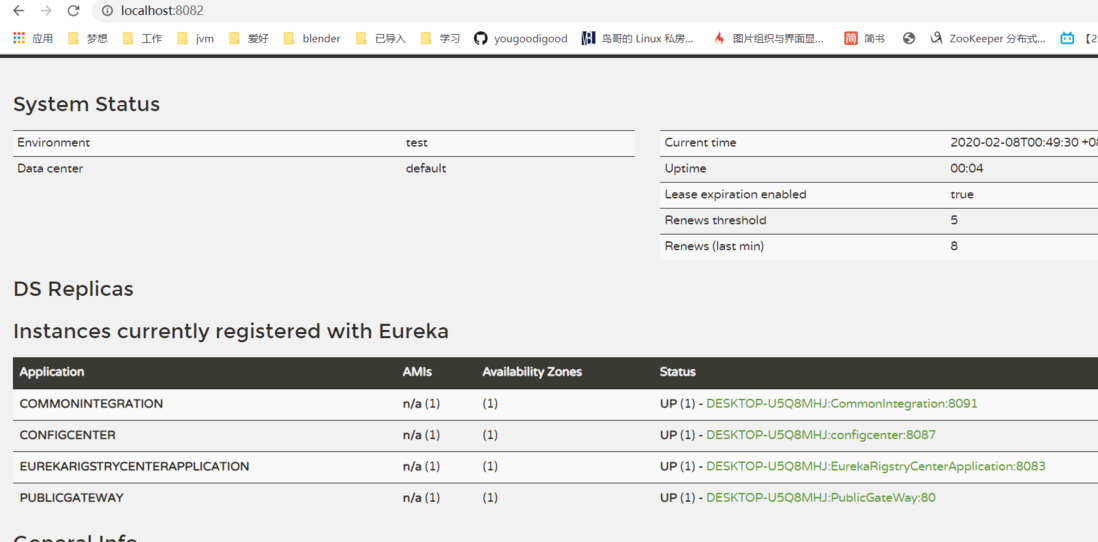
注册中心2

评论
登录后参与技术讨论,分享你的经验与见解。
登录 / 注册暂无评论