twojs 动态路径 绘制心形线

文章目录
原文链接: twojs 动态路径 绘制心形线
稍微有点瑕疵... 有点晕..今天就先这样吧, 这个方程是对的, 用两个sin两个圆拟合, 效果看这也还行
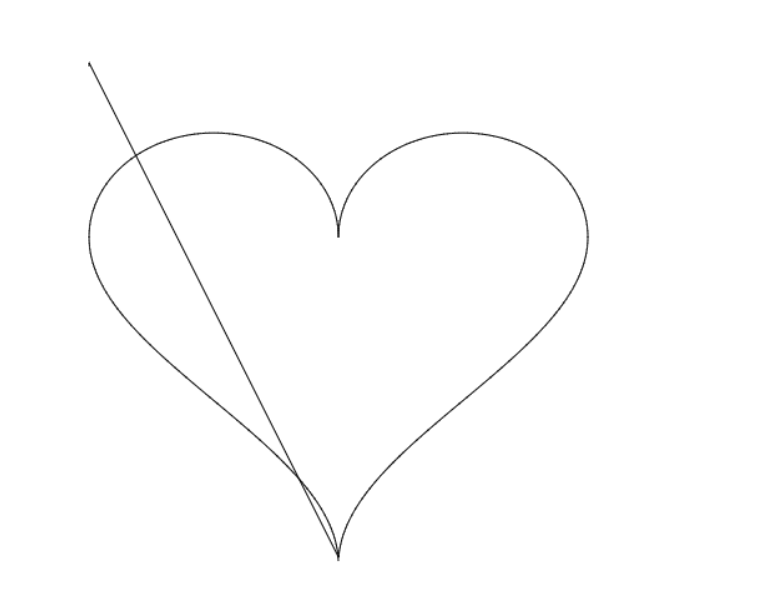
绘制心形线
<template>
  <div class="flex-row">
    <div>twojs</div>
    <div id="draw-shapes"></div>
  </div>
</template>

<script lang="ts" setup>
import Two from "two.js";
import { onMounted } from "vue";
const points: [number, number][] = [];

// 心形线由两个sin和两个圆组成
const size = 100;
// sin(x)+1 [-pi/2, pi/2]
for (let i = 0; i < size; i++) {
  const x = (Math.PI / size) * i - Math.PI / 2;
  const y = Math.sin(x) + 1;
  points.push([x, y]);
}

// (x-pi/2)**2 + (y-1/2)**2
for (let i = 0; i < size; i++) {
  const dr = Math.PI / size;
  const x = Math.PI / 2 + 1 * Math.sin(i * dr);
  const y = 1 + 1 * Math.cos(i * dr);
  points.push([x, y]);
}
// (x-pi/2)**2 + (y+1/2)**2
for (let i = 0; i < size; i++) {
  const dr = Math.PI / size;
  const x = Math.PI / 2 + 1 * Math.sin(i * dr);
  const y = -1 + 1 * Math.cos(i * dr);
  points.push([x, y]);
}

// -sin(x)-1 [-pi/2, pi/2]
for (let i = 0; i < size; i++) {
  const x = Math.PI / 2 - (Math.PI / size) * i;
  const y = -Math.sin(x) - 1;
  points.push([x, y]);
}
console.error(
  "x min max",
  Math.min(...points.map((i) => i[0])),
  Math.max(...points.map((i) => i[0]))
);
console.error(
  "y min max",
  Math.min(...points.map((i) => i[1])),
  Math.max(...points.map((i) => i[1]))
);
onMounted(() => {
  const elem = document.getElementById("draw-shapes");
  const height = 800;
  const width = 1000;
  const params = {
    width,
    height,
    autostart: true,
    type: Two.Types.webgl,
  };
  const data = points.map(([a, b]) => {
    const x = ((a + Math.PI / 2) * width) / 6;
    const y = ((b / 2) * height) / 2 + height / 2;
    // return [x, y];
    return [y / 2, height / 2 - x / 2];
  });

  const two = new Two(params).appendTo(elem);
  const path = two.makePath(
    data[0][0],
    data[0][1],
    data[1][0],
    data[1][1],
    true,
    false,
    true
  );
  let start = 2;
  const h = setInterval(() => {
    console.log(Two.Commands);
    if (start >= data.length) {
      clearInterval(h);
      return;
    }
    const p = new Two.Anchor(data[start][0], data[start][1], Two.Commands.line);
    console.log("p", p);
    // M._commond ='L'
    // M.command = Two.Commands.line;
    // path.vertices.splice(0, 0, M);
    // path.position.add(200, 300);
    start++;
    path.vertices.push(p);
    two.update();
  }, 100);
});
</script>

<style></style>
评论
登录后参与技术讨论,分享你的经验与见解。
登录 / 注册⭐️ Admin快速开发: https://show.cool-admin.com/
赞 0⭐️ 官方文档: https://cool-js.com
赞 0⭐️ chatgpt在线体验: https://cool-js.com/ai/chat-vip/index.html?r=helloworld
赞 0