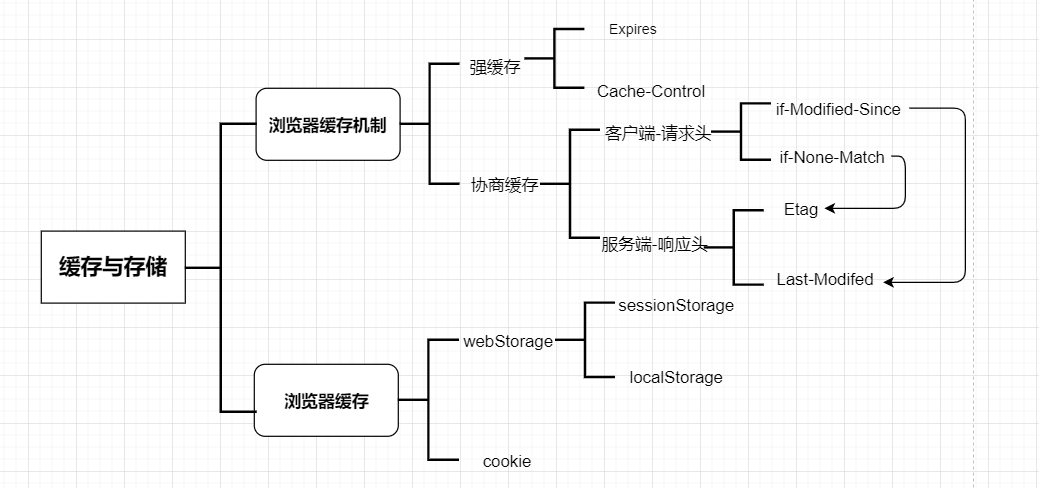
cookie
- 存活期:cookie可设置为长时间保持
- 作用范围:cookie存储在客户端,发送http请求时会将cookie添加到cookie头字段,发送给服务器
- 存储量:单个cookie保存的数据不能超过4K。
session
session是另一种记录服务器和客户端会话状态的机制。session是基于cookie实现的,session存储在服务器端,sessionId会被存储到客户端的cookie中。
- 存活期:session 一般失效时间较短,客户端关闭或者session 超时都会失效。
- 作用范围:session存储在服务端,安全性相对cookie要好一些。
- 存储量:session存储没有上限,但出于对服务器的性能考虑,session内不要存放过多的数据,并且需要设置session删除机制。
token
- 简单token的组成: uid(用户唯一的身份标识)、time(当前时间的时间戳)、sign(签名,token 的前几位以哈希算法压缩成的一定长度的十六进制字符串)
- token:服务端验证客户端发送过来的token时,还需要查询数据库获取用户信息,然后验证token是否有效。 每一次请求都需要携带token,需要把token放到http的Header里。基于token的用户认证是一种服务端无状态的认证方式,服务端不用存放token数据。用解析token的计算时间换取session的存储空间,从而减轻服务器的压力,减少频繁的查询数据库。
jwt
- JSON Web Token(简称 JWT)是目前最流行的跨域认证解决方案。是一种认证授权机制。JWT是为了在网络应用环境间传递声明而执行的一种基于JSON的开放标准(RFC 7519)。JWT的声明一般被用来在身份提供者和服务提供者间传递被认证的用户身份信息,以便于从资源服务器获取资源。比如用在用户登录上
- 将token和payload加密后存储于客户端,服务端只需要使用密钥解密进行校验(校验也是jwt自己实现的)即可,不需要查询或者减少查询数据库,因为jwt自包含了用户信息和加密的数据。
sessionStorage
- 存活期:sessionStorage是会话级别储存,在浏览器或页面关闭时数据就会销毁。不同的浏览器tab页面不相同
- 作用范围:只是客户端的储存,不会涉及到服务器储存
- 存储量:localStorage和sessionStorage一般有5M
localStorage
- 存活期:localStorage是持久化的本地储存,不刻意去删除数据, 数据是不会销毁的。不同的浏览器tab页面相同。
- 作用范围:只是客户端的储存,不会涉及到服务器储存。
- 存储量:localStorage和sessionStorage一般有5M。
- 数据结构:键值键,值只能是字符串
storage事件:
- 当同源页面的某个页面修改了localStorage,其余的同源页面只要注册了storage事件,就会触发
示例
// 页面A监听 import React, { useEffect } from 'react'; const HomePage = () => { const handleStorage = (e) => { console.log('e', e); }; useEffect(() => { window.addEventListener('storage', handleStorage); return () => { window.removeEventListener('storage', handleStorage); }; }, []); return <div style={{ height: 'calc(100vh - 60px)', overflow: 'scroll' }}></div>; }; export default HomePage; // 页面B触发localStorage import React from 'react'; const SubPage = () => { return ( <div style={{ height: 'calc(100vh - 60px)', overflow: 'scroll' }}> <button onClick={() => { localStorage.setItem('zlz_test_storage', 'test-' + Math.ceil(Math.random() * 20)); }} > localStorage </button> </div> ); }; export default SubPage;- 同页面触发,需额外自定义事件实现
Event和dispatchEvent
  const originSetItem = localStorage.setItem;
  localStorage.setItem = function (key, value) {
    const setItemChange = new Event('storage');
    setItemChange.key = key;
    setItemChange.oldValue = localStorage.getItem(key);
    setItemChange.newValue = value;
    window.dispatchEvent(setItemChange);
    originSetItem.apply(this, arguments);
  };
indexDB
- IndexedDB主要用于客户端存储大量结构化数据(包括, 文件/ blobs)。该API使用索引来实现对该数据的高性能搜索。虽然 Web Storage 对于存储较少量的数据很有用,但对于存储更大量的结构化数据来说,这种方法不太有用
- IndexedDB是一个基于JavaScript的面向对象的数据库。 它允许我们存储和检索用键索引的对象;可以存储结构化克隆算法支持的任何对象。 我们只需要指定数据库模式,打开与数据库的连接,然后检索和更新一系列事务。
- 浏览器的本地数据库,异步,也有同源限制,容量在250M以上甚至没有限制
- 简易封装
// DBUtils.ts
interface EventResponse extends EventTarget {
  target: {
    result: IDBDatabase | unknown;
  };
}

type DBMethods = {
  getItem: (key: string) => Promise<unknown>;
  getAllItem: () => Promise<unknown>;
  getAllKeys: () => Promise<unknown>;
  setItem: (key: string, value: string | number | boolean | unknown[] | Record<string, unknown>) => Promise<unknown>;
  removeItem: (key: string) => Promise<unknown>;
  removeAll: () => Promise<unknown>;
};

interface DBUtilOption {
  dbName?: string;
  version?: number;
  keyPath?: string;
}

export default class DBUtils {
  dbName: string;
  DBOpenResult: Promise<unknown>;
  db: IDBDatabase | undefined;
  keyPath: string;

  constructor(config: DBUtilOption = {}) {
    const { dbName = 'cache', version = 1, keyPath = 'id' } = config;
    this.dbName = dbName;
    this.keyPath = keyPath;

    this.DBOpenResult = new Promise((resolve, reject) => {
      // 打开数据库
      const request: IDBOpenDBRequest = window.indexedDB.open(this.dbName, version);
      request.onerror = () => {
        reject('数据库打开异常');
      };
      request.onsuccess = () => {
        this.db = request.result;
        resolve('');
      };

      request.onupgradeneeded = (event) => {
        const ev = (event as unknown) as EventResponse;
        const db = ev.target.result as IDBDatabase;
        db.onerror = function () {
          reject('数据库打开失败');
        };
        // 创建一个数据库存储对象
        const objectStore: IDBObjectStore = db.createObjectStore(this.dbName, {
          keyPath,
          autoIncrement: !config.keyPath,
        });

        // 建立一个索引, 没有配置则默认使用id
        objectStore.createIndex(keyPath, keyPath, {
          unique: true,
        });
      };
    });
  }

  setItem: DBMethods['setItem'] = (key, value) =>
    new Promise((resolve, reject) => {
      this.DBOpenResult.then(() => {
        if (!this.db) return;
        const transaction = this.db.transaction([this.dbName], 'readwrite');
        // 打开已经存储的数据对象
        const objectStore = transaction.objectStore(this.dbName);
        // 添加到数据对象中
        // { key: value}
        let values = {};
        if (typeof value === 'string' || typeof value === 'number' || typeof value === 'boolean' || Array.isArray(value)) {
          values[this.keyPath] = key;
          values[key] = value;
        } else {
          values = value;
          if (!value[this.keyPath]) {
            values[this.keyPath] = key;
          }
        }
        const objectStoreRequest = objectStore.put(values);
        objectStoreRequest.onsuccess = () => {
          resolve('');
        };
        objectStoreRequest.onerror = (err) => {
          console.error(`从数据库设置${key}异常`, err);
          reject();
        };
      });
    });

  getItem: DBMethods['getItem'] = (key) =>
    new Promise((resolve, reject) => {
      this.DBOpenResult.then(() => {
        if (!this.db) return;
        const transaction = this.db.transaction([this.dbName], 'readonly');
        const objectStore = transaction.objectStore(this.dbName);
        const objectStoreRequest = objectStore.index(this.keyPath).get(key);
        objectStoreRequest.onsuccess = () => {
          resolve(objectStoreRequest.result);
        };
        objectStoreRequest.onerror = (err) => {
          console.error(`从数据库读取${key}异常`, err);
          reject();
        };
      });
    });

  getAllItem: DBMethods['getAllItem'] = () => {
    // let recordList = [];
    return new Promise((resolve, reject) => {
      this.DBOpenResult.then(() => {
        if (!this.db) return;
        const transaction = this.db.transaction([this.dbName], 'readonly');
        const objectStore = transaction.objectStore(this.dbName);
        // const objectStoreRequest = objectStore.openCursor();
        // objectStoreRequest.onsuccess = function (event) {
        //   var cursor = event.target.result;
        //   // 如果没有遍历完,继续下面的逻辑
        //   if (cursor) {
        //     recordList.push(cursor.value);
        //     // 继续下一个游标项
        //     cursor.continue();
        //     // 如果全部遍历完毕
        //   } else {
        //     resolve(recordList);
        //   }
        // };
        const objectStoreRequest = objectStore.getAll();
        objectStoreRequest.onsuccess = function (event) {
          const ev = (event as unknown) as EventResponse;
          resolve(ev.target?.result);
        };
        objectStoreRequest.onerror = (err) => {
          console.error(`从数据库读取异常`, err);
          reject();
        };
      });
    });
  };

  getAllKeys: DBMethods['getAllKeys'] = () =>
    new Promise((resolve, reject) => {
      this.DBOpenResult.then(() => {
        if (!this.db) return;
        const transaction = this.db.transaction([this.dbName], 'readonly');
        const objectStore = transaction.objectStore(this.dbName);
        const objectStoreRequest = objectStore.getAllKeys();
        objectStoreRequest.onsuccess = function (event) {
          const ev = (event as unknown) as EventResponse;
          resolve(ev.target?.result);
        };
        objectStoreRequest.onerror = (err) => {
          console.error(`从数据库读取异常`, err);
          reject();
        };
      });
    });

  removeItem: DBMethods['removeItem'] = (key) =>
    new Promise((resolve, reject) => {
      this.DBOpenResult.then(() => {
        if (!this.db) return;
        const transaction = this.db.transaction([this.dbName], 'readwrite');
        const objectStore = transaction.objectStore(this.dbName);
        const objectStoreRequest = objectStore.delete(key);
        objectStoreRequest.onsuccess = () => {
          resolve('');
        };
        objectStoreRequest.onerror = (err) => {
          console.error(`从数据库删除${key}异常`, err);
          reject();
        };
      });
    });

  removeAll: DBMethods['removeAll'] = () =>
    new Promise((resolve, reject) => {
      this.DBOpenResult.then(() => {
        if (!this.db) return;
        const transaction = this.db.transaction([this.dbName], 'readwrite');
        const objectStore = transaction.objectStore(this.dbName);
        const objectStoreRequest = objectStore.clear();
        objectStoreRequest.onsuccess = () => {
          resolve('');
        };
        objectStoreRequest.onerror = (err) => {
          console.error(`数据库清空异常`, err);
          reject();
        };
      });
    });
}
- 使用示例
import React from 'react';
import DBUtils from './DBUtils';

const HomePage = () => {
  const db = new DBUtils({ dbName: 'indexdb_test_001', keyPath: 'fileKey' });
  const { removeAll, removeItem, getItem, setItem, getAllItem, getAllKeys } = db;

  const onSetValue = () => {
    const key = 'key-' + Math.ceil(Math.random() * 10);
    setItem(key, { data: 'xxxxxdddd' });
    setItem('token', '222222');
  };

  const onGetValue = async () => {
    const res = await getItem('token');
    console.log(res);
  };

  const onGetAllValue = async () => {
    const res = await getAllItem();
    const res2 = await getAllKeys();
    console.log(res, res2);
  };

  const onDeleteValue = async () => {
    await removeItem('1111');
  };

  const onClear = async () => {
    await removeAll();
  };
  return (
    <div style={{ height: 'calc(100vh - 60px)', overflow: 'scroll' }}>
      <p>
        <button onClick={() => onSetValue()}>设置值</button>
      </p>
      <p>
        <button onClick={onGetValue}>获取值</button>
      </p>
      <p>
        <button onClick={onGetAllValue}>获取所有值</button>
      </p>
      <p>
        <button onClick={onDeleteValue}>删除值</button>
      </p>
      <p>
        <button onClick={onClear}>重置</button>
      </p>
    </div>
  );
};

export default HomePage;