Vuex从入门到放弃(webpack自动导入模块 命名空间 辅助函数)
1.什么是vuex
1.1 什么是状态管理
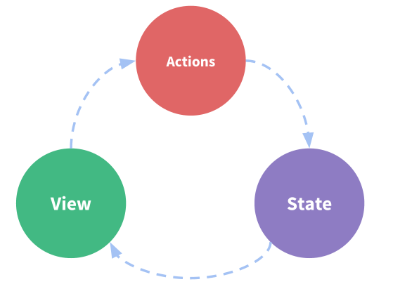
- state,驱动应用的数据源;
- view,以声明方式将 state 映射到视图;
- actions,响应在 view 上的用户输入导致的状态变化。
下面是从官方文档上扒下来的一张图简洁明了的说明了单向数据流的特性

如果单单使用只使用单向数据流的模式进行开发,业务组件不复杂倒还好,可是遇到组件层级比较深的情况下就会导致代码难以维护。
1.2 Vuex

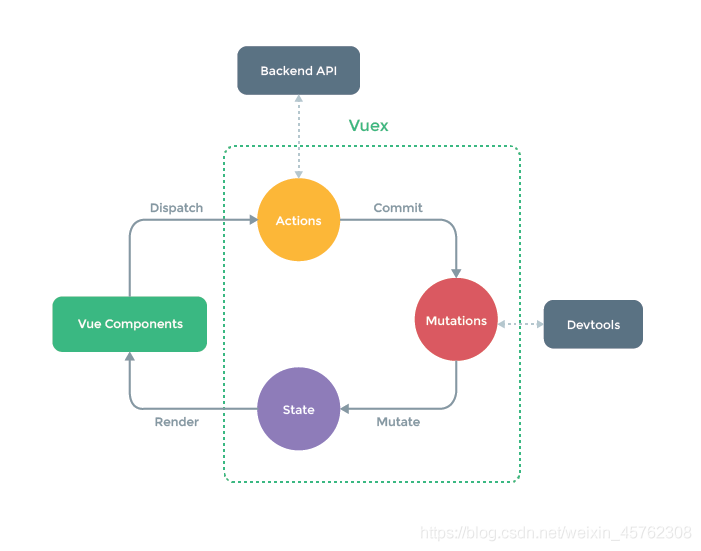
没错!这张图也是从官方文档里面扒下来的,这张图按照我的理解可以拆分成三部分。
1.2.1 第一部分:不经过官方提供的api(mapstate mapactions mapmutations)来触发视图的更新,请看以下例子
- index.vue
//index.vue
<template>
  <div>
    <div>{{datacount}}</div>
    <div>{{count}}</div>

    <button @click="increment()">+</button>
    <button @click="reduce()">-</button>
  </div>
</template>

<script>
import { mapState } from "vuex";
export default {
  data() {
    return {
      datacount: this.$store.state.count //1.这样写视图并不会实时更新
      //   count: 0
    };
  },
  // views
  computed: {
    // count() {
    //   return this.$store.state.count;//3. 通过计算属性能够视图能够实时响应更新
    // },
    ...mapState(['count'])//4. 辅助函数的写法 语法糖的效果能让你少按几次键盘
  },
  methods: {
    increment() {
      this.$store.commit("increment");
      // this.count = this.$store.state.count;  2.通过直接赋值的方式当然能实时响应状态
      console.log(this.$store.state.count);
    },
    reduce() {
      this.$store.commit("reduce");
      //   this.count = this.$store.state.count;
      console.log(this.$store.state.count);
    }
  }
};
</script>- store/index.js
import Vue from 'vue';
import Vuex from 'vuex';
Vue.use(Vuex);
 const store = new Vuex.Store({
    state: {
        count: 0,

      },
      mutations: {
        increment (state) {
          state.count++

        },
        reduce(state){
            state.count--

        }
      }
    });
export default store;
1.2.2 经过官网提供的辅助函数(语法糖)来触发vuex的状态更新
- ...mapState 映射为 this.$store.state.xxxx
- ...mapGetters 映射为 this.$store.getters.xxxx
- ...mapActions 映射为 this.$store.dispatch("xxx",n);
直接上代码:
//index.vue
<template>
  <div>
      <h5>辅助函数Getters:{{getStateCount}}</h5>
      <h5>辅助函数Getters:{{count}}</h5>
       <button @click="ADD_ONE(2)">+ADD_ONE</button>
    <button @click="REDUCE_ONE(5)">-REDUCE_ONE</button>
  </div>
</template>

<script>
import { mapState, mapGetters, mapActions  } from "vuex";
export default {
  data() {
    return {

    };
  },
  computed: {
    ...mapGetters(["getStateCount"]),
    ...mapState('app',['count'])
  },
  methods: {
    ...mapActions('app',["ADD_ONE"]),
    ...mapActions('app',["REDUCE_ONE"]),
  }
};
</script>
//store/index.js
import Vue from "vue";
import Vuex from "vuex";
import getters from "./getters"
import app from "./modules/app"
Vue.use(Vuex);
const store = new Vuex.Store({
modules:{
app,
},
getters
})
export default store//store/getters.js
const getters = {
// getStateCount(state){
// return state.app.count+1
// }
getStateCount:state => state.app.count+5
}
export default getters//store/modules/app.js
const state = {
count:0
}
const mutations = {
ADD_ONE:(state,n) => {
state.count +=n
},
REDUCE_ONE:(state,n) => {
state.count -=n
}
}
const actions = {
ADD_ONE:({commit},count) =>{
commit('ADD_ONE',count)
},
REDUCE_ONE:({commit},count) =>{
commit('REDUCE_ONE',count)
}
}
export default {
namespaced: true,//这一行代码添加了 就给vuex添加了一个命名空间
state,
mutations,
actions
}还可以通过webpack来自动导入模块 自行查询require.context这个api 网速的文章介绍都很多 这里就不展开了。最后重点来了:外包在职萌新求内推 位置广州