用 argparse 给 Python 日志工具加文件和时间参数
本节目录
第二章的脚本能读 JSON Lines,也能看出有多少条记录被跳过。现在把它变成一个可重复调用的命令。你可以指定日志文件、时间范围和 HTTP 方法,在同一份文件里分别统计某个小时的 GET 和 POST,无需改 Python 源码。 回顾逐行读取大日志
先约定时间边界
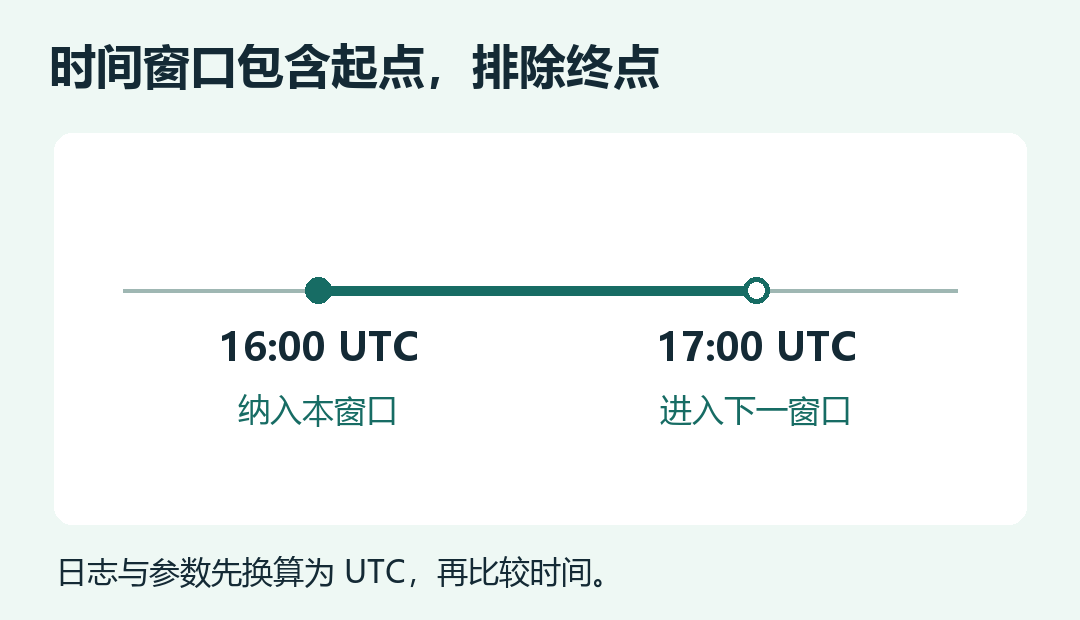
输入文件是位置参数,--since、--until 和 --method 是可选参数。带时区的日志时间和命令行时间都会转换成 UTC。时间窗口采用 包含起点、排除终点 的规则。比如 16:00 到 17:00 的窗口纳入恰好 16:00 的请求,17:00 的请求进入后一个窗口。连续跑两份小时报表时,边界请求各算一次。 Python argparse 文档
准备样例和脚本
把以下内容保存为 UTF-8 文件 access.jsonl。第一条和第八条分别落在示例窗口之前和结束边界,最后一条用来验证坏记录统计。耗时字段留给下一节使用。
{"ts":"2026-11-19T15:59:59Z","method":"GET","path":"/search","status":200,"duration_ms":900}
{"ts":"2026-11-20T00:00:00+08:00","method":"GET","path":"/search?q=python","status":200,"duration_ms":40}
{"ts":"2026-11-19T16:01:00Z","method":"GET","path":"/search?q=go","status":404,"duration_ms":80}
{"ts":"2026-11-19T16:02:00Z","method":"POST","path":"/search","status":201,"duration_ms":60}
{"ts":"2026-11-19T16:03:00Z","method":"GET","path":"/api/items","status":502,"duration_ms":300}
{"ts":"2026-11-19T16:04:00Z","method":"GET","path":"/api/items","status":200}
{"ts":"2026-11-19T16:59:59Z","method":"GET","path":"/search","status":200,"duration_ms":100}
{"ts":"2026-11-19T17:00:00Z","method":"GET","path":"/search","status":500,"duration_ms":1000}
{"ts":
在同一个目录新建 log_cli.py,粘贴完整代码。本章示例使用 Python 3.11 或更高版本。
import argparse
import json
from collections import Counter
from datetime import datetime, timezone
from pathlib import Path


REQUIRED = {"ts", "method", "path", "status"}


def as_utc(text):
    moment = datetime.fromisoformat(text)
    if moment.utcoffset() is None:
        raise ValueError("时间必须带 UTC 偏移")
    return moment.astimezone(timezone.utc)


def timestamp_arg(text):
    try:
        return as_utc(text)
    except (ValueError, OverflowError) as error:
        raise argparse.ArgumentTypeError("请传入带时区的 ISO 8601 时间") from error


def build_parser(description):
    parser = argparse.ArgumentParser(description=description)
    parser.add_argument("input", type=Path, help="UTF-8 JSON Lines 文件")
    parser.add_argument("--since", type=timestamp_arg, help="开始时间,包含此刻")
    parser.add_argument("--until", type=timestamp_arg, help="结束时间,不包含此刻")
    parser.add_argument("--method", help="仅统计指定方法,如 GET")
    return parser


def parse_args(parser, argv=None):
    args = parser.parse_args(argv)
    if args.since is not None and args.until is not None and args.since >= args.until:
        parser.error("--since 必须早于 --until")
    return args


def parse_record(line):
    if not line.strip():
        return None, "空行"
    try:
        row = json.loads(line)
    except json.JSONDecodeError:
        return None, "JSON 格式错误"
    if not isinstance(row, dict):
        return None, "JSON 不是对象"
    if REQUIRED.difference(row):
        return None, "缺少必填字段"

    method, path, status = row["method"], row["path"], row["status"]
    if not isinstance(method, str) or not method or not method.isascii() or not method.isalpha():
        return None, "请求方法无效"
    if not isinstance(path, str) or not path.startswith("/") or "\r" in path or "\n" in path:
        return None, "路径无效"
    if type(status) is not int or not 100 <= status <= 599:
        return None, "状态码无效"
    try:
        row["ts"] = as_utc(row["ts"])
    except (TypeError, ValueError, OverflowError):
        return None, "时间戳无效"
    row["path"] = path.split("?", 1)[0]
    return row, None


def selected_rows(lines, args, skipped):
    for line in lines:
        row, reason = parse_record(line)
        if reason is not None:
            skipped[reason] += 1
            continue
        if args.since is not None and row["ts"] < args.since:
            continue
        if args.until is not None and row["ts"] >= args.until:
            continue
        if args.method is not None and row["method"] != args.method:
            continue
        yield row


def main(argv=None):
    parser = build_parser("按时间和 HTTP 方法统计日志")
    args = parse_args(parser, argv)
    skipped = Counter()
    try:
        with args.input.open(encoding="utf-8") as log:
            total = sum(1 for _ in selected_rows(log, args, skipped))
    except (OSError, UnicodeError) as error:
        parser.error(f"无法读取输入:{error}")
    print(f"符合筛选的请求:{total}")
    print(f"整份输入跳过的记录:{sum(skipped.values())}")


if __name__ == "__main__":
    main()
type=Path 把文件参数转成路径对象。type=timestamp_arg 把时间参数解析成可比较的 UTC 时间;没有时区或顺序颠倒时,argparse 会给出错误。记录校验发生在筛选之前,所以输出一行是窗口内的有效请求数,另一行是整份输入的跳过数。坏记录可能连时间都没有,按全文件报告更便于核对数据来源。
跑一遍,再换两个参数
python log_cli.py access.jsonl --since 2026-11-19T16:00:00Z --until 2026-11-19T17:00:00Z --method GET
符合筛选的请求:5
整份输入跳过的记录:1
第二条日志的时间是北京时间 11 月 20 日零点,换算后恰好等于 UTC 16:00,因此会被纳入。第八条恰好等于 UTC 17:00,因此会被排除。
练习时先去掉 --method GET,预期窗口内有 6 条,再换成 --method POST,预期只有 1 条。然后把开始时间改成没有偏移的 2026-11-19T16:00:00,确认程序给出明确的参数错误。保存好 log_cli.py,下一节会复用这套读取和筛选函数。 继续统计错误率和 P95