用类型标注和数据类重构 Python 日志工具
本节目录
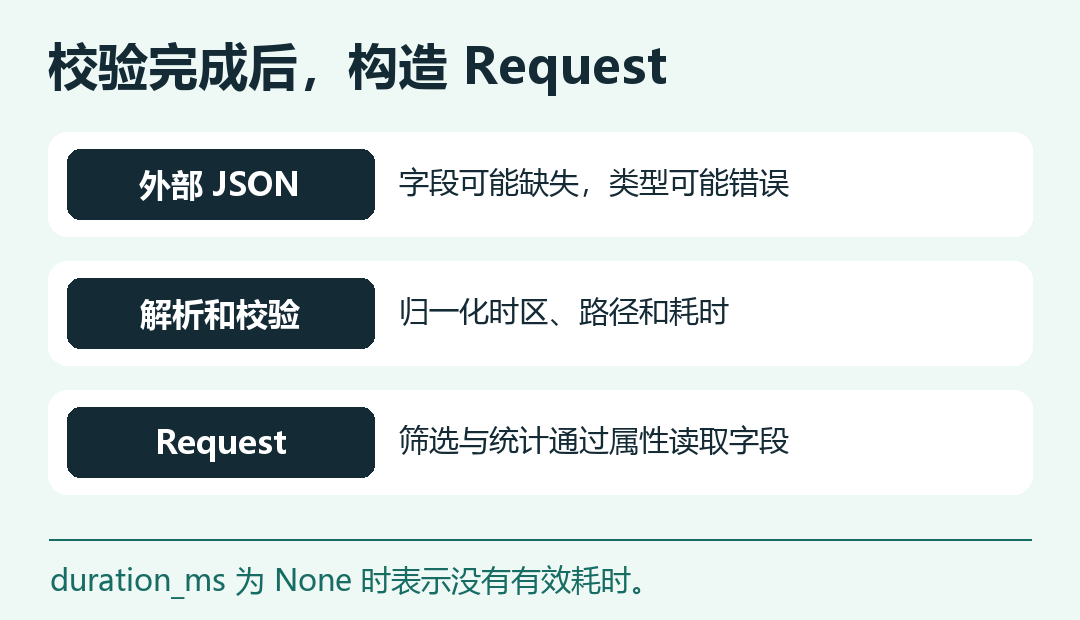
第三章里,解析后的请求还是一个字典。写批量统计时,拼错 row["status"] 的键,要等代码读到一条记录才报错。现在把已经通过校验的请求装进 Request 数据类,让字段名、类型和缺失值的含义在一处写清楚。外部 JSON 仍先做运行时校验,类型标注帮助编辑器和类型检查工具理解代码。 先准备第三章的回归测试 · Python 类型标注文档
定义解析后的请求
在第三章的脚本目录新建 records.py。frozen=True 禁止普通赋值修改对象字段,例如统计阶段不能把已经归一化的路径改掉。duration_ms 可以是浮点数或 None,其中 0.0 表示有效的零耗时。 Python 数据类文档
import math
from dataclasses import dataclass
from datetime import datetime


@dataclass(frozen=True, slots=True)
class Request:
    ts: datetime
    method: str
    path: str
    status: int
    duration_ms: float | None = None


def normalize_duration(value: object) -> float | None:
    if type(value) not in (int, float):
        return None
    try:
        number = float(value)
    except OverflowError:
        return None
    return number if math.isfinite(number) and number >= 0 else None
改造解析、筛选和统计
在 log_cli.py 顶部增加:
from collections.abc import Iterable, Iterator
from records import Request, normalize_duration
然后把 parse_record 和紧随其后的 selected_rows 整段替换如下,保留其余代码。输入成功时返回 (Request, None),失败时返回 (None, 原因)。这里显式检查 request 在成功分支可用,再访问对象字段。
def parse_record(line: str) -> tuple[Request, None] | tuple[None, str]:
    if not line.strip():
        return None, "空行"
    try:
        row = json.loads(line)
    except json.JSONDecodeError:
        return None, "JSON 格式错误"
    if not isinstance(row, dict):
        return None, "JSON 不是对象"
    if REQUIRED.difference(row):
        return None, "缺少必填字段"

    method, path, status = row["method"], row["path"], row["status"]
    if not isinstance(method, str) or not method or not method.isascii() or not method.isalpha():
        return None, "请求方法无效"
    if not isinstance(path, str) or not path.startswith("/") or "\r" in path or "\n" in path:
        return None, "路径无效"
    if type(status) is not int or not 100 <= status <= 599:
        return None, "状态码无效"

    timestamp = row["ts"]
    if not isinstance(timestamp, str):
        return None, "时间戳无效"
    try:
        moment = as_utc(timestamp)
    except (ValueError, OverflowError):
        return None, "时间戳无效"

    return Request(moment, method, path.split("?", 1)[0], status, normalize_duration(row.get("duration_ms"))), None


def selected_rows(
    lines: Iterable[str],
    args: argparse.Namespace,
    skipped: Counter[str],
) -> Iterator[Request]:
    for line in lines:
        request, reason = parse_record(line)
        if reason is not None:
            skipped[reason] += 1
            continue
        assert request is not None
        if args.since is not None and request.ts < args.since:
            continue
        if args.until is not None and request.ts >= args.until:
            continue
        if args.method is not None and request.method != args.method:
            continue
        yield request
最后,在 metrics.py 的 build_report 里,用下面的循环替换原先遍历 selected_rows 的整段循环。可以去掉原来的 latency_ms 函数和 import math,耗时的校验已移到解析阶段。报表字典里的字段名和 CSV、JSON 的输出逻辑沿用上一章。
    for request in selected_rows(lines, args, skipped):
        endpoints[request.method, request.path] += 1
        client_errors += 400 <= request.status < 500
        server_errors += 500 <= request.status < 600
        if request.duration_ms is not None:
            latencies.append(request.duration_ms)
跑旧测试,再给新对象加一组检查
保存以下代码为 test_records.py。它用三条合成记录确认 null、布尔值和零耗时各自的处理结果,同时核对时区、路径和冻结字段。
import json
from dataclasses import FrozenInstanceError
from datetime import timezone

import pytest

from log_cli import parse_record
from records import Request


@pytest.mark.parametrize(("raw", "expected"), [(None, None), (True, None), (0, 0.0)])
def test_record_normalizes_path_timezone_and_duration(raw, expected):
    line = json.dumps({
        "ts": "2026-11-20T00:00:00+08:00",
        "method": "GET",
        "path": "/search?q=python",
        "status": 200,
        "duration_ms": raw,
    })
    request, reason = parse_record(line)
    assert reason is None
    assert isinstance(request, Request)
    assert request.ts.tzinfo == timezone.utc
    assert request.ts.hour == 16
    assert request.path == "/search"
    assert request.duration_ms == expected

    with pytest.raises(FrozenInstanceError):
        setattr(request, "path", "/other")
运行 python -m pytest -q test_log_cli.py test_records.py,应看到:
12 passed
练习时往 test_records.py 的参数表加入 (-1, None),确认负耗时被丢弃。再试着把 Request.status 的声明改成 str,观察 pytest 是否会因这一行而失败。类型标注本身不会改变 Python 已有的运行时校验,真实输入仍由解析函数守门。 继续用 pyproject.toml 安装工具