用 Python 处理空行、坏 JSON 和缺失字段
本节目录
统计报表最容易漏掉的是「有多少数据没进报表」。例如一个采集程序把 status 字段名改了,脚本若把异常都静默跳过,报表里的请求量会下降,读者可能误以为访问少了。本节把每条跳过记录归到一个明确原因,并用七条坏记录检验。 回顾 JSON Lines 和 UTC 分组
先确定接受什么样的记录
日志必须是 JSON 对象,带 ts、method、path 和 status。时间戳必须带 UTC 偏移;状态码必须是 100 到 599 的整数。例子里记录的是常见的纯字母 HTTP 方法和以斜杠开头的路径。Python 中布尔值的类型是 bool,它还是 int 的子类,因此代码用 type(status) is int 来拒绝 JSON 里的 true 和 false。
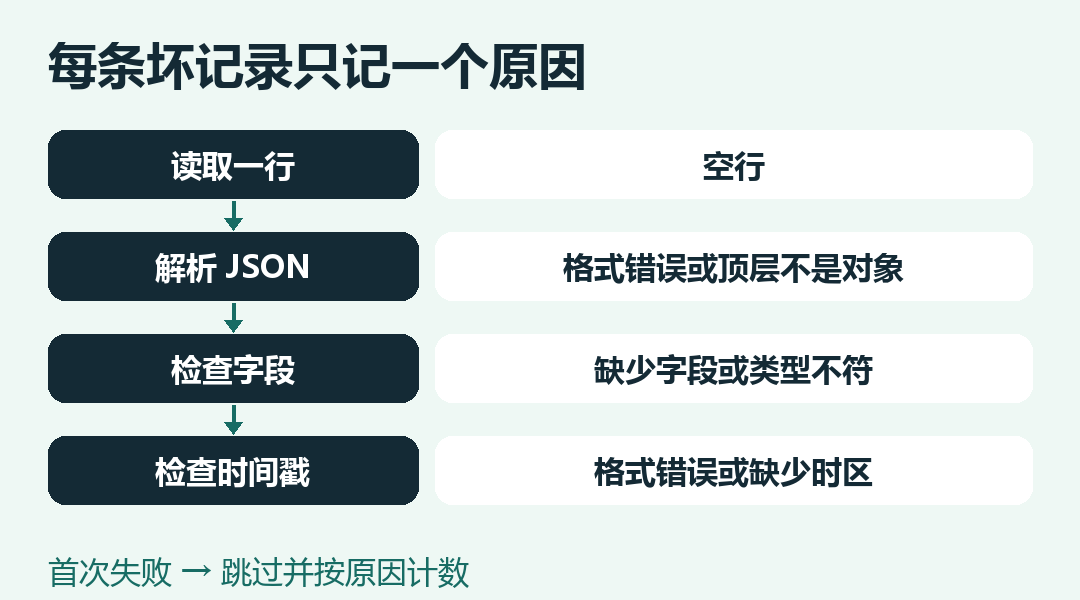
同一行可能同时缺字段和时间戳无效。这里记录第一个失败原因,所以「有效请求 + 跳过记录」应该等于读到的总行数。比如缺了 status,先计为缺少字段;修复后再次运行,才会暴露同一行的其他问题。
把正常和异常放在一个文件里
把下列内容保存成 mixed.jsonl。前三行有效,其后的空行是有意保留的测试数据。
{"ts":"2026-11-20T00:12:00+08:00","method":"GET","path":"/search?q=python","status":200}
{"ts":"2026-11-19T16:12:05Z","method":"POST","path":"/search","status":201}
{"ts":"2026-11-19T11:12:10-05:00","method":"GET","path":"/old-page","status":404}

{"ts":
[]
{"ts":"2026-11-19T16:12:15Z","method":"GET","path":"/"}
{"ts":"2026-11-19T16:12:20Z","method":"GET","path":"/","status":true}
{"ts":"昨天","method":"GET","path":"/","status":200}
{"ts":"2026-11-19T16:12:30","method":"GET","path":"/","status":200}
把代码保存为同目录下的 validate.py,用 Python 3.11 或更高版本运行 python validate.py。它会给有效请求按方法和路径计数,并额外统计各类跳过原因。
import json
from collections import Counter
from datetime import datetime, timezone
from pathlib import Path


REQUIRED = {"ts", "method", "path", "status"}


def parse_record(line):
    if not line.strip():
        return None, "空行"

    try:
        row = json.loads(line)
    except json.JSONDecodeError:
        return None, "JSON 格式错误"
    if not isinstance(row, dict):
        return None, "JSON 不是对象"
    if REQUIRED.difference(row):
        return None, "缺少必填字段"

    method, path, status = row["method"], row["path"], row["status"]
    if not isinstance(method, str) or not method or not method.isascii() or not method.isalpha():
        return None, "请求方法无效"
    if not isinstance(path, str) or not path.startswith("/"):
        return None, "路径无效"
    if type(status) is not int or not 100 <= status <= 599:
        return None, "状态码无效"

    timestamp = row["ts"]
    if not isinstance(timestamp, str):
        return None, "时间戳无效"
    try:
        moment = datetime.fromisoformat(timestamp)
        if moment.utcoffset() is None:
            return None, "缺少时区"
        utc = moment.astimezone(timezone.utc)
    except (ValueError, OverflowError):
        return None, "时间戳无效"

    return (utc, method, path.split("?", 1)[0], status), None


def summarize(lines):
    endpoints = Counter()
    skipped = Counter()
    for line in lines:
        record, problem = parse_record(line)
        if problem is not None:
            skipped[problem] += 1
            continue
        _, method, path, _ = record
        endpoints[method, path] += 1
    return endpoints, skipped


def main():
    source = Path(__file__).with_name("mixed.jsonl")
    with source.open(encoding="utf-8") as log:
        endpoints, skipped = summarize(log)

    print(f"有效请求:{sum(endpoints.values())}")
    print(f"跳过记录:{sum(skipped.values())}")
    for reason, count in skipped.items():
        print(f"  {reason}  {count}")


if __name__ == "__main__":
    main()
用报表发现采集问题
有效请求:3
跳过记录:7
  空行  1
  JSON 格式错误  1
  JSON 不是对象  1
  缺少必填字段  1
  状态码无效  1
  时间戳无效  1
  缺少时区  1
这里把七种问题各放了一条。排查真实日志时,可先看占比最高的原因。例如报告说大量记录缺少字段,就检查变更前后采集端的字段名。读取约定是 UTF-8 文本。如果文件无法解码,读取会报错,应先核对文件编码。本节没有把文件损坏算作普通坏记录。 Python JSONDecodeError
练习时,把 "status":true 改成 "status":200。有效请求应变成 4,跳过记录应变成 6,「状态码无效」应从输出消失。然后把一条合法记录的路径改为数字,看报表是否增加「路径无效」。保留这个 validate.py,下节的内存实验会直接复用它。 继续逐行处理大日志